
• Skip to primary navigation
  • Skip to main content
  • Skip to primary sidebar
Source Digit

Source Digit

Linux, Ubuntu Tutorials & News, Technology, Gadgets & Gizmos

  • Home
  • How To
  • Ubuntu
  • Instagram
  • Blogging
  • Android
  • WordPress
  • +More
    • Cloud Computing
    • Gadgets
    • Social Media
    • Technology
  • Write for Us
Home / Ubuntu / Install Corebird Twitter Client On Ubuntu 16.10 Desktop

Install Corebird Twitter Client On Ubuntu 16.10 Desktop

By Sourabh / October 25, 2016 Category: How To, Ubuntu

Install Corebird Twitter Client on Ubuntu 16.10 Desktop. Corebird 1.3.3 is the latest release of Corebird Twitter Client for Linux Ubuntu Systems. It support longer tweets and brings a dark mode UI.

Corebird 1.3.3 is the latest release and brings the following changes:

  • Support longer tweets in a few more places
  • Properly escape ampersand characters in user mentions to fix GtkLabel warnings about wrong escape characters in tooltips
  • Fix tweet length calculations for whitespace-only tweets
  • Check for duplicated entries in media arrays. This is apparently a problem on Twitter’s side but led to crashes in Corebird
  • Use the correct nsfw status of a tweet, i.e. the one that can actually show images.
  • Fix a crash when sending a tweet with multiple images attached
  • Fix tweet length calculation of quote tweets. This previously led to tweets getting rejected by the server even though Corebird claimed they were fine.
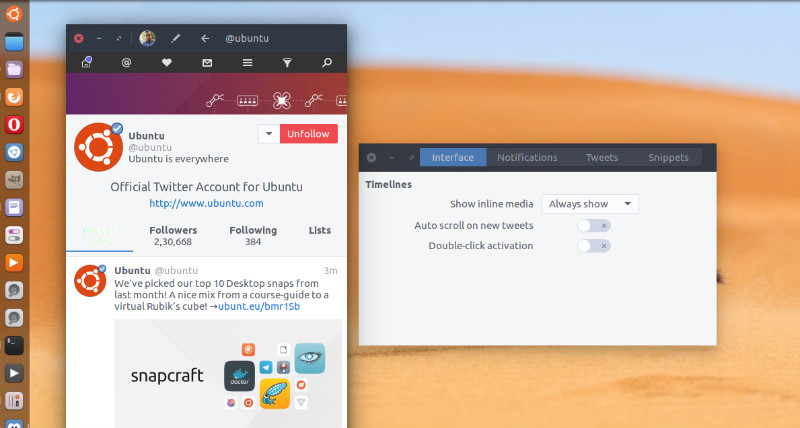
corebird-3

Install Corebird

Open terminal and run the following commands to install Corebird 1.3 on Ubuntu Systems:

$ sudo add-apt-repository ppa:ubuntuhandbook1/corebird
$ sudo apt-get update
$ sudo apt-get install corebird

Set Up Corebird on Ubuntu

Once installed, open Corebird from Ubuntu Dash. Type Corebird and click on it to open the Twitter Client. For the first time users, you will be asked to authorise Corebird using your Twitter account. All you need is to authorize your Twitter account to use Corebird. Once done, you are ready to use Corebird.

Uninstall Corebird From Ubuntu

If you wish to remove and uninstall corebird, run the command given below:

$ sudo apt install ppa-purge
$ sudo ppa-purge ppa:ubuntuhandbook1/corebird

Tags: Corebird Ubuntu 16.10, Download Corebird on Ubuntu 16.10, Install Corebird On Ubuntu 16.10, Install Twitter Client On Ubuntu 16.10 Desktop, Twitter Client On Ubuntu 16.10 Desktop, Twitter Client Ubuntu 16.10, Twitter Ubuntu 16.10, Ubuntu 16.10 Corebird, Ubuntu 16.10 Download Corebird, Ubuntu 16.10 Install Corebird, Ubuntu 16.10 Twitter, Ubuntu 16.10 Twitter Client

Primary Sidebar

Latest Posts

Delete Directory And Contents Recursively Without Prompt On Linux

Check User Login History In Ubuntu Linux Command Line

Use Locate Command To Find File In Linux Terminal By Name

How To Change Terminal Color In Ubuntu Command Line

How To Run Fsck Manually In Linux To Fix Unexpected Inconsistency

How To Fix Broken Packages On Ubuntu From Terminal

Re Execute The Previous Command In Linux Ubuntu Command Line

How Much RAM Is Needed For Ubuntu PC

How To Find Large Files And Directories In Linux Command Line

How To Use Clear Command History In Linux Terminal

© 2026 Source Digit • Linux, Ubuntu Tutorials & News, Technology, Gadgets & Gizmos

  • Home
  • About
  • Privacy Policy
  • Terms & Conditions
  • Contact Us
  • Sitemap