
• Skip to primary navigation
  • Skip to main content
  • Skip to primary sidebar
Source Digit

Source Digit

Linux, Ubuntu Tutorials & News, Technology, Gadgets & Gizmos

  • Home
  • How To
  • Ubuntu
  • Instagram
  • Blogging
  • Android
  • WordPress
  • +More
    • Cloud Computing
    • Gadgets
    • Social Media
    • Technology
  • Write for Us
Home / Ubuntu / How To Search Files On Ubuntu – Install FSearch Utility On Ubuntu

How To Search Files On Ubuntu – Install FSearch Utility On Ubuntu

By Sourabh / February 24, 2017 Category: How To, Ubuntu

Want to know how to search a file in Ubuntu? Install FSearch utility on Ubuntu. on Ubuntu, Fsearch can find file recursive or find a directory also. It is similar to locate command in Ubuntu. FSearch is a fast file search utility for GNU/Linux operating systems, inspired by Everything Search Engine. It’s written in C and based on GTK+3.
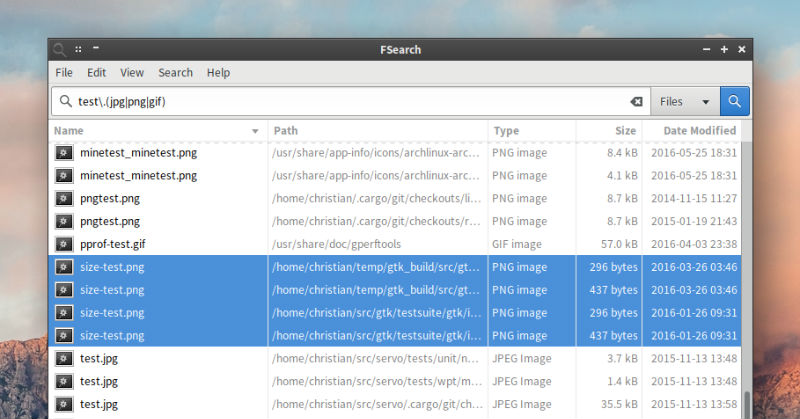
search-ubuntu

Features

  • Instant (as you type) results
  • RegEx support
  • Filter support (only search for files, folders or everything)
  • Fast sort by filename, path, size or modification time
  • Customizable interface

Requirements

  • GTK+ 3.12 or newer
  • PCRE (libpcre)

Download & Install FSearch On Ubuntu

Visit the link given here to download and then install the FSearch tool n Ubuntu Systems.

  • Official Website https://cboxdoerfer.github.io/fsearch/
  • Deb File https://github.com/cboxdoerfer/fsearch/releases/download/0.1beta1/fsearch_0.1beta1-1_amd64.deb

NOTE: If you installed the previous alpha deb package you should remove that first before installing the new beta. “sudo apt-get remove fsearch-dev” (without quotes). Also note that the application is in an early development stage and still considered alpha.

Credit: OMG Ubuntu | FSearch

Tags: Find Directory Ubuntu, Find Directory Ubuntu 16.04, Find Directory Ubuntu 16.10, Find File Ubuntu, Find File Ubuntu 16.04, Find File Ubuntu 16.10, Locate Command In Ubuntu, Ubuntu 16.04 Find Directory, Ubuntu 16.04 Find File, Ubuntu 16.10 Find Directory, Ubuntu 16.10 Find File, Ubuntu Find Directory, Ubuntu Find Directory By Name, Ubuntu Find File, Ubuntu Find File Command Line Recursive, Ubuntu Find File Containing Text, Ubuntu Find File Recursive, Ubuntu Find File Wildcard, Ubuntu Find Permission Denied

Primary Sidebar

Latest Posts

Delete Directory And Contents Recursively Without Prompt On Linux

Check User Login History In Ubuntu Linux Command Line

Use Locate Command To Find File In Linux Terminal By Name

How To Change Terminal Color In Ubuntu Command Line

How To Run Fsck Manually In Linux To Fix Unexpected Inconsistency

How To Fix Broken Packages On Ubuntu From Terminal

Re Execute The Previous Command In Linux Ubuntu Command Line

How Much RAM Is Needed For Ubuntu PC

How To Find Large Files And Directories In Linux Command Line

How To Use Clear Command History In Linux Terminal

© 2026 Source Digit • Linux, Ubuntu Tutorials & News, Technology, Gadgets & Gizmos

  • Home
  • About
  • Privacy Policy
  • Terms & Conditions
  • Contact Us
  • Sitemap