
• Skip to primary navigation
  • Skip to main content
  • Skip to primary sidebar
Source Digit

Source Digit

Linux, Ubuntu Tutorials & News, Technology, Gadgets & Gizmos

  • Home
  • How To
  • Ubuntu
  • Instagram
  • Blogging
  • Android
  • WordPress
  • +More
    • Cloud Computing
    • Gadgets
    • Social Media
    • Technology
  • Write for Us
Home / Ubuntu / Install Wunderlist App “Wunderlistux” On Ubuntu 16.10/16.04

Install Wunderlist App “Wunderlistux” On Ubuntu 16.10/16.04

By Sourabh / October 21, 2016 Category: How To, Ubuntu

Learn how to install Wunderlist App “Wunderlistux” on Ubuntu 16.10 and Ubuntu 16.04 Systems. Wunderlistux is an open-source electron wrapper for Wunderlist task management application. The Wunderlist app is specially designed for Elementary OS, but can easily be used on Ubuntu Systems also. The Wunderlist app uses the elementary (sic) GTK theme and icons and looks awesome.

Install Wunderlistux in Ubuntu Linux
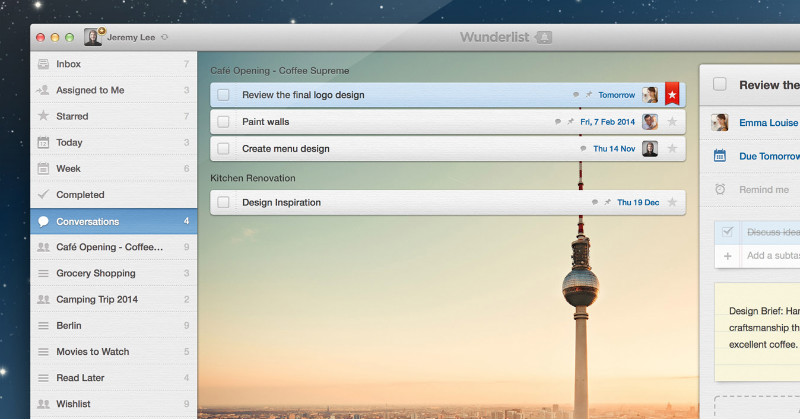
wunderlist

Download the installer package .zip or .tar.gz from the official source. Click here to download the last release of Wunderlist App ‘Wunderlistux’ for Linux Ubuntu.

Once downloaded, extract and run the executable from. This will launch the Wunderlistux application.

Create Wunderlistux Shortcut

To add an app shortcut, create a file in “~/.local/share/applications” called wunderlistux.desktop with the following contents:

[Desktop Entry] Name=Wunderlistux
Exec=/path/to/Wunderlistux-linux-x64/Wunderlistux
Terminal=false
Type=Application
Icon=/path/to/Wunderlistux-linux-x64/resources/app/images/wunderlist.png

Or just copy the wunderlistux.desktop file from the release you downloaded. You have to edit the file anyway to fix the paths.

Tags: Ubuntu 16.04 Wunderlist, Ubuntu 16.10 Wunderlist, Wunderlist App "Wunderlistux" Ubuntu, Wunderlist App "Wunderlistux" Ubuntu 16.04, Wunderlist App "Wunderlistux" Ubuntu 16.10, Wunderlist App for Linux, Wunderlist App for Ubuntu, Wunderlist App Ubuntu, Wunderlist App Ubuntu 16.04, Wunderlist App Ubuntu 16.10, Wunderlist Electron App for Linux, Wunderlist Electron App for Ubuntu, Wunderlist for Linux, Wunderlist for Ubuntu, Wunderlist for Ubuntu 16.04, Wunderlist for Ubuntu 16.10

Primary Sidebar

Latest Posts

Job Scheduling Using At Command In Linux With Examples

How To Check Permissions Of A Directory In Linux Command

Delete Directory And Contents Recursively Without Prompt On Linux

Check User Login History In Ubuntu Linux Command Line

Use Locate Command To Find File In Linux Terminal By Name

How To Change Terminal Color In Ubuntu Command Line

How To Run Fsck Manually In Linux To Fix Unexpected Inconsistency

How To Fix Broken Packages On Ubuntu From Terminal

Re Execute The Previous Command In Linux Ubuntu Command Line

How Much RAM Is Needed For Ubuntu PC

© 2026 Source Digit • Linux, Ubuntu Tutorials & News, Technology, Gadgets & Gizmos

  • Home
  • About
  • Privacy Policy
  • Terms & Conditions
  • Contact Us
  • Sitemap