
• Skip to primary navigation
  • Skip to main content
  • Skip to primary sidebar
Source Digit

Source Digit

Linux, Ubuntu Tutorials & News, Technology, Gadgets & Gizmos

  • Home
  • How To
  • Ubuntu
  • Instagram
  • Blogging
  • Android
  • WordPress
  • +More
    • Cloud Computing
    • Gadgets
    • Social Media
    • Technology
  • Write for Us
Home / Ubuntu / Install Adobe Flash Player for Chromium on Ubuntu 16.10

Install Adobe Flash Player for Chromium on Ubuntu 16.10

By Sourabh / October 24, 2016 Category: How To, Ubuntu

Install Adobe Flash Player for Chromium and Opera browsers on Ubuntu 16.10 Systems. Adobe Flash Player is a lightweight browser plug-in and rich Internet application runtime that delivers consistent and engaging user experiences, stunning audio/video playback, and exciting gameplay.

The Pepper Flash Player does not work for for Chromium based browsers on Ubuntu Systems as it has been removed the latest PPAPI bundle. Luckily, Ubuntu users can install the latest PPAPI Flash Player from Adobe website and install it manually on the Ubuntu Systems.

Install Adobe Flash Player for Chromium
flash-chromium

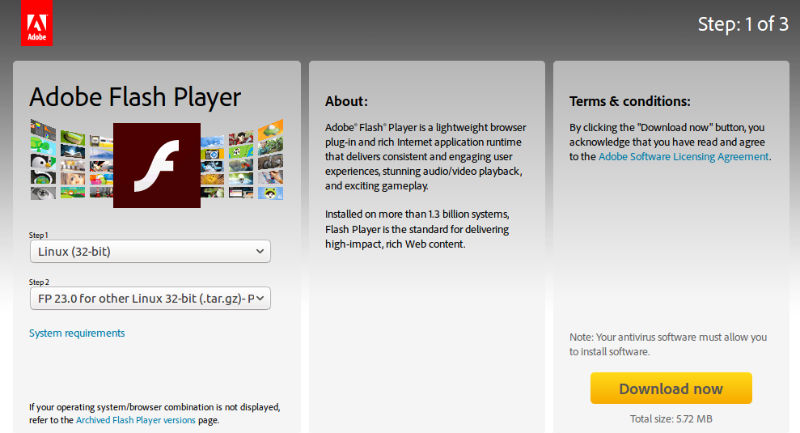
Download PPAPI Bundle [Flash] https://get.adobe.com/flashplayer/otherversions/
Select the OS type and then select Flash installer package type. Select FP 23.0

Once downloaded install in manually or run the following commands:

sudo apt install pepperflashplugin-nonfree
sudo mv ~/Downloads/flash_player_ppapi_*/libpepflashplayer.so /usr/lib/pepperflashplugin-nonfree/
sudo apt-get update

Now restart the system and open web browser. The flash should work easily on Ubuntu Systems.

Tags: Adobe Flash Player for Chromium on Ubuntu 16.10, Adobe Flash Player for Opera on Ubuntu 16.10, Flash for Chromium on Ubuntu 16.10, Flash for Opera on Ubuntu 16.10, Install Adobe Flash Player for Chromium on Ubuntu 16.10, Install Adobe Flash Player for Opera on Ubuntu 16.10, Install Adobe Flash Player on Ubuntu 16.10

Primary Sidebar

Latest Posts

Job Scheduling Using At Command In Linux With Examples

How To Check Permissions Of A Directory In Linux Command

Delete Directory And Contents Recursively Without Prompt On Linux

Check User Login History In Ubuntu Linux Command Line

Use Locate Command To Find File In Linux Terminal By Name

How To Change Terminal Color In Ubuntu Command Line

How To Run Fsck Manually In Linux To Fix Unexpected Inconsistency

How To Fix Broken Packages On Ubuntu From Terminal

Re Execute The Previous Command In Linux Ubuntu Command Line

How Much RAM Is Needed For Ubuntu PC

© 2026 Source Digit • Linux, Ubuntu Tutorials & News, Technology, Gadgets & Gizmos

  • Home
  • About
  • Privacy Policy
  • Terms & Conditions
  • Contact Us
  • Sitemap