
• Skip to primary navigation
  • Skip to main content
  • Skip to primary sidebar
Source Digit

Source Digit

Linux, Ubuntu Tutorials & News, Technology, Gadgets & Gizmos

  • Home
  • How To
  • Ubuntu
  • Instagram
  • Blogging
  • Android
  • WordPress
  • +More
    • Cloud Computing
    • Gadgets
    • Social Media
    • Technology
  • Write for Us
Home / Ubuntu / Mozilla Firefox 50 Released – How To Upgrade Mozilla Firefox 50 On Ubuntu

Mozilla Firefox 50 Released – How To Upgrade Mozilla Firefox 50 On Ubuntu

By Sourabh / November 19, 2016 Category: How To, Ubuntu

Mozilla Firefox 50 released. Here’s how to install or upgrade Mozilla Firefox 50 web browser on Ubuntu 16.10, Ubuntu 16.04, Ubuntu 15.04, Ubuntu 14.04 and other Ubuntu Derivatives.

Mozilla Firefox 50

Mozilla Firefox 50.0 web browser brings various new features and fixes. For Linux Ubuntu Systems, firefox 50 has added a built-in Emoji set and brings download protection for a large number of executable file types. Other features and fixes released are:

New

  • Playback video on more sites without plugins with WebM EME Support for Widevine on Windows and Mac
  • Improved performance for SDK extensions or extensions using the SDK module loader
  • Added download protection for a large number of executable file types on Windows, Mac and Linux
  • Increased availability of WebGL to more than 98 percent of users on Windows 7 and newer
  • Added Guarani (gn) locale
  • Added option to Find in page that allows users to limit search to whole words only
  • Updates to keyboard shortcuts
  • Set a preference to have Ctrl+Tab cycle through tabs in recently used order
  • View a page in Reader Mode by using Ctrl+Alt+R (command+alt+r on Mac)

Fixed

  • Login cookies are now saved for sites with a high number of cookies (Bug 1264192)
  • Various security fixes
  • Fixed rendering of dashed and dotted borders with rounded corners (border-radius)

Changed

  • Blocked versions of libavcodec older than 54.35.1
  • Added a built-in Emoji set for operating systems without native Emoji fonts (Windows 8.0 and lower and Linux)

Upgrade Mozilla Firefox 50
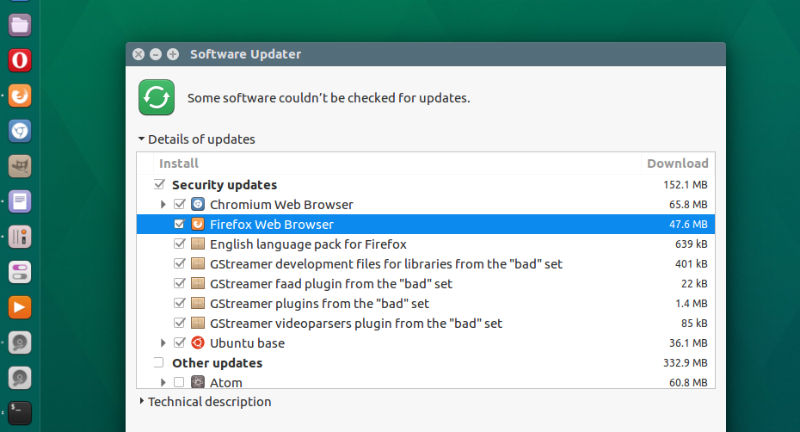
firefox-50

Mozilla Firefox 50 has been released for all supported Ubuntu Linux Systems. To upgrade to Mozilla Firefox 50 on Ubuntu 16.10, Ubuntu 16.04, Ubuntu 15.10, Ubuntu 15.04, Ubuntu 14.10, Ubuntu 14.04 and other Ubuntu Derivatives, simply launch Software Updater and upgrade Firefox.

Tags: Download Mozilla Firefox 50 on Ubuntu, Firefox 50 Ubuntu 16.04, Install Mozilla Firefox 50 on Ubuntu, Mozilla Firefox 50 Ubuntu, Mozilla Firefox 50 Ubuntu 14.04, Mozilla Firefox 50 Ubuntu 16.04, Mozilla Firefox 50 Ubuntu 16.10, Ubuntu 14.04 Mozilla Firefox 50, Ubuntu 16.04 Mozilla Firefox 50, Ubuntu 16.10 Mozilla Firefox 50, Ubuntu Mozilla Firefox 50, Update Mozilla Firefox 50 on Ubuntu, Upgrade Mozilla Firefox 50 on Ubuntu

Primary Sidebar

Latest Posts

Delete Directory And Contents Recursively Without Prompt On Linux

Check User Login History In Ubuntu Linux Command Line

Use Locate Command To Find File In Linux Terminal By Name

How To Change Terminal Color In Ubuntu Command Line

How To Run Fsck Manually In Linux To Fix Unexpected Inconsistency

How To Fix Broken Packages On Ubuntu From Terminal

Re Execute The Previous Command In Linux Ubuntu Command Line

How Much RAM Is Needed For Ubuntu PC

How To Find Large Files And Directories In Linux Command Line

How To Use Clear Command History In Linux Terminal

© 2026 Source Digit • Linux, Ubuntu Tutorials & News, Technology, Gadgets & Gizmos

  • Home
  • About
  • Privacy Policy
  • Terms & Conditions
  • Contact Us
  • Sitemap