
Install MKVToolNix Matroska Tools on Ubuntu Linux Systems. Terminal commands to install MKVToolNix 9.6.0 on Ubuntu 16.10, Ubuntu 16.04, Ubuntu 15.04, Ubuntu 14.04 and other Ubuntu Derivatives.
MKVToolNix tool comes with the following in-built command-line tools:
- mkvmerge : Used for creating Matroska files from other formats
- mkvinfo : Used to get information about the Matroska file
- mkvextract : Extracts tracks from Matroska files to all other formats
MKVToolNix can easily be used to edit mkv video files, split files, sync audio with video.
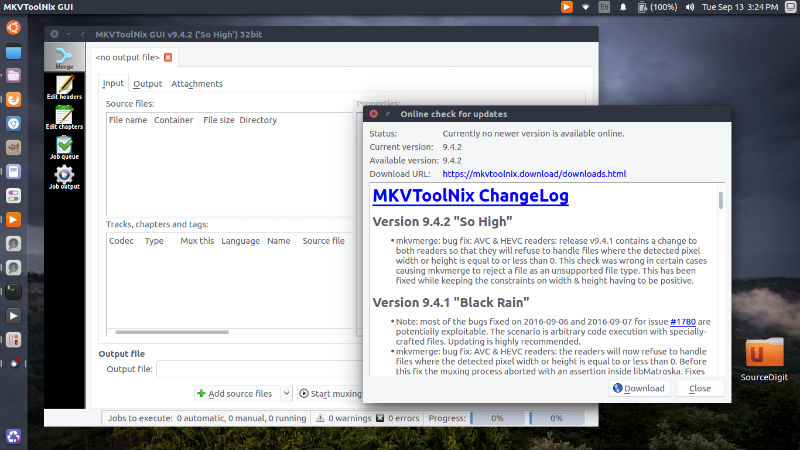
MKVToolNix v9.6.0 is the latest MKVToolNix Matroska Tools for Ubuntu Linux. MKVToolNix 9.6.0 has been released with the following changes:
- mkvmerge & mkvextract: added support for HDMV TextST subtitles.
- mkvextract: VobSub bug fix: mkvextract will add a “langidx” line to the .idx file upon extraction. Fixes #1810.
- MKVToolNix GUI: multiplexer enhancement: added a column “source file’s directory” to the track list. Implements #1809.
- MKVToolNix GUI: multiplexer enhancement: added an option for selecting all tracks of the currently selected source files in the source file context menu. Inspired by #1809.
- MKVToolNix GUI: job output tool bug fix: the button for acknowledging warnings & errors wasn’t properly disabled when the user used outside methods of acknowledging them (e.g. via the menu or via the job queue). Fixes #1802.
- mkvmerge: MPLS parser bug fix: fixed reading the “in” & “out” timestamps for “play items”. This bug resulted in
- mkvmerge not reading the correct range from the referenced M2TS file under certain rare circumstances.
- mkvmerge: bug fix: mkvmerge was entering endless loops under certain conditions when appending files. This was a regression introduced with the fix to #1774 (using very large –sync values causing mkvmerge to abort).
- MKVToolNix GUI: new feature: added options in the preferences to only show the list of often used languages/country codes/character sets in their respective selections instead of both the often used and the full list. Implements #1796.
Install MKVToolNix on Ubuntu Linux
Run the following commands in terminal to install mkvtoolnix on all Ubuntu versions using PPA:
$ sudo apt-apt-repository ppa:djcj/mkvtoolnix

$ sudo apt-get update

$ sudo apt-get install mkvtoolnix
Install MKVToolNix on Ubuntu 16.10
$ wget -q -O - https://www.bunkus.org/gpg-pub-moritzbunkus.txt | sudo apt-key add -

$ sudo sh -c 'echo "deb http://www.bunkus.org/ubuntu/yakkety/ ./" >> /etc/apt/sources.list'

$ sudo apt-get update

$ sudo apt-get install mkvtoolnix mkvtoolnix-gui
Install MKVToolNix on Ubuntu 16.04
$ wget -q -O - https://www.bunkus.org/gpg-pub-moritzbunkus.txt | sudo apt-key add -

$ sudo sh -c 'echo "deb http://www.bunkus.org/ubuntu/xenial/ ./" >> /etc/apt/sources.list'

$ sudo apt-get update

$ sudo apt-get install mkvtoolnix mkvtoolnix-gui
Install MKVToolNix on Ubuntu 15.10
$ wget -q -O - https://www.bunkus.org/gpg-pub-moritzbunkus.txt | sudo apt-key add -

$ sudo sh -c 'echo "deb http://www.bunkus.org/ubuntu/wily/ ./" >> /etc/apt/sources.list'

$ sudo apt-get update

$ sudo apt-get install mkvtoolnix mkvtoolnix-gui
Install MKVToolNix on Ubuntu 14.04
$ wget -q -O - https://www.bunkus.org/gpg-pub-moritzbunkus.txt | sudo apt-key add -

$ sudo sh -c 'echo "deb http://www.bunkus.org/ubuntu/trusty/ ./" >> /etc/apt/sources.list'

$ sudo apt-get update

$ sudo apt-get install mkvtoolnix mkvtoolnix-gui
If you want to uninstall and remove mkvtoolnix and mkvtoolnix-gui from Linux Ubuntu Systems, run:
$ sudo apt-get remove mkvtoolnix mkvtoolnix-gui