
• Skip to primary navigation
  • Skip to main content
  • Skip to primary sidebar
Source Digit

Source Digit

Linux, Ubuntu Tutorials & News, Technology, Gadgets & Gizmos

  • Home
  • How To
  • Ubuntu
  • Instagram
  • Blogging
  • Android
  • WordPress
  • +More
    • Cloud Computing
    • Gadgets
    • Social Media
    • Technology
  • Write for Us
Home / How To / Install The Latest Atom 1.13 Text Editor On Ubuntu Linux

Install The Latest Atom 1.13 Text Editor On Ubuntu Linux

By Sourabh / February 26, 2017 Category: How To, Ubuntu

Install the latest release of Atom Text Editor on Linux Ubuntu Systems. Install Atom 1.13 Text Editor on Ubuntu 16.04, Ubuntu 15.04, Ubuntu 14.04 and other Ubuntu Derivatives. Atom 1.13 Text Editor brings many usability improvements and performance boosters. It is shipped with benchmarks, reopen project, new Octicons and a keystroke resolver API. It ships without the Shadow DOM editor boundary.
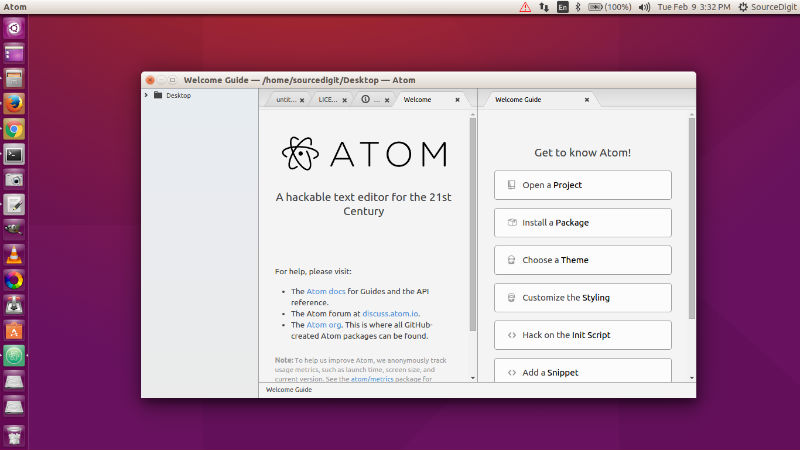
atom-ubuntu-editor

Atom 1.13 Changes & New features

  • Atom Benchmarks – In our continuous mission to improve Atom’s performance, 1.13 introduces benchmarks to better quantify improvements or :scream: regressions.
  • Reopen Project – Want to get Atom back to a previous state without figuring out the command line incantation? There’s now a Reopen Project menu item, palette command, and API.
  • New Octicons – A new version of the Octicons is now bundled in Atom with improvements to line-weight and sizing normalization. In addition 20 new icons are available.
  • Keystroke Resolver API – To help address the long tail of unusual international keyboard behaviors as interpreted by Chrome, particularly on Linux, Atom 1.13 includes a custom keystroke resolver API allowing users to assign Chrome keyboard events to Atom-style keystrokes.
  • Shadow DOM Removal – This release marks the end of Atom’s failed experiment using the Shadow DOM as a way to isolate the editor from unintended CSS. Check out the in-depth post for details.
  • Usability Improvements
    1. Allow reordering project folders via drag and drop
    2. Optional full-width status bar
    3. Follow-through tooltip behavior
    4. Don’t show find panel when doing cmd-e
  • Performance Boosters
    1. Don’t construct placeholder tokenized lines
    2. Avoid forcing computation of all screen lines when opening a fileMore Info: http://blog.atom.io/2017/01/10/atom-1-13.html

Install Atom via WebUpd8 PPA

Run the command given below to install the latest Atom from WebUpd8 PPA:

$ sudo add-apt-repository ppa:webupd8team/atom
$ sudo apt-get update
$ sudo apt-get install atom

Once installed, open Atom text editor from Ubuntu Dash or Terminal.

Tags: Atom 1.13 Editor, Atom 1.13 Editor Features, Atom 1.13 Text Editor, Atom 1.13 Text Editor Download, Atom 1.13 Text Editor Features, Atom 1.13 Text Editor Install, Atom 1.13 Text Editor Ubuntu, Atom 1.13 Text Editor Ubuntu 14.04, Atom 1.13 Text Editor Ubuntu 15.04, Atom 1.13 Text Editor Ubuntu 16.04, Atom 1.13 Text Editor Update, Atom Text Editor 1.13, Atom Text Editor 1.13 Download, Atom Text Editor 1.13 Features, Atom Text Editor 1.13 Install, Atom Text Editor 1.13 Ubuntu, Atom Text Editor 1.13 Ubuntu 14.04, Atom Text Editor 1.13 Ubuntu 15.04, Atom Text Editor 1.13 Ubuntu 16.04, Atom Text Editor 1.13 Update, Atom Text Editor Download, Atom Text Editor Install, Atom Text Editor Ubuntu, Atom Text Editor Ubuntu 14.04, Atom Text Editor Ubuntu 15.04, Atom Text Editor Ubuntu 16.04, Atom Text Editor Update, Download Atom 1.13 Text Editor, Download Atom Text Editor, Download Atom Text Editor 1.13, Install Atom 1.13 Text Editor, Install Atom Text Editor, Install Atom Text Editor 1.13, Ubuntu 14.04 Atom 1.13 Text Editor, Ubuntu 14.04 Atom Text Editor, Ubuntu 14.04 Atom Text Editor 1.13, Ubuntu 15.04 Atom 1.13 Text Editor, Ubuntu 15.04 Atom Text Editor, Ubuntu 15.04 Atom Text Editor 1.13, Ubuntu 16.04 Atom 1.13 Text Editor, Ubuntu 16.04 Atom Text Editor, Ubuntu 16.04 Atom Text Editor 1.13, Ubuntu Atom 1.13 Text Editor, Ubuntu Atom Text Editor, Ubuntu Atom Text Editor 1.13, Update Atom 1.13 Text Editor, Update Atom Text Editor, Update Atom Text Editor 1.13

Primary Sidebar

Latest Posts

Delete Directory And Contents Recursively Without Prompt On Linux

Check User Login History In Ubuntu Linux Command Line

Use Locate Command To Find File In Linux Terminal By Name

How To Change Terminal Color In Ubuntu Command Line

How To Run Fsck Manually In Linux To Fix Unexpected Inconsistency

How To Fix Broken Packages On Ubuntu From Terminal

Re Execute The Previous Command In Linux Ubuntu Command Line

How Much RAM Is Needed For Ubuntu PC

How To Find Large Files And Directories In Linux Command Line

How To Use Clear Command History In Linux Terminal

© 2026 Source Digit • Linux, Ubuntu Tutorials & News, Technology, Gadgets & Gizmos

  • Home
  • About
  • Privacy Policy
  • Terms & Conditions
  • Contact Us
  • Sitemap