
• Skip to primary navigation
  • Skip to main content
  • Skip to primary sidebar
Source Digit

Source Digit

Linux, Ubuntu Tutorials & News, Technology, Gadgets & Gizmos

  • Home
  • How To
  • Ubuntu
  • Instagram
  • Blogging
  • Android
  • WordPress
  • +More
    • Cloud Computing
    • Gadgets
    • Social Media
    • Technology
  • Write for Us
Home / How To / How To Backup And Restore PPAs And Apps In Ubuntu

How To Backup And Restore PPAs And Apps In Ubuntu

By Sourabh / January 24, 2017 Category: How To, Ubuntu

How to backup and restore PPAs and apps in Ubuntu? Install Aptik on Ubuntu Systems, a tool to backup and restore PPAs. Backup and restore downloaded packages in APT cache. On Ubuntu, it’s like to backup and restore entire system.

Aptik is a utility to simplify re-installation of software packages after upgrading and re-installing the Linux and Ubuntu-based distributions. The application can also be used to backup and restore icons & themes, application settings and re-add third-party PPAs.

Install Aptik in Ubuntu
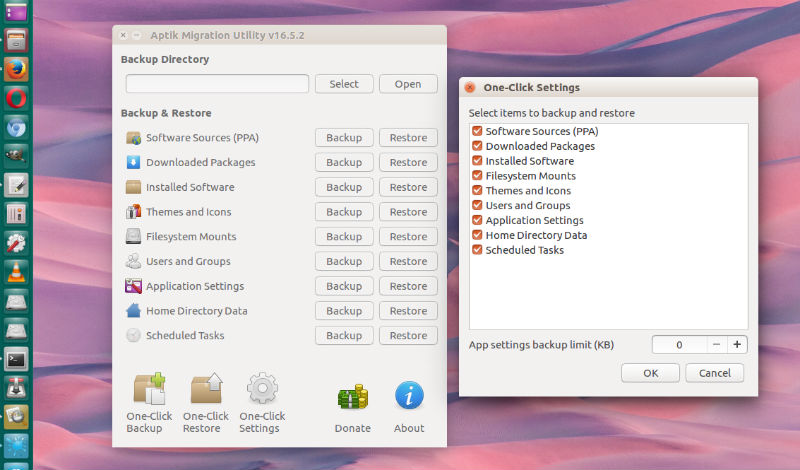
Run the following commands in Terminal to install Aptil PPA on Ubuntu 16.10, Ubuntu 16.04, Ubuntu 15.10, Ubuntu 15.04, Ubuntu 14.10, Ubuntu 14.04 and other Ubuntu Derivatives:

sudo add-apt-repository ppa:teejee2008/ppa
sudo apt-get update
sudo apt-get install aptik

http://www.teejeetech.in/
https://launchpad.net/apt-toolkit

Tags: Aptik Ubuntu PPA, Backup 3rd Party Apps Ubuntu, Backup Application Settings, Backup Applications Ubuntu, Backup Apps Ubuntu, Backup Downloaded Apt Cache Packages, Backup Downloaded Packages, Backup Downloaded Packages InApt Cache, Backup Icons And Themes, Backup Icons Ubuntu, Backup PPAs Ubuntu, Backup Softwares Ubuntu, Backup Third Party Apps Ubuntu, Backup Ubuntu 3rd Party Apps, Backup Ubuntu Applications, Backup Ubuntu Apps, Backup Ubuntu Icons, Backup Ubuntu PPAs, Backup Ubuntu Softwares, Backup Ubuntu System, Backup Ubuntu Third Party Apps, Install Aptik Ubuntu, Install Aptik Ubuntu PPA, Restore 3rd Party Apps Ubuntu, Restore Application Settings, Restore Applications Ubuntu, Restore Apps Ubuntu, Restore Downloaded Apt Cache Packages, Restore Downloaded Packages, Restore Downloaded Packages InApt Cache, Restore Icons And Themes, Restore Icons Ubuntu, Restore PPAs Ubuntu, Restore Softwares Ubuntu, Restore Third Party Apps Ubuntu, Restore Ubuntu 3rd Party Apps, Restore Ubuntu Applications, Restore Ubuntu Apps, Restore Ubuntu Icons, Restore Ubuntu PPAs, Restore Ubuntu Softwares, Restore Ubuntu System, Restore Ubuntu Third Party Apps, Ubuntu PPA Aptik, Ubuntu PPA Install Aptik, Ubuntu System Backup, Ubuntu System Restore

Primary Sidebar

Latest Posts

How To Check User Permissions In Linux Using Command

Check Which Folder Is Taking More Space In Ubuntu Linux

How to Install Claude Desktop App in Ubuntu Linux

Job Scheduling Using At Command In Linux With Examples

How To Check Permissions Of A Directory In Linux Command

Delete Directory And Contents Recursively Without Prompt On Linux

Check User Login History In Ubuntu Linux Command Line

Use Locate Command To Find File In Linux Terminal By Name

How To Change Terminal Color In Ubuntu Command Line

How To Run Fsck Manually In Linux To Fix Unexpected Inconsistency

© 2026 Source Digit • Linux, Ubuntu Tutorials & News, Technology, Gadgets & Gizmos

  • Home
  • About
  • Privacy Policy
  • Terms & Conditions
  • Contact Us
  • Sitemap