
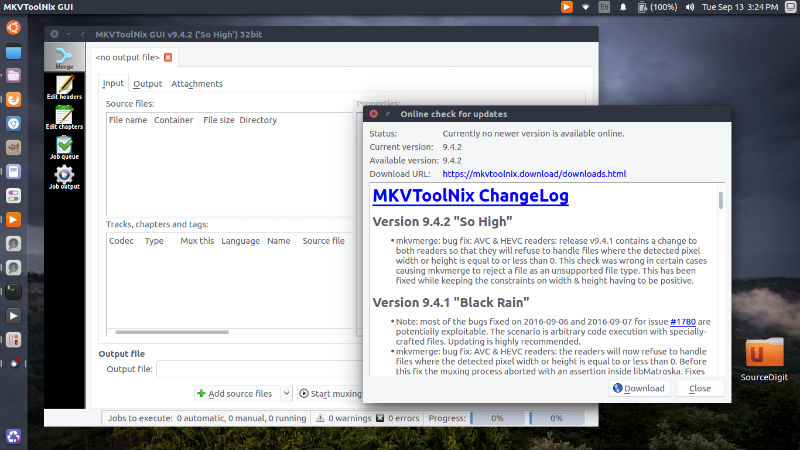
MKVToolNix 9.9.0 MKV Manipulation Tool has been released. Install MKVToolNix on Ubuntu 16.10 and Ubuntu 16.04 Systems. MKVToolNix 9.9.0 is a bug fix release. Especially the MP4 input module has received a lot of love.
See below for details. Important note for packagers: pre-built man pages are no longer included. Instead they’re built during compilation requiring xsltproc, the DocBook XSL stylesheets. Additionally the system version of pugixml can now be used. See the news below for details.
New features and enhancements
- GUI: chapter editor: added a character set selection in the preferences for text files. If a character set is selected there, it will be used instead of asking the user when opening text chapter files. Implements #1874.
- GUI: multiplexer: added a column “character set” to the “tracks, chapters and tags” list view showing the currently selected character set for that track. Implements #1873.
- mkvmerge: added an –engage option “all_i_slices_are_key_frames” for treating all I slices of an h.264/AVC stream as key frames in pathological streams that lack real key frames. Implements #1876.
- GUI: running programs after jobs: added a new variable <MTX_INSTALLATION_DIRECTORY> for the directory the MKVToolNix GUI executable is located in.
- mkvmerge: DVB subtitle tracks whose CodecPrivate data is only four bytes long will now be fixed up to the proper five bytes by adding the subtitling type byte.
- mkvmerge: MP4 reader: “ctts” version 1 atoms are now supported.
Bug fixes
- mkvmerge: AC-3 handling: some source files provide timestamps for audio tracks only once every n audio frames. In such situations mkvmerge was buffering too much data resulting in a single gap in the timestamps of one frame duration after frame number n – 1 (the second audio timestamp read from the source file was used one output frame too early). Fixes #1864.
- mkvmerge: MP4 reader: mkvmerge was only reading a small part of MP4 DASH files where the first “moov” “mdat” atoms occur before the first “moof” atom. This is part of the fix for #1867.
- mkvmerge: MP4 reader: edit list (“edts” atoms) that are part of the “moof” atoms used in MP4 DASH files weren’t parsed. Instead the edit lists from the main track headers inside the “moov” atom were used. This is part of the fix for #1867.
- mkvmerge: MP4 reader: when an MP4 DASH file contained both normal chunk offset table (“stco”/”co64” atoms) in their regular “moov” atoms, a sample-to-chunk table (“stsc” atom) whose last entry had a “samples per chunk” count greater than 1 and DASH “trun” atoms, then mkvmerge was calculating wrong positions the frame content. This is part of the fix for #1867.
- mkvmerge: MP4 reader: mkvmerge couldn’t deal with the key frame index table having duplicate entries. The result was that only key frames up to and including the first duplicate entry were marked as key frames in the output file. All other frames weren’t, even though some of them were referenced from the key frame table after the first duplicate entry. This is part of the fix for #1867.
- mkvmerge: MP4 reader: when an MP4 file contained more than one copy of the “moov” atom (the track headers etc.), mkvmerge was parsing them all adding tracks multiple times. Fix for #1877.
- mkvmerge: MP4 reader: fixed an integer overflow during the timestamp calculation leading to files with wrong timestamps. Such files could not be played back properly by most players. Fixes #1883.
- mkvmerge: MPEG TS reader: if the PMT lists a DVBSUB track, mkvmerge will now recognize it without having to find a packet for it within the probed range.
- mkvmerge: splitting by parts (both the “timestamps” and the “frames” variants): fixed the calculation of track statistics tags. When calculating the duration the skipped portions weren’t taken into account leading to a too-high duration. As a consequence the BPS tag (bits per second) was wrong, too. Fixes #1885.
- mkvmerge: reading files with DVB/HDMV TextSV subtitle tracks with invalid CodecPrivate caused mkvmerge to abort with an error from boost::format about the format string not having enough arguments. Fixes #1894.
- mkvmerge: fixed misdetection of certain AC-3 files as MP3 files which led to an error message that “the demultiplexer could not be initialized”.
- mkvmerge: fixed huge memory consumption when appending big Matroska files with sparse tracks (e.g. forced subtitle tracks). The Matroska reader will now queue at most 128 MB of data. Fixes #1893.
- mkvmerge: MP4 reader: the timestamps of all multiplexed tracks will now be 0-based properly.
- mkvmerge: MP4 reader: the DTS-to-PTS offsets given by the “ctts” atoms are now applied for all tracks containing a “ctts” atom, not just h.264 & h.265 tracks.
Build system changes
- Up to and including release 9.8.0 the man pages and their translations came pre-built and bundled with the source code. Those pre-built files have now been removed and must be built during the build process. Therefore the tool “xsltproc” and the DocBook XSL stylesheets for man pages are now required dependencies. Additionally the tool “po4a” must be installed for the translated man pages to be built and installed, though this is optional. In order to facilitate finding the new requirements new options have been added to confiure: “–with-xsltproc=prog”, “–with-docbook-xsl-root=dir”, “–with-po4a=prog” and “–with-po4a-translate=prog.
- pugixml detection will be attempted via “pkg-config” first. If that fails, “configure” will fall back to the previous method of trying just to compile and link a test program with the standard include and library locations. Implements #1891.
Install MKVToolNix on Ubuntu Linux
Run the following commands in terminal to install mkvtoolnix on all Ubuntu versions using PPA:
$ sudo apt-apt-repository ppa:djcj/mkvtoolnix

$ sudo apt-get update

$ sudo apt-get install mkvtoolnix
Install MKVToolNix on Ubuntu 16.10
$ wget -q -O - https://www.bunkus.org/gpg-pub-moritzbunkus.txt | sudo apt-key add -

$ sudo sh -c 'echo "deb http://www.bunkus.org/ubuntu/yakkety/ ./" >> /etc/apt/sources.list'

$ sudo apt-get update

$ sudo apt-get install mkvtoolnix mkvtoolnix-gui
Install MKVToolNix on Ubuntu 16.04
$ wget -q -O - https://www.bunkus.org/gpg-pub-moritzbunkus.txt | sudo apt-key add -

$ sudo sh -c 'echo "deb http://www.bunkus.org/ubuntu/xenial/ ./" >> /etc/apt/sources.list'

$ sudo apt-get update

$ sudo apt-get install mkvtoolnix mkvtoolnix-gui
Install MKVToolNix on Ubuntu 15.10
$ wget -q -O - https://www.bunkus.org/gpg-pub-moritzbunkus.txt | sudo apt-key add -

$ sudo sh -c 'echo "deb http://www.bunkus.org/ubuntu/wily/ ./" >> /etc/apt/sources.list'

$ sudo apt-get update

$ sudo apt-get install mkvtoolnix mkvtoolnix-gui
Install MKVToolNix on Ubuntu 14.04
$ wget -q -O - https://www.bunkus.org/gpg-pub-moritzbunkus.txt | sudo apt-key add -

$ sudo sh -c 'echo "deb http://www.bunkus.org/ubuntu/trusty/ ./" >> /etc/apt/sources.list'

$ sudo apt-get update

$ sudo apt-get install mkvtoolnix mkvtoolnix-gui
If you want to uninstall and remove mkvtoolnix and mkvtoolnix-gui from Linux Ubuntu Systems, run:
$ sudo apt-get remove mkvtoolnix mkvtoolnix-gui