
Best Atom themes 2017. Learn how to install Atom themes. This post writes about the best atom ui themes 2017, atom material ui theme, atom monokai and others.
Install Atom Themes
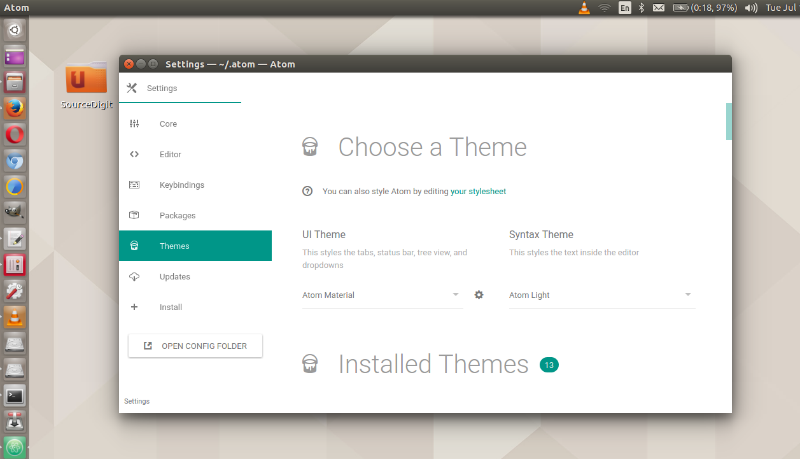
To install Atom themes, you can run the terminal commands for the respective theme or simply install it from the Atom’s Setting page. Go to Atom’s settings, search for the theme package and select Install. Using the Atom theme is very easy, simply select the theme from the drop-down theme selection box.
For example, to install piatto-light-syntax, open Settings > Install, set the filter to Themes and search for piatto-light-syntax. To use the theme, go to Atom > Preferences > Themes and in the Syntax Themes dropdown, select Piatto Light from the list.
You can have a look at all the themes at https://atom.io/themes
Best Atom Themes
There are more than thousand themes for Atom text editor, but not all are liked by many. I have curated a list of the most popular Atom themes you can install and use:
atom-material UI
A dynamic UI theme for Atom that (kinda) follows Google’s Material Design Guidelines. Best with Atom Material Syntax. Inspired by Mattia Astorino’s SublimeText theme. Atom Material UI supports different accent colors. To change it, go to Settings > Themes and click the cog icon next to the theme selector.
Run the following commands to install atom-material UI:
apm install atom-material-ui
With Atom Material Syntax
apm install atom-material-syntax
With Light syntax theme variant
apm install atom-material-syntax-light
With Dark syntax theme variant
apm install atom-material-syntax-dark
You can install atom-material UI from Atom’s settings, select Install and then search for this package.
Monokai theme
A monokai syntax theme for Atom. Originally converted from the TextMate theme using the TextMate bundle converter. To install Monokai theme, open Settings > Install, set the filter to Themes and search for monokai. Then go to Atom > Preferences > Themes and in the Syntax Themes dropdown, select Monokai from the list.
dash-ui theme
A matching UI theme for dash-syntax. To install Monokai theme, open Settings > Install, set the filter to Themes and search for dash-ui. Then go to Atom > Preferences > Themes and in the Syntax Themes dropdown, select dash-ui theme from the list.
Piatto Light syntax theme
A clean light syntax theme. Originally converted from the Sublime Text theme made by samuelrafo. Run the following command to install Piatto Light syntax theme:
apm install piatto-light-syntax
Alternatively open Settings > Install, set the filter to Themes and search for piatto-light-syntax.
Then go to Atom > Preferences > Themes and in the Syntax Themes dropdown, select Piatto Light from the list.
Chestnut light theme
A light easy on the eyes theme with minimal amount of highlighting. Based on Flatwhite theme with Comments clearly visible. Run the following command to install chestnut light theme:
apm install chestnut-light-atom-syntax
You can also go to Settings > Install, search for chestnut-light-atom-syntax and click Install. To use, go to Settings > Themes and choose Chestnut Light Atom from the dropdown menu.