
• Skip to primary navigation
  • Skip to main content
  • Skip to primary sidebar
Source Digit

Source Digit

Linux, Ubuntu Tutorials & News, Technology, Gadgets & Gizmos

  • Home
  • How To
  • Ubuntu
  • Instagram
  • Blogging
  • Android
  • WordPress
  • +More
    • Cloud Computing
    • Gadgets
    • Social Media
    • Technology
  • Write for Us
Home / How To / Install Sunflower File Manager On Linux Ubuntu

Install Sunflower File Manager On Linux Ubuntu

By Sourabh / December 10, 2018 Category: How To, Ubuntu

How to install Sunflower file manager on Linux Ubuntu. The Sunflower is a twin-panel file manager for Linux Ubuntu Systems. It is intended to be an easy-to-use and powerful file manager that seamlessly integrates into the GNOME desktop environment (but not limited to).
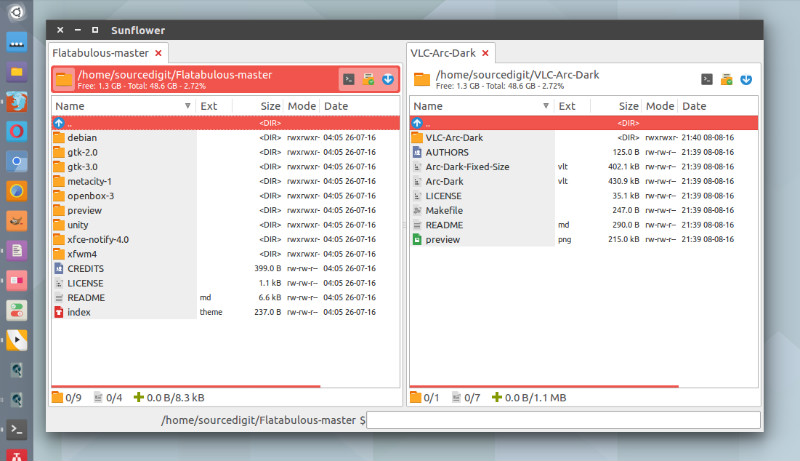
The Sunflower File Manager has been released with latest updates and changes. Sunflower 0.2.59 is an cross-platform, open-source file manager for Linux Systems.

  • Customizable: Feature-packed configuration to help make the program your own.
  • Tabbed Interface: More flexibility in your daily operations through easy to use interface.
  • Sessions: Set of tabs for every occasion.
  • Emblems: Visually mark your files and directories for quick referrence.
  • Built-in Terminal: Quick access to command line interface through terminal tabs, VTE or external.
  • Multithreading: Better multitasking with full multithreading support.
  • Python and GTK+: Easily extensible with Python and GTK+.
  • Keyboard Oriented: Fully optimized for keyboard users

Install Sunflower File Manager

Sunflower file manager can be installed via PPA on Ubuntu 17.04, Ubuntu 16.04, Ubuntu 15.04, Ubuntu 14.10, Ubuntu 14.04 and other Ubuntu Derivatives. Run the following commands in Terminal to install Sunflower file manager:

sudo add-apt-repository ppa:atareao/sunflower
sudo apt-get update
sudo apt-get install sunflower

Once installed, open Sunflower file manager from Ubuntu Dash.

Tags: Best File Manager Linux, Best File Manager Ubuntu, File Manager Linux, File Manager Ubuntu, File Manager Ubuntu 14.04, File Manager Ubuntu 15.04, File Manager Ubuntu 16.04, File Manager Ubuntu 17.04, File Manager Ubuntu 17.10, Install Sunflower File Manager Linux, Install Sunflower File Manager Ubuntu, Linux File Manager, Sunflower File Manager Debian, Sunflower File Manager Linux, Sunflower File Manager Linux Mint, Sunflower File Manager Ubuntu, Sunflower File Manager Unix, Top File Manager Linux, Top File Manager Ubuntu, Ubuntu 14.04 File Manager, Ubuntu 15.04 File Manager, Ubuntu 16.04 File Manager, Ubuntu 17.04 File Manager, Ubuntu 17.10 File Manager, Ubuntu file manager

Primary Sidebar

Latest Posts

Delete Directory And Contents Recursively Without Prompt On Linux

Check User Login History In Ubuntu Linux Command Line

Use Locate Command To Find File In Linux Terminal By Name

How To Change Terminal Color In Ubuntu Command Line

How To Run Fsck Manually In Linux To Fix Unexpected Inconsistency

How To Fix Broken Packages On Ubuntu From Terminal

Re Execute The Previous Command In Linux Ubuntu Command Line

How Much RAM Is Needed For Ubuntu PC

How To Find Large Files And Directories In Linux Command Line

How To Use Clear Command History In Linux Terminal

© 2026 Source Digit • Linux, Ubuntu Tutorials & News, Technology, Gadgets & Gizmos

  • Home
  • About
  • Privacy Policy
  • Terms & Conditions
  • Contact Us
  • Sitemap