
• Skip to primary navigation
  • Skip to main content
  • Skip to primary sidebar
Source Digit

Source Digit

Linux, Ubuntu Tutorials & News, Technology, Gadgets & Gizmos

  • Home
  • How To
  • Ubuntu
  • Instagram
  • Blogging
  • Android
  • WordPress
  • +More
    • Cloud Computing
    • Gadgets
    • Social Media
    • Technology
  • Write for Us
Home / How To / Install Green Recorder in Ubuntu 17.10 – Screen Recorder for Linux Ubuntu

Install Green Recorder in Ubuntu 17.10 – Screen Recorder for Linux Ubuntu

By Sourabh / November 6, 2017 Category: How To, Ubuntu

Install Green Recorder in Ubuntu 17.10. Green Recorder is a screen recorder for Linux Ubuntu Desktop. It supports Wayland & Xorg.

Green Recorder app is built using Python, GTK+ 3 and ffmpeg. It supports recording audio and video on almost all Linux interfaces. Also, Green Recorder is the first desktop program to support Wayland display server on GNOME session.

The following formats are currently supported: mkv, avi, mp4, wmv, gif and nut (And only WebM for Wayland’s GNOME session). You can stop the recording process easily by right-clicking the icon and choosing “Stop Record”. Or middle-clicking the recording icon in the notifications area (but doesn’t work on all interfaces).

You can choose the audio input source you want from the list. You can also set the default values you want from the preferences window. And a lot more.
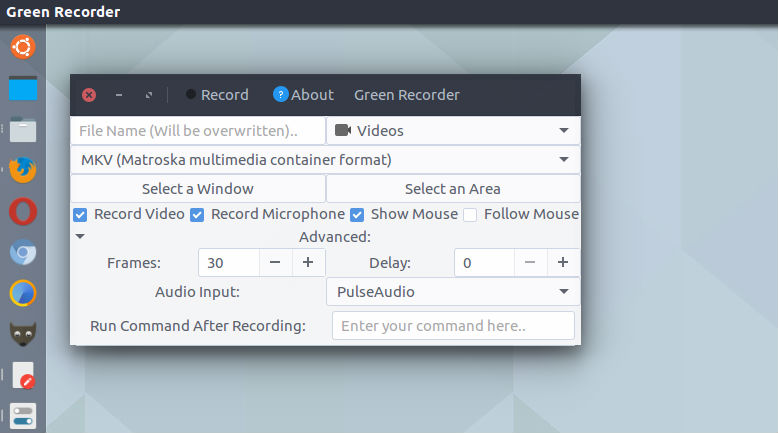
Green Recorder 2.0 on Ubuntu

Run the following commands in Terminal to install Green Recorder on Ubuntu Systems:

sudo apt-get update
sudo add-apt-repository ppa:fossproject/ppa
sudo apt-get update
sudo apt-get install green-recorder

Once installed, open the green-recorder app from Ubuntu Dash.

If you aren’t happy with the app and wish to uninstall and remove green-recorder, simply run the following commands:

sudo apt-get update
sudo apt-get remove green-recorder
sudo apt-get autoremove

If you need to know more about the app, visit https://launchpad.net/~mhsabbagh/+archive/ubuntu/greenproject

Tags: Green Recorder, Green Recorder Linux, Green Recorder Ubuntu, Green Screen Recorder, Green Screen Recorder Linux, Green Screen Recorder Ubuntu, Linux Green Recorder, Linux Green Screen Recorder, Linux Screen Recorder, Screen Recorder Linux, Screen Recorder Ubuntu, Ubuntu Green Recorder, Ubuntu Green Screen Recorder

Primary Sidebar

Latest Posts

Delete Directory And Contents Recursively Without Prompt On Linux

Check User Login History In Ubuntu Linux Command Line

Use Locate Command To Find File In Linux Terminal By Name

How To Change Terminal Color In Ubuntu Command Line

How To Run Fsck Manually In Linux To Fix Unexpected Inconsistency

How To Fix Broken Packages On Ubuntu From Terminal

Re Execute The Previous Command In Linux Ubuntu Command Line

How Much RAM Is Needed For Ubuntu PC

How To Find Large Files And Directories In Linux Command Line

How To Use Clear Command History In Linux Terminal

© 2026 Source Digit • Linux, Ubuntu Tutorials & News, Technology, Gadgets & Gizmos

  • Home
  • About
  • Privacy Policy
  • Terms & Conditions
  • Contact Us
  • Sitemap