
• Skip to primary navigation
  • Skip to main content
  • Skip to primary sidebar
Source Digit

Source Digit

Linux, Ubuntu Tutorials & News, Technology, Gadgets & Gizmos

  • Home
  • How To
  • Ubuntu
  • Instagram
  • Blogging
  • Android
  • WordPress
  • +More
    • Cloud Computing
    • Gadgets
    • Social Media
    • Technology
  • Write for Us
Home / How To / Install Suru Icon Theme On Ubuntu 17.10

Install Suru Icon Theme On Ubuntu 17.10

By Sourabh / November 17, 2017 Category: How To, Ubuntu

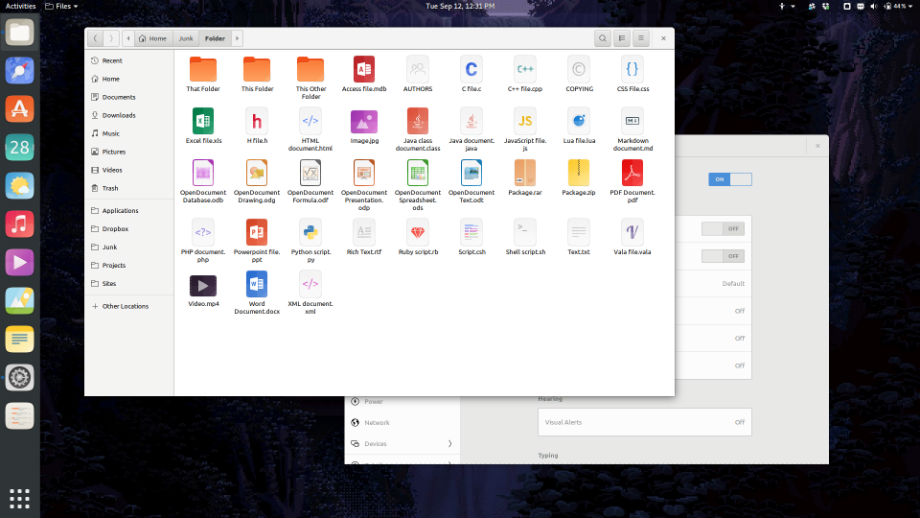
Install Suru Icon Theme for Ubuntu 17.10 and Ubuntu 17.04. Suru is scheduled to be the default icon theme in Ubuntu 18.04 LTS. Suru is the origami-based design theme for Linux Ubuntu Systems.

Suru is a FreeDesktop icon theme based upon the defunct Ubuntu mobile icon set and is designed with the original Suru icon guidelines and palette in mind. Many of the original generic app icons and symbolic icons have been repurposed, however this icon set has extensive additions such as icons for additional apps, as well as icons for folders, devices, file types, application categories, and other system toolbar and status icons.
Installing & Using

Please note: this icon theme is in-development, you may find there are several “missing” icons. There are no official packages or releases (yet) but you can install this theme from source with the provided Makefile and a few commands.

Download Suru Icon Theme (.Zip)

From the root directory of this repository running make install will install Suru to your home folder. After which you should be able to pick Suru as your icon theme or set it with:


sudo apt-get update
gsettings set org.gnome.desktop.interface icon-theme Suru

You can install Suru system-wide with sudo make install-root but you needn’t do that if you’re the only user.

Removing Suru

To remove Suru, simply run: make uninstall or, depending on whether or not you installed it with superuser priveleges: sudo make uninstall-root

Suru – https://github.com/snwh/suru-icon-theme/

Tags: Icon Theme Ubuntu 18.04, Icon Theme Ubuntu 18.04 LTS, Icon Ubuntu 18.04, New Icon Theme Ubuntu 18.04 LTS, Suru Icon, Suru Icon Theme, Suru Icon Theme Ubuntu, Suru Icon Theme Ubuntu 17, Suru Icon Theme Ubuntu 18, Suru Icon Ubuntu 17, Suru Theme, Suru Theme Ubuntu 17, Theme Ubuntu 18.04, Ubuntu 17 Suru Icon, Ubuntu 17 Suru Icon Theme, Ubuntu 17 Suru Theme, Ubuntu 18 Suru Icon Theme, Ubuntu 18.04 Icon, Ubuntu 18.04 Icon Theme, Ubuntu 18.04 LTS Icon Theme, Ubuntu 18.04 Theme, Ubuntu Suru Icon Theme

Primary Sidebar

Latest Posts

How To Run Fsck Manually In Linux To Fix Unexpected Inconsistency

How To Fix Broken Packages On Ubuntu From Terminal

Re Execute The Previous Command In Linux Ubuntu Command Line

How Much RAM Is Needed For Ubuntu PC

How To Find Large Files And Directories In Linux Command Line

How To Use Clear Command History In Linux Terminal

Linux Command To Check RAM Size In Ubuntu Terminal In GB

How To Install Proprietary Drivers In Linux Ubuntu Using Terminal

How To Shutdown Linux With A 15 Minute Delay And Message

Free AI Courses With Certificate For Beginners In India

© 2026 Source Digit • Linux, Ubuntu Tutorials & News, Technology, Gadgets & Gizmos

  • Home
  • About
  • Privacy Policy
  • Terms & Conditions
  • Contact Us
  • Sitemap