
• Skip to primary navigation
  • Skip to main content
  • Skip to primary sidebar
Source Digit

Source Digit

Linux, Ubuntu Tutorials & News, Technology, Gadgets & Gizmos

  • Home
  • How To
  • Ubuntu
  • Instagram
  • Blogging
  • Android
  • WordPress
  • +More
    • Cloud Computing
    • Gadgets
    • Social Media
    • Technology
  • Write for Us
Home / How To / Enable Minimise On Click On Ubuntu 19.10 Desktop

Enable Minimise On Click On Ubuntu 19.10 Desktop

By Sourabh / September 8, 2020 Category: How To, Ubuntu

How to enable “minimise on click” on Ubuntu 19.10 Desktop. Enable minimise function on Unity Ubuntu 19.10, via terminal commands or Ubuntu unity tweak tool.

By default, the minimise function isn’t enabled in Ubuntu 19.10 Unity Desktop. So you cannot click on an app launcher icon to open an app and again click on it to minimise the app.

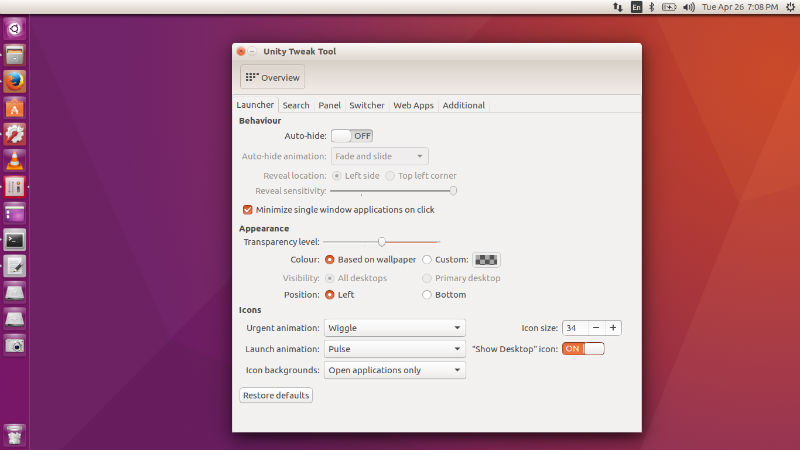
Luckily you can enable minimise on click on Ubuntu 19.10 Desktop. Here’s how to do this:
unity-ubuntu-16-04
  • Open Unity Tweak Tool.
  • Click on Launcher tab under Unity.
  • Click and enable Minimise. Select the option “Minimize single window applications on click” under Behaviour tab.

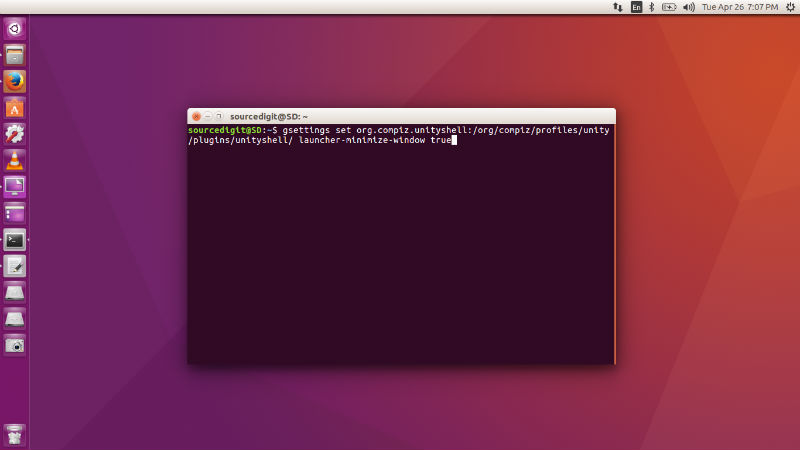
You can also enable minimise on click using terminal commands. Run the following commands to enable it:

gsettings set org.compiz.unityshell:/org/compiz/profiles/unity/plugins/unityshell/ launcher-minimize-window true
ubuntu-16-minimize

Once done, you will be able to easily minimise the app using mouse click.

Primary Sidebar

Latest Posts

Delete Directory And Contents Recursively Without Prompt On Linux

Check User Login History In Ubuntu Linux Command Line

Use Locate Command To Find File In Linux Terminal By Name

How To Change Terminal Color In Ubuntu Command Line

How To Run Fsck Manually In Linux To Fix Unexpected Inconsistency

How To Fix Broken Packages On Ubuntu From Terminal

Re Execute The Previous Command In Linux Ubuntu Command Line

How Much RAM Is Needed For Ubuntu PC

How To Find Large Files And Directories In Linux Command Line

How To Use Clear Command History In Linux Terminal

© 2026 Source Digit • Linux, Ubuntu Tutorials & News, Technology, Gadgets & Gizmos

  • Home
  • About
  • Privacy Policy
  • Terms & Conditions
  • Contact Us
  • Sitemap