
Kdenlive 20.08 video editor is released with new interface and features. Here is how to install Kdenlive Video Editor on Ubuntu Linux using PPA via terminal commands.
Kdenlive 20.08
Kdenlive 20.08 is out with nifty features like Interface Layouts, Multiple Audio Stream support, Cached data management and Zoombars in the Clip Monitor and Effects Panel but one may argue that the highlights of this release are stability and interface improvements. This version received a total of 284 commits with some major contributions from new developers.
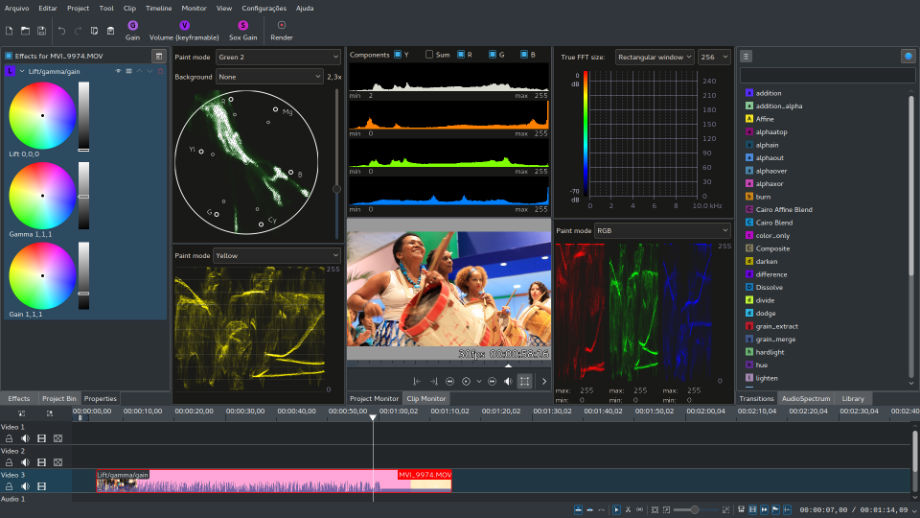
Notable Changes:
- Audio: This version brings the initial step in implementing an advanced audio workflow by adding multiple audio stream support. In the next releases expect audio routing and channel mapping as well. The mixer got a facelift making it more efficient in smaller heights.
- Cache management: A new cache management interface under settings allows you to maintain and control the size of your cached and proxied files as well as backup-ed data. You may also clean data older than a specified amount of months.
New shortcuts
- ‘ (Apostrophe) to set audio stream to target track.
- Shift + Alt as alternate shortcut to move single clip to another track.
- Alt + mouse Windows specific shortcut to change a grouped clip’s track (Alt+mouse).
- . + number to focus on Video tracks (i.e: . + 1 focus on video track 1)
- alt + number to focus on audio tracks (i.e: alt + 2 focus on audio track 2)
- ( snaps beginning of clip to cursor in the timeline
- ) snaps end of clip to cursor in the timeline
Miscellaneous improvements
- Project notes: allow creating markers from timestamps and assign timestamps to current bin clip.
- Added option to always display clip monitor audio thumbs below video instead of an overlay.
- Composite transitions with Lumas.
- Add a “Save Copy” action to save a project copy.
- Project bin improvements: Expand/collapse all bin folders with Shift+click, remember folder status (expanded/collapsed) on save, and many other fixes.
- Add clip length adjustment to speed dialog.
- Titler: add option to save title and add to project in in one pass (through the create button menu.
- Add proxy icon to clips in timeline.
- Increase monitor audio thumb resolution.
- Ability to change colors of audio thumbnails (Go to Settings > Configure > Colors).
- Renamed “Add Slideshow Clip” to “Add Image Sequence”.
- Clickable clip name on top of Clip Properties widget opens a file explorer to the clip’s location).
- Windows: use compatible methods when dropping a folder in bin.
Install Kdenlive 20.08
Run the following set of commands to install Kdenlive 20.08 on Ubuntu Systems:
sudo apt-get update sudo apt-get upgrade sudo add-apt-repository ppa:kdenlive/kdenlive-stable sudo apt-get update sudo apt-get install kdenlive
NOTE: Projects created with 20.08 forward are not backwards compatible, that is, you won’t be able to open your .kdenlive project files with older versions.
Uninstall & Remove Kdenlive 20.08
Run the following commands to purge the PPA and downgrade Kdenlive package installed on the system.
sudo apt install ppa-purgesudo ppa-purge ppa:kdenlive/kdenlive-stable
Run the following commands to remove the PPA and kdenlive from the system.
sudo add-apt-repository --remove ppa:kdenlive/kdenlive-stable sudo apt remove --autoremove kdenlive kdenlive-data sudo apt-get update