
How to find when a command was executed in Linux and how to check command history in Linux for a user. Understand history command with date and time in Ubuntu.
History Command
The history command can be used to display the recently used command history.
The history command has the following syntax:
history [-c] [-d offset] [n] or history -anrw [filename] or history -ps arg [arg...]
Users can display or manipulate the history list. One can display the history list with line numbers, prefixing each modified entry with a `*’. An argument of N lists only the last N entries.
History Command Options:
-c : clear the history list by deleting all of the entries
-d offset : delete the history entry at offset OFFSET.
-a : append history lines from this session to the history file
-n : read all history lines not already read from the history file
-r : read the history file and append the contents to the history list
-w : write the current history to the history file and append them to the history list
-p : perform history expansion on each ARG and display the result without storing it in the history list
-s : append the ARGs to the history list as a single entry
By default history command will display output as follows:
$ history
NOTE: When we use history command it won’t display what time the commands were executed from the bash history. To solve this problem create a shell variable called HISTTIMEFORMAT.
How to see time stamps in bash history
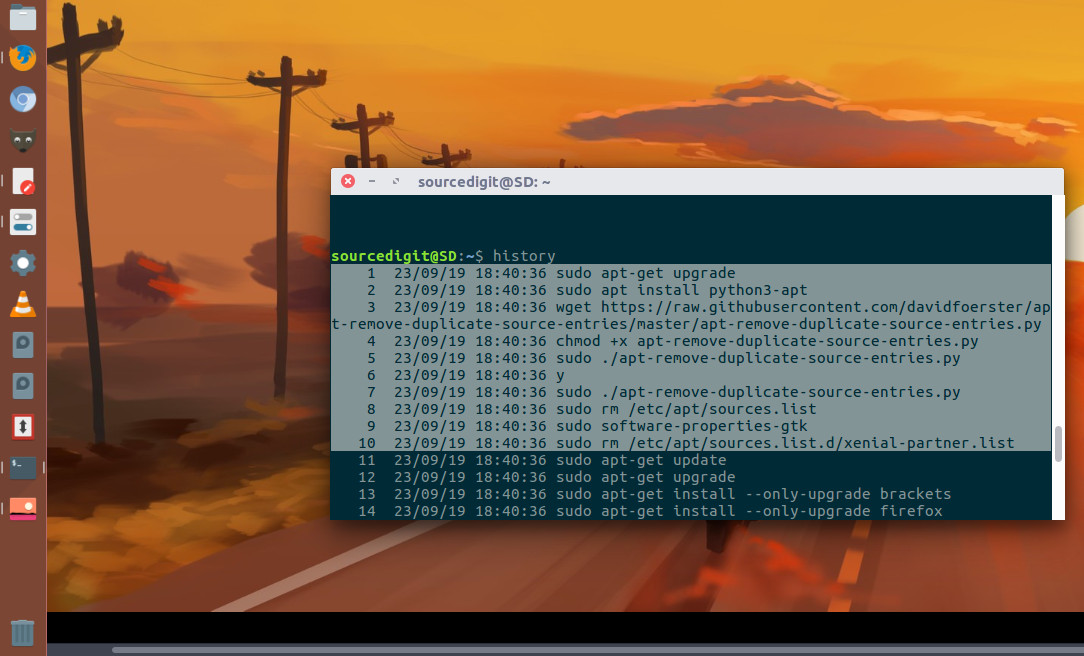
Defining the environment variable named HISTTIMEFORMAT as follows:
$ HISTTIMEFORMAT="%d/%m/%y %T "
OR add to your ~/.bash_profile file, enter:
$ echo 'export HISTTIMEFORMAT="%d/%m/%y %T "' >> ~/.bash_profile
Where,
%d – Day
%m – Month
%y – Year
%T – Time
Use the source command to load HISTTIMEFORMAT from file into the current shell script or a command prompt:
$ . ~/.bash_profile
OR
$ source ~/.bash_profile
Now run the history command to retrieve Linux or Unix bash command line history by date and time.