
If Linux internet is not working, here is how to check network connection in Ubuntu terminal. You can also check internet speed in Ubuntu terminal.
Read to learn how to do this.
speedtest-cli
The speedtest-cli is a command line interface for testing Internet bandwidth using speedtest.net Speedtest-cli is a script written in the Python programming language which measures the Internet speed bidirectionally.
This application allows you to check your Internet speed upon distance in km, it can test against specific servers and it also provides a URL so that you can share your result on the Internet.
Install speedtest-cli on Ubuntu
Run the following commands to install speedtest-cli on Ubuntu:
sudo apt-get update
sudo apt-get install python-pip
sudo pip install speedtest-cli
Once installed, you can use it via Terminal commands.
Using speedtest-cli
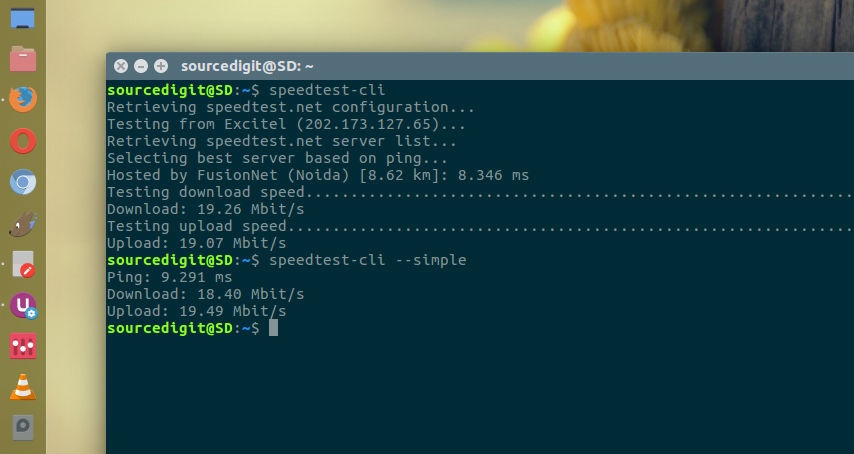
The speedtest-cli command can be used to check the Internet speed on Ubuntu Linux Systems. The command has the following format:
speedtest-cli [-h] [--bytes] [--share] [--simple] [--csv] [--csv-delimiter CSV_DELIMITER] [--csv-header] [--json] [--list] [--server SERVER] [--mini MINI] [--source SOURCE] [--timeout TIMEOUT] [--secure] [--version]
The easiest way to use the command is without any argument:
$ speedtest-cli
The command shows the download speed and upload speed in Mbit/s. If you wish to get the speed results in bytes, run:
$ speedtest-cli --bytes
Whereas the command when used with –simple argument, displays only the basic information like ping, download and upload speed.
$ speedtest-cli --simple
You can also share the speed results as image using the command speedtest-cli –share.