
If you want to record screen on Ubuntu with audio, you can install record screen using SimpleScreenRecorder application on Linux Ubuntu. Read more to know how to record screen in Linux Ubuntu command line.
SimpleScreenRecorder
SimpleScreenRecorder is a powerful tool to record screen on Ubuntu with audio. It comes with a powerful yet simple graphical user interface (Qt-based). The application can be used to records the entire screen or part of it, or records OpenGL applications directly (similar to Fraps on Windows).
The application synchronizes audio and video properly and also reduces the video frame rate if your computer is too slow. It features fully multithreaded functionality which results is smoother video and better performance on computers with multiple processors.
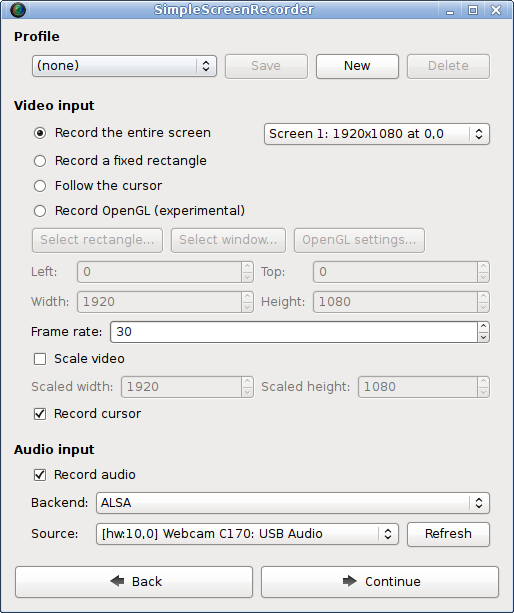
Users can pause and resume recording at any time and see the statistics during recording, such as file size, bit rate, total recording time, actual frame rate, and more.
And the best part is, if you get stuck anywhere and need help you can access the tooltips. The application has tooltip which helps you with everything so that you don’t have to read the documentation to find out what something does.
Installing SimpleScreenRecorder
If you are using Ubuntu 17.04 or newer, SimpleScreenRecorder can be found in the official repositories. You can install it with:
sudo apt-get update
sudo apt-get install simplescreenrecorder
If you want to record 32-bit OpenGL applications on a 64-bit system, run the following command to install SimpleScreenRecorder:
sudo apt-get install simplescreenrecorder-lib:i386
If you are using an older version of Ubuntu, or you want to get the latest version of SimpleScreenRecorder immediately without waiting for the next Ubuntu release, you can also get the package(s) from the SimpleScreenRecorder PPA:
sudo apt-add-repository ppa:maarten-baert/simplescreenrecorder
sudo apt-get update
sudo apt-get install simplescreenrecorder
Once installed opope the SimpleScreenRecorder from Ubuntu menu and start using.