
• Skip to primary navigation
  • Skip to main content
  • Skip to primary sidebar
Source Digit

Source Digit

Linux, Ubuntu Tutorials & News, Technology, Gadgets & Gizmos

  • Home
  • How To
  • Ubuntu
  • Instagram
  • Blogging
  • Android
  • WordPress
  • +More
    • Cloud Computing
    • Gadgets
    • Social Media
    • Technology
  • Write for Us
Home / How To / How to Schedule Your Posts in WordPress

How to Schedule Your Posts in WordPress

By Sourabh / January 19, 2015 Category: How To, WordPress

How to schedule WordPress posts. Learn how to schedule blog posts in WordPress. Easily schedule WordPress posts and control when the WordPress blog post gets published.

WordPress has a built-in WordPress post scheduler feature which can help you to add a publish time for your WordPress blog posts. Lest us see how:

How to schedule blog posts in WordPress

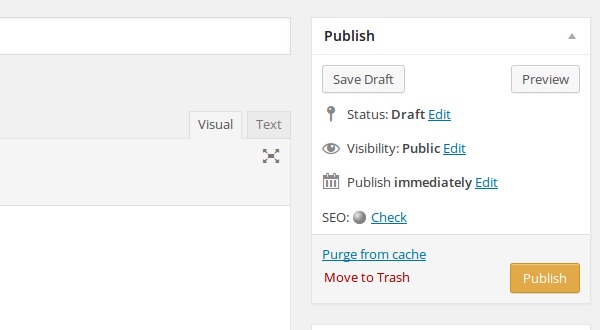
Write your WordPress blog post in normal way, but before you press publish button, click the edit link next to Publish. WordPress posts scheduling feature is found in the Publish box, upper right side of the post editor page.
How-to-Schedule-WordPress-Posts-image-01

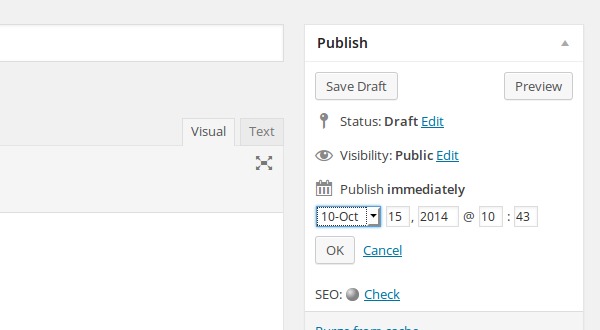
When you click the edit link next to Publish, you’ll now see a drop-down option to schedule your post. You can select the month, date and year to publish the post. You can also select the time – hour and minute.
 

How-to-Schedule-WordPress-Posts-image-03

For example, if you’d like to publish this post at 9 a.m. tomorrow (16 October 2014), set tomorrow’s date and time for 9 a.m. and click Ok. Now you can see the Schedule button has appeared and highlighted (blue colour). Click on the Schedule button to schedule the blog post.

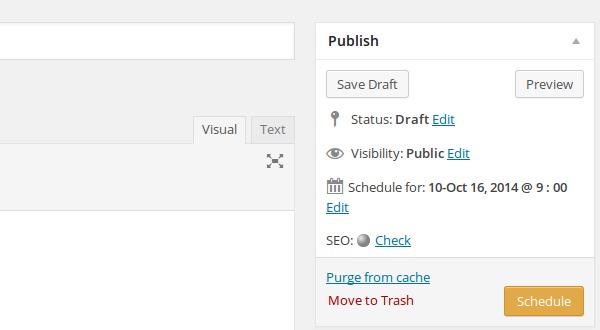
Once you click the Schedule button, you’ll see the status of this WordPress post has is shown as scheduled. The post shall be published and visible on the exact date and time set for scheduled.
 

How-to-Schedule-WordPress-Posts-image-04

You can also change the scheduled post to publish it immediately or re-schedule it. To do so,  click the Edit link next to the scheduled publish time and update the date and the time.

Tags: How to schedule blog posts in wordpress, How to Schedule Your Posts in WordPress, Schedule blog posts in WordPress, Schedule posts in WordPress, Scheduling WordPress Posts, WordPress, WordPress Basics, WordPress Tips

Primary Sidebar

Latest Posts

Delete Directory And Contents Recursively Without Prompt On Linux

Check User Login History In Ubuntu Linux Command Line

Use Locate Command To Find File In Linux Terminal By Name

How To Change Terminal Color In Ubuntu Command Line

How To Run Fsck Manually In Linux To Fix Unexpected Inconsistency

How To Fix Broken Packages On Ubuntu From Terminal

Re Execute The Previous Command In Linux Ubuntu Command Line

How Much RAM Is Needed For Ubuntu PC

How To Find Large Files And Directories In Linux Command Line

How To Use Clear Command History In Linux Terminal

© 2026 Source Digit • Linux, Ubuntu Tutorials & News, Technology, Gadgets & Gizmos

  • Home
  • About
  • Privacy Policy
  • Terms & Conditions
  • Contact Us
  • Sitemap