
• Skip to primary navigation
  • Skip to main content
  • Skip to primary sidebar
Source Digit

Source Digit

Linux, Ubuntu Tutorials & News, Technology, Gadgets & Gizmos

  • Home
  • How To
  • Ubuntu
  • Instagram
  • Blogging
  • Android
  • WordPress
  • +More
    • Cloud Computing
    • Gadgets
    • Social Media
    • Technology
  • Write for Us
Home / How To / Add the Forget Button in Firefox 35 & Delete Browsing History Instantly

Add the Forget Button in Firefox 35 & Delete Browsing History Instantly

By Sourabh / January 14, 2015 Category: How To

How to add the Forget Button in Firefox 35. Enable and use the Forget Button in Firefox 35 to delete (clear) the browsing history instantly.

Firefox (33.1 onwards) comes with a new Forget button which quickly deletes the Firefox browsing history. The Forget button with the new version of Firefox wipes out the recent browsing history without affecting the stored information.

How to Enable Forget Button in Firefox 35

Here is how to add the Forget button to your toolbar.

  • Click the menu button.
  • Click +Customize at the bottom of the menu panel.
  • Drag the Forget button from the Additional Tools and Features panel to your toolbar, then click Exit Customize.

How to Use Forget Button in Firefox 35

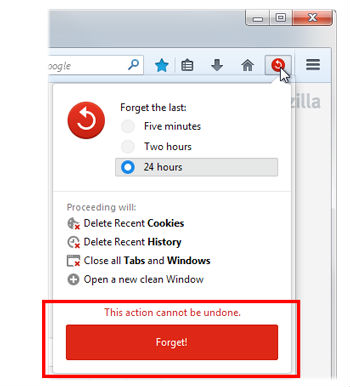
  • To clear your recent history, click the Forget button on your toolbar.
  • Choose a time frame that you’d like to forget (five minutes, two hours or 24 hours) and click the red Forget button.
  • Firefox will clear history and cookies from the specified time frame, close your open tabs and relaunch a new, clean window.

Firefox-Forget-Button-0i

When you want to delete the recent history, click the Forget button. The button lets you  select the time frame to clear the browsing history. The available options are:

  • 5 minutes
  • 2 hours
  • 24 hours.

Tags: Add the Forget Button in Firefox 35, Enable Forget Button Firefox 33.1, Firefox 33.1 Clear Recent History, Firefox 33.1 Delete History Button, Firefox 33.1 Forget button, Firefox 33.1 Forget History Button, Forget Button Firefox 33.1, Forget Button in Firefox 35, How To Install Firefox 33.1, How to Use Forget Button in Firefox 35, Install Mozilla Firefox 33.1, Mozilla Firefox 33.1, Use Forget Button in Firefox 33.1

Primary Sidebar

Latest Posts

Delete Directory And Contents Recursively Without Prompt On Linux

Check User Login History In Ubuntu Linux Command Line

Use Locate Command To Find File In Linux Terminal By Name

How To Change Terminal Color In Ubuntu Command Line

How To Run Fsck Manually In Linux To Fix Unexpected Inconsistency

How To Fix Broken Packages On Ubuntu From Terminal

Re Execute The Previous Command In Linux Ubuntu Command Line

How Much RAM Is Needed For Ubuntu PC

How To Find Large Files And Directories In Linux Command Line

How To Use Clear Command History In Linux Terminal

© 2026 Source Digit • Linux, Ubuntu Tutorials & News, Technology, Gadgets & Gizmos

  • Home
  • About
  • Privacy Policy
  • Terms & Conditions
  • Contact Us
  • Sitemap