
• Skip to primary navigation
  • Skip to main content
  • Skip to primary sidebar
Source Digit

Source Digit

Linux, Ubuntu Tutorials & News, Technology, Gadgets & Gizmos

  • Home
  • How To
  • Ubuntu
  • Instagram
  • Blogging
  • Android
  • WordPress
  • +More
    • Cloud Computing
    • Gadgets
    • Social Media
    • Technology
  • Write for Us
Home / Uncategorized / Install Flacon MP3 (Audio files) Extraction Tool on Ubuntu 15.04 & Ubuntu 14.04

Install Flacon MP3 (Audio files) Extraction Tool on Ubuntu 15.04 & Ubuntu 14.04

By Sourabh / September 10, 2015 Category: Uncategorized

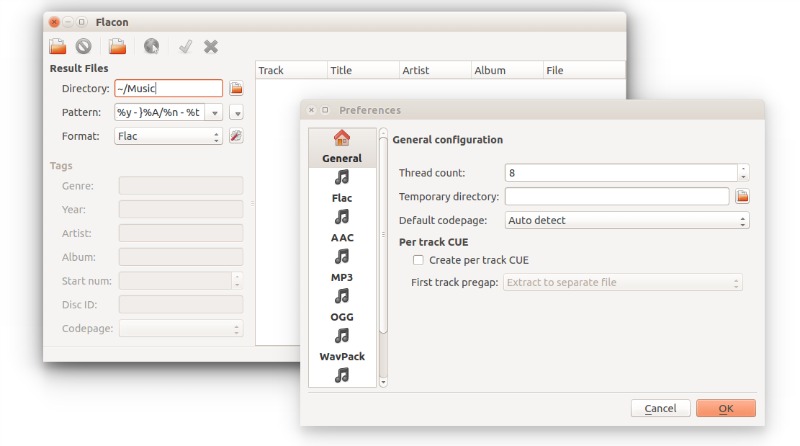
Flacon Extraction Tool on Ubuntu 15.04, Ubuntu 14.04 and Linux Mint. Extracts individual tracks (Single MP3 files) from audio CD or large audio file containing the entire album of music. It saves the extracted track as a separate audio file. Flacon tool supports various audio formats – WavPack, APE, FLAC, WAV or True Audio.
flacon-tool

To do this, it uses information from the appropriate CUE file. Besides, Flacon makes it possible to conveniently revise or specify tags both for all tracks at once or for each tag separately.

It also features output format settings. Users can set the output quality, compression and other settings of the audio file to be extracted.

Flacon features:

  • Supports the following input formats: WAV, FLAC, APE, WavPack, True Audio (TTA).
  • Supported output formats: LAC, WAV, WavPack, AAC, OGG, MP3 and Opus (with the latest Flacon 1.2.0) with preset and quality settings, etc.;
  • Replay Gain analysis (album-gain and track-gain modes);
  • Multi-threaded conversion process;
  • Automatic character set detection for CUE files;
  • Automatically tag resulting track files;
  • Generation of the pertrack CUE file in the output dir.

Install Flacon in Ubuntu or Linux Mint

Flacon 1.2.0 is the latest release of the Flacon software. It brings the following changes:

  • Qt5 support
  • Added support for Opus output files
  • Added support for OS/2
  • Translations updated

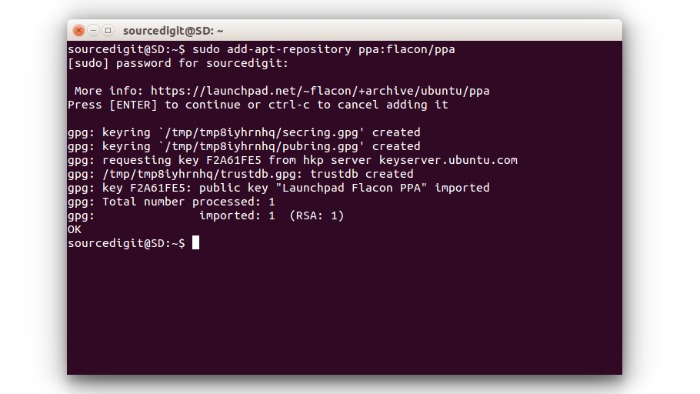
Open Terminal and run the following commands to install Flacon 1.2.0 in Ubuntu or Linux Mint Systems, via its official PPA:
flacon-01

sudo add-apt-repository ppa:flacon/ppa
sudo apt-get update
sudo apt-get install flacon

Flacon tool can also be installed on other Linux distributions. Please visit the Flacon downloads page for more information.

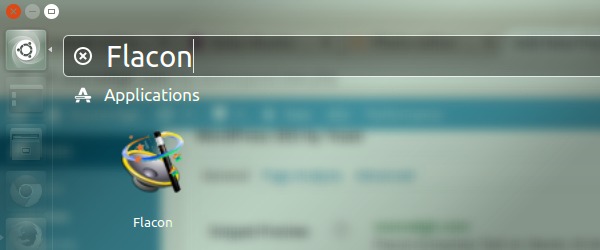
Once installed, you can open the Flacon tool via Ubuntu Dash.
flacon-start

If you aren’t happy with the software, you can uninstall and remove the Flacon from Ubuntu Systems. To do so, run the following commands:

sudo apt-get remove flacon

Tags: Extract Individual Single MP3 file From Audio CD, Extract Individual Tracks From Audio CD, Flacon Extraction Tool Ubuntu, Flacon Tool Ubuntu, How To Extract Individual Tracks From Audio CD, How To Extract Single MP3 file From Audio CD, How To Rip Individual Single MP3 file From Audio CD, How To Rip Individual Tracks From Audio CD, Install Flacon in Linux Mint, Install Flacon in Ubuntu, Install Flacon in Ubuntu 14.04, Install Flacon in Ubuntu 14.10, Install Flacon in Ubuntu 15.04, Install Flacon MP3 (Audio files) Extraction Tool on Ubuntu, Rip Individual Single MP3 file From Audio CD, Rip Individual Tracks From Audio CD, Ubuntu MP3 File Extraction Tool

Primary Sidebar

Latest Posts

Delete Directory And Contents Recursively Without Prompt On Linux

Check User Login History In Ubuntu Linux Command Line

Use Locate Command To Find File In Linux Terminal By Name

How To Change Terminal Color In Ubuntu Command Line

How To Run Fsck Manually In Linux To Fix Unexpected Inconsistency

How To Fix Broken Packages On Ubuntu From Terminal

Re Execute The Previous Command In Linux Ubuntu Command Line

How Much RAM Is Needed For Ubuntu PC

How To Find Large Files And Directories In Linux Command Line

How To Use Clear Command History In Linux Terminal

© 2026 Source Digit • Linux, Ubuntu Tutorials & News, Technology, Gadgets & Gizmos

  • Home
  • About
  • Privacy Policy
  • Terms & Conditions
  • Contact Us
  • Sitemap