
• Skip to primary navigation
  • Skip to main content
  • Skip to primary sidebar
Source Digit

Source Digit

Linux, Ubuntu Tutorials & News, Technology, Gadgets & Gizmos

  • Home
  • How To
  • Ubuntu
  • Instagram
  • Blogging
  • Android
  • WordPress
  • +More
    • Cloud Computing
    • Gadgets
    • Social Media
    • Technology
  • Write for Us
Home / How To / Remove Shutdown Confirmation Box In Ubuntu 15.10

Remove Shutdown Confirmation Box In Ubuntu 15.10

By Sourabh / November 18, 2015 Category: How To, Ubuntu

How to turn off and remove the Shutdown/Restart/LogOut confirmation dialog box in Ubuntu. Remove shutdown confirmation box in Ubuntu 15.10, Ubuntu 14.04, Ubuntu 15.04 and Ubuntu 14.10.

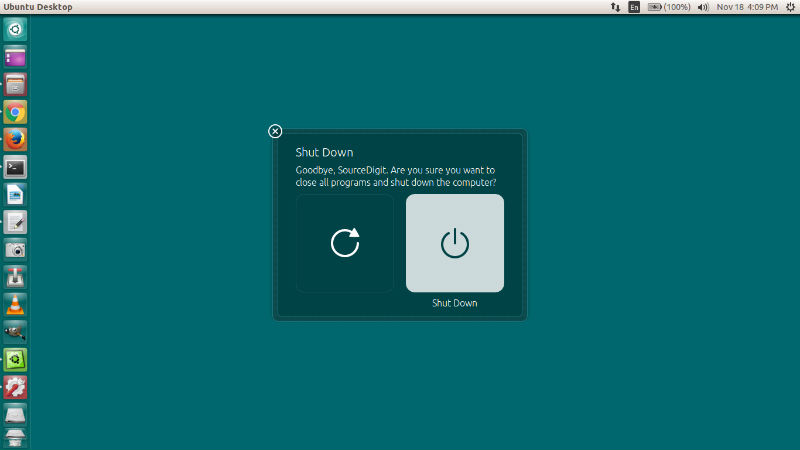
By default, Ubuntu 15.10, Ubuntu 15.04 and Ubuntu 14.04 is configured to always prompt you with a dialog box when you wish to shutdown, restart or logout from your current session. This prevents you from mistakenly shutting down or restarting your Ubuntu 15.10, Ubuntu 15.04 and Ubuntu 14.04 PC.
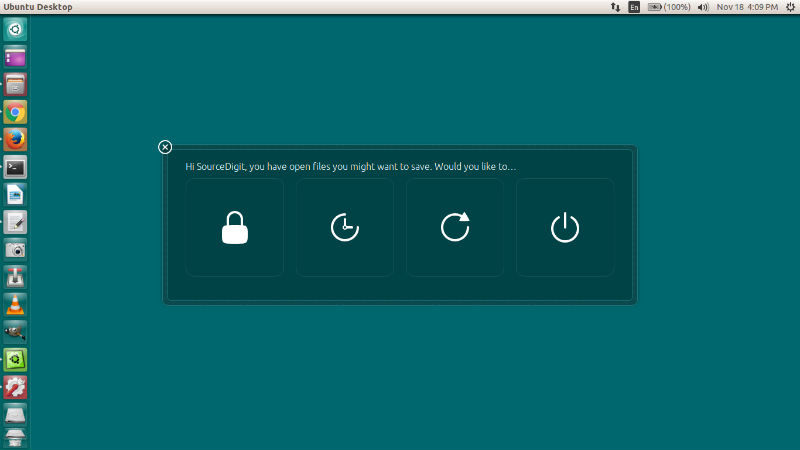
shutdown-01

Luckily, you can disable the confirmation dialog box to appear every-time you select to shutdown, restart and logout Ubuntu 15.10, Ubuntu 15.04 and Ubuntu 14.04. Here’s the terminal commands to remove Shut Down & Restart confirmation dialog box in Ubuntu 15.04 and Ubuntu 14.04.

Disable Shutdown Confirmation in Ubuntu

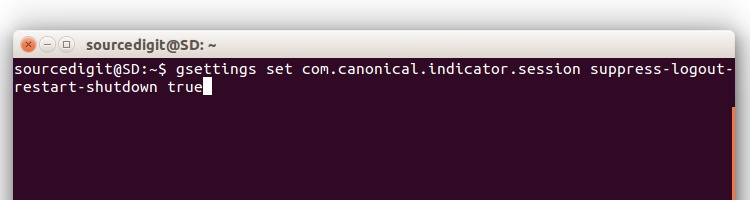
To disable shutdown dialog box, open a Terminal (Ctrl+Alt+T) and use the following command:

gsettings set com.canonical.indicator.session suppress-logout-restart-shutdown true

Please Note: When you disable the shutdown/restart confirmation dialog box, it also disable the log out/lock confirmation dialog box.
studown-1
After executing the above command there is no need of a system restart. Next time when you click on shutdown, it will immediately shut down the system without asking for your confirmation.

Re-Enable Shutdown Confirmation in Ubuntu
shutdown-02

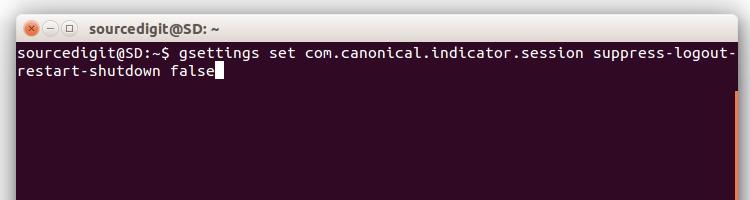
To enable the confirmation dialog box again, open a Terminal and type the following command:

gsettings set com.canonical.indicator.session suppress-logout-restart-shutdown false
shutdown-02

Tags: Disable Shutdown Confirmation Box In Ubuntu 14.04, Disable Shutdown Confirmation Box In Ubuntu 14.10, Disable Shutdown Confirmation Box In Ubuntu 15.04, Disable Shutdown Confirmation Box In Ubuntu 15.10, Disable Shutdown Confirmation Box Ubuntu, Get Rid Of Shutdown Confirmation Dialogue Box In Ubuntu, Remove Shutdown Confirmation Box In Ubuntu 14.04, Remove Shutdown Confirmation Box In Ubuntu 14.10, Remove Shutdown Confirmation Box In Ubuntu 15.04, Remove Shutdown Confirmation Box In Ubuntu 15.10, Remove Shutdown Confirmation Box Ubuntu, Turn Off Shutdown Confirmation Box In Ubuntu 14.04, Turn Off Shutdown Confirmation Box In Ubuntu 14.10, Turn Off Shutdown Confirmation Box In Ubuntu 15.04, Turn Off Shutdown Confirmation Box In Ubuntu 15.10, Turn Off Shutdown Confirmation Box Ubuntu, Ubuntu Disable Shutdown Confirmation Box, Ubuntu Remove Shutdown Confirmation Box, Ubuntu Turn Off Shutdown Confirmation Box

Primary Sidebar

Latest Posts

Delete Directory And Contents Recursively Without Prompt On Linux

Check User Login History In Ubuntu Linux Command Line

Use Locate Command To Find File In Linux Terminal By Name

How To Change Terminal Color In Ubuntu Command Line

How To Run Fsck Manually In Linux To Fix Unexpected Inconsistency

How To Fix Broken Packages On Ubuntu From Terminal

Re Execute The Previous Command In Linux Ubuntu Command Line

How Much RAM Is Needed For Ubuntu PC

How To Find Large Files And Directories In Linux Command Line

How To Use Clear Command History In Linux Terminal

© 2026 Source Digit • Linux, Ubuntu Tutorials & News, Technology, Gadgets & Gizmos

  • Home
  • About
  • Privacy Policy
  • Terms & Conditions
  • Contact Us
  • Sitemap