
• Skip to primary navigation
  • Skip to main content
  • Skip to primary sidebar
Source Digit

Source Digit

Linux, Ubuntu Tutorials & News, Technology, Gadgets & Gizmos

  • Home
  • How To
  • Ubuntu
  • Instagram
  • Blogging
  • Android
  • WordPress
  • +More
    • Cloud Computing
    • Gadgets
    • Social Media
    • Technology
  • Write for Us
Home / How To / Install Comic Book Reader on Ubuntu 15.10

Install Comic Book Reader on Ubuntu 15.10

By Sourabh / February 16, 2016 Category: How To, Ubuntu

Comic book reader on Ubuntu. Install Comix, Linux comic reader and read comic books in Ubuntu. Using Comix, one can run .cbr files to read comics in Ubuntu. Comix is a user-friendly, customizable image viewer. It is specifically designed to handle comic books, but also serves as a generic viewer. It reads images in ZIP, RAR or tar archives (also gzip or bzip2 compressed) as well as plain image files. It is written in Python and uses GTK+ through the PyGTK bindings.
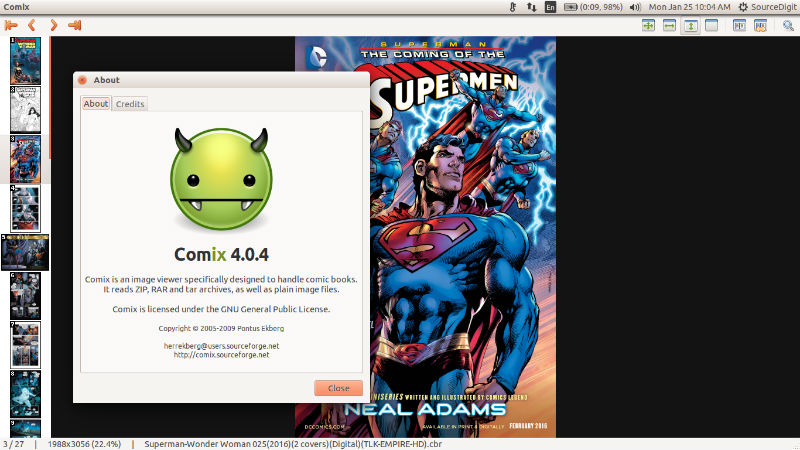
comix

Features of Comix Application

  • Fullscreen mode.
  • Double page mode.
  • Fit image to window width, height or both.
  • Rotation and mirroring.
  • Magnifying glass.
  • Image enhancements.
  • Both left-to-right and right-to-left reading modes.
  • Bookmarks support.
  • Archive comments support.
  • Archive editor.
  • Comic book library.
  • Reads most common image formats.
  • Reads ZIP and tar archives natively, and RAR archives through the unrar program.
  • Runs on Linux, *BSD and virtually any other UNIX-like OS.
  • Available in over 20 different languages.
  • More!

Install Comix on Ubuntu

Comix can be installed on Linux Ubuntu Systems – Ubuntu 15.10, Ubuntu 15.04, Ubuntu 14.10, Ubuntu 14.04 and Linux Mint Systems. Run the following command in Terminal to install Comix on Ubuntu:

sudo apt-get install unrar
sudo apt-get install p7zip-full p7zip-rar
sudo apt-get install comix

Once installed, open the Comix app from Ubuntu Dash or Menu.
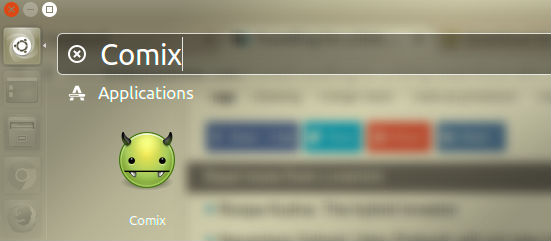
comix-open

If you wish to uninstall and remove the Comix app, run the command given below:

sudo apt-get remove comix

Tags: Comic Book Reader Ubuntu, Comic Viewer Ubuntu, Comix Ubuntu, How To Read Comic Books In Ubuntu, How To Run .cbr Files to Read Comics in Ubuntu, Install Comic Book Reader Ubuntu, Linux Comics Reader, Linux Read Comic Books, Linux Run .cbr Files, Read Comic Books In Linux, Read Comic Books In Ubuntu, Run .cbr Files Linux, Run .cbr Files Ubuntu Ubuntu Run .cbr Files, Ubuntu Comix, Ubuntu Read Comic Books

Primary Sidebar

Latest Posts

Delete Directory And Contents Recursively Without Prompt On Linux

Check User Login History In Ubuntu Linux Command Line

Use Locate Command To Find File In Linux Terminal By Name

How To Change Terminal Color In Ubuntu Command Line

How To Run Fsck Manually In Linux To Fix Unexpected Inconsistency

How To Fix Broken Packages On Ubuntu From Terminal

Re Execute The Previous Command In Linux Ubuntu Command Line

How Much RAM Is Needed For Ubuntu PC

How To Find Large Files And Directories In Linux Command Line

How To Use Clear Command History In Linux Terminal

© 2026 Source Digit • Linux, Ubuntu Tutorials & News, Technology, Gadgets & Gizmos

  • Home
  • About
  • Privacy Policy
  • Terms & Conditions
  • Contact Us
  • Sitemap