
• Skip to primary navigation
  • Skip to main content
  • Skip to primary sidebar
Source Digit

Source Digit

Linux, Ubuntu Tutorials & News, Technology, Gadgets & Gizmos

  • Home
  • How To
  • Ubuntu
  • Instagram
  • Blogging
  • Android
  • WordPress
  • +More
    • Cloud Computing
    • Gadgets
    • Social Media
    • Technology
  • Write for Us
Home / How To / Install Notepadqq 0.51 On Linux Ubuntu Systems

Install Notepadqq 0.51 On Linux Ubuntu Systems

By Sourabh / July 23, 2016 Category: How To, Ubuntu

Notepad for Linux Ubuntu Systems. Install Notepadqq on Ubuntu, via PPA. Notepadqq is similar to Notepad++ text editor. The Notepadqq 0.51 editor has many exciting editing features such as syntax highlighing, support for programming languages and text formatting features. It also support search, find and replace and bookmarks function.
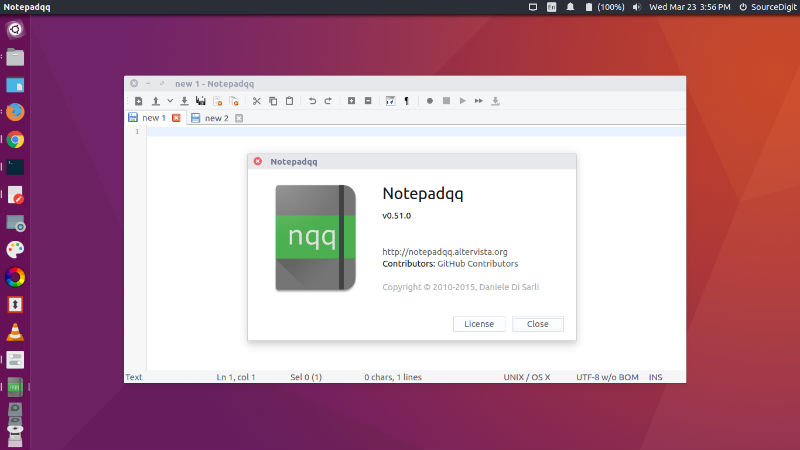
notepad-ubuntu

Notepadqq 0.51 is the latest version available of the Notepad Text Editor. Notepadqq 0.51 has been released with various features and improvements such as a new icon and various translations:

  • Always use tabSize from the preferences when converting tabs to spaces
  • Keyboard shortcuts compatibility with translations
  • HU localization
  • Fix casing bug for search dialog
  • Shift+Insert to paste
  • Ctrl+Insert to copy
  • Identify TCL scripts by shebang
  • Recognize more Fortran extensions

Install Notepadqq on Ubuntu

Run the following commands to install Notepadqq 0.51 on Ubuntu 15.10, Ubuntu 15.04, Ubuntu 14.10, Ubuntu 14.04 and other Ubuntu Derivative Systems:


$ sudo add-apt-repository ppa:notepadqq-team/notepadqq
$ sudo apt-get update
$ sudo apt-get install notepadqq

Once installed, open the Notepadqq from Ubuntu Dash or Menu.

Run the following command to uninstall and remove Notepadqq:

$ sudo apt-get remove notepadqq


Tags: How To Open Notepad In Linux Terminal, Install Notepadqq Ubuntu 16.04, Install Notepadqq Ubuntu PPA, Notepad For Linux Download, Notepad++ Centos, Notepad++ Linux Mint, Notepad++ Linux Wine, Notepadqq Centos, Notepadqq Fedora, Notepadqq Linux, Notepadqq Linux Ubuntu, Notepadqq Ubuntu, Notepadqq Ubuntu Linux, Notepadqq Ubuntu PPA, Ubuntu 16.04 Install Notepadqq, Ubuntu PPA Notepadqq, Ubuntu PPA Notepadqq Install

Primary Sidebar

Latest Posts

Use Locate Command To Find File In Linux Terminal By Name

How To Change Terminal Color In Ubuntu Command Line

How To Run Fsck Manually In Linux To Fix Unexpected Inconsistency

How To Fix Broken Packages On Ubuntu From Terminal

Re Execute The Previous Command In Linux Ubuntu Command Line

How Much RAM Is Needed For Ubuntu PC

How To Find Large Files And Directories In Linux Command Line

How To Use Clear Command History In Linux Terminal

Linux Command To Check RAM Size In Ubuntu Terminal In GB

How To Install Proprietary Drivers In Linux Ubuntu Using Terminal

© 2026 Source Digit • Linux, Ubuntu Tutorials & News, Technology, Gadgets & Gizmos

  • Home
  • About
  • Privacy Policy
  • Terms & Conditions
  • Contact Us
  • Sitemap