• Skip to primary navigation
  • Skip to main content
  • Skip to primary sidebar
Source Digit

Source Digit

Linux, Ubuntu Tutorials & News, Technology, Gadgets & Gizmos

  • Home
  • How To
  • Ubuntu
  • Instagram
  • Blogging
  • Android
  • WordPress
  • +More
    • Cloud Computing
    • Gadgets
    • Social Media
    • Technology
  • Write for Us
Home / How To / How to Auto Mount Hard Drive Partitions On Start Up In Ubuntu 16.04

How to Auto Mount Hard Drive Partitions On Start Up In Ubuntu 16.04

By Sourabh / August 1, 2016 Category: How To, Ubuntu

How to auto mount hard drive partitions automatically on Ubuntu 16.04. Mount partitions automatically on system startup in Ubuntu. Automatically mount external hard drive Ubuntu Linux. Ubuntu’s filesystem table is located at ‘/etc/fstab’.

For Ubuntu Systems the most common thing to be mounted is a hard drive partition. Hard drives are kept in /dev and have different names depending on what type of drive they are. IDE/ATA drives are labelled as /dev/hda, /dev/hdb, /dev/hdc and /dev/hdd. Therefore SATA and USB drives are labelled as /dev/sdX where X is a letter, starting at “a”.  Devices like USB sticks are treated like hard drives.

Following are the steps to auto mount hard drive partitions automatically on Ubuntu:

  • Open Disks utility from Ubuntu Unity Dash.
  • In the Disks utility window, select the hard disk and then select the HDD partition you want to mount automatically.
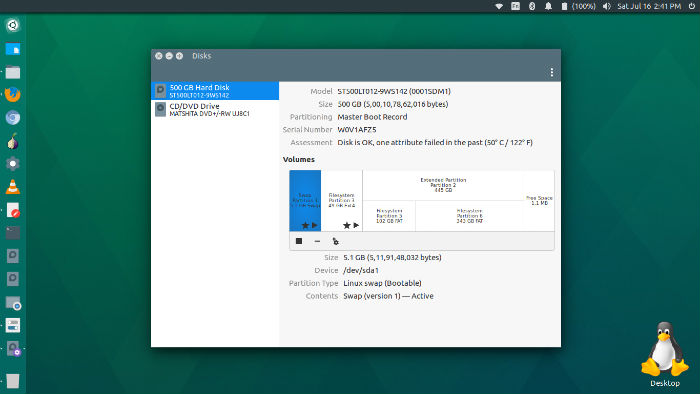
disks-01

  • Now click the settings gear icon and then select “Edit Mount Options…”
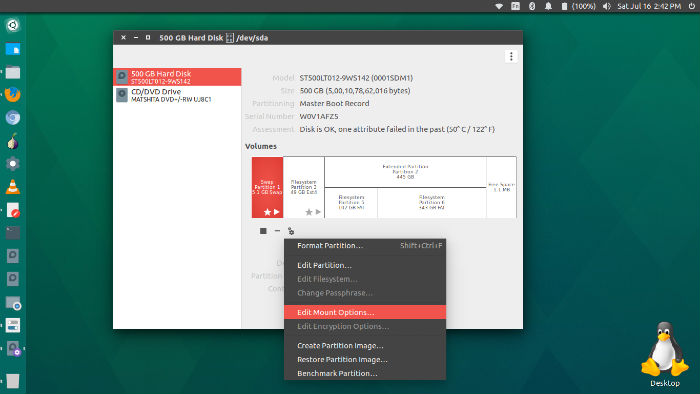
disks-02

  • In the Edit Mount Options window
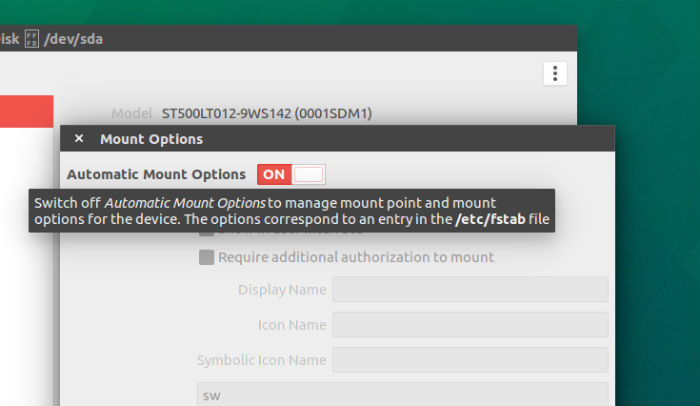
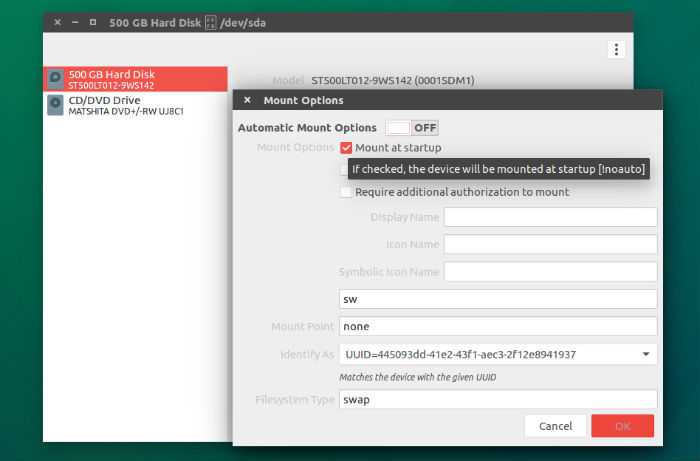
  • Turn on “Automatic Mount Options”

disks-03

disks-04

  • Please Note – Due to a bug, please un-check “Show in user interface” options and also leave the following tabs empty “Display Name, Icon Name, Symbolic Icon Name”.

Re-do previous steps on other partitions and done!

Tags: Auto Mount Hard Drive Automatically On Start Up In Ubuntu 16.04, Auto Mount Hard Drive In Ubuntu, Auto Mount Hard Drive In Ubuntu 16.04, Auto Mount Hard Drive On Start Up In Ubuntu, Auto Mount Hard Drive On Start Up In Ubuntu 16.04, Auto Mount Partitions Automatically On Start Up In Ubuntu 16.04, Auto Mount Partitions In Ubuntu, Auto Mount Partitions In Ubuntu 16.04, Auto Mount Partitions On Start Up In Ubuntu, Auto Mount Partitions On Start Up In Ubuntu 16.04, Automatically Mount Drive Linux, Automatically Mount Hard Drive In Ubuntu 16.04, Automatically Mount Partitions In Ubuntu 16.04, Mount External Hard Drive Ubuntu, Mount Hard Drive Automatically In Ubuntu 16.04, Mount Partitions Automatically In Ubuntu 16.04, Pysdm, Ubuntu 16.04 Auto Mount Hard Drive, Ubuntu 16.04 Auto Mount Partitions, Ubuntu 16.04 Automatically Auto Mount Hard Drive, Ubuntu 16.04 Automatically Auto Mount Partitions, Ubuntu Automount Nfs, Ubuntu Automount Usb, Ubuntu Mount Drive, Ubuntu Mount Fstab, Ubuntu Mount Ntfs Drive

Primary Sidebar

Latest Posts

Delete Directory And Contents Recursively Without Prompt On Linux

Check User Login History In Ubuntu Linux Command Line

Use Locate Command To Find File In Linux Terminal By Name

How To Change Terminal Color In Ubuntu Command Line

How To Run Fsck Manually In Linux To Fix Unexpected Inconsistency

How To Fix Broken Packages On Ubuntu From Terminal

Re Execute The Previous Command In Linux Ubuntu Command Line

How Much RAM Is Needed For Ubuntu PC

How To Find Large Files And Directories In Linux Command Line

How To Use Clear Command History In Linux Terminal

© 2026 Source Digit • Linux, Ubuntu Tutorials & News, Technology, Gadgets & Gizmos

  • Home
  • About
  • Privacy Policy
  • Terms & Conditions
  • Contact Us
  • Sitemap