
• Skip to primary navigation
  • Skip to main content
  • Skip to primary sidebar
Source Digit

Source Digit

Linux, Ubuntu Tutorials & News, Technology, Gadgets & Gizmos

  • Home
  • How To
  • Ubuntu
  • Instagram
  • Blogging
  • Android
  • WordPress
  • +More
    • Cloud Computing
    • Gadgets
    • Social Media
    • Technology
  • Write for Us
Home / Ubuntu / Install Rocket Menu Application Indicator On Ubuntu 16.04

Install Rocket Menu Application Indicator On Ubuntu 16.04

By Sourabh / July 30, 2016 Category: How To, Ubuntu

Install Rocket Menu Application Indicator on Ubuntu 16.04. Rocket Menu is an application indicator with quick launch menu for Ubuntu Unity. Rocket Menu provides a convenient method of opening files, folders, web addresses and network (SFTP, FTP, SMB) drives.

Install Rocket Menu on Ubuntu
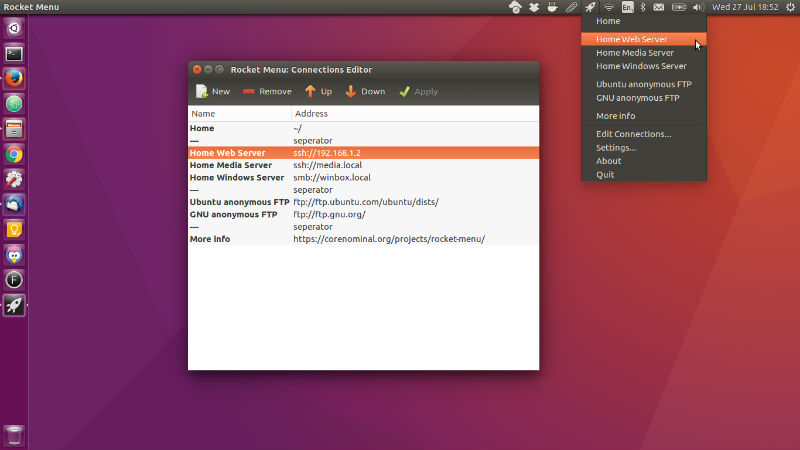
rocket-menu

Rocket Menu is specifically targeted at Ubuntu 16.04 running the default Unity desktop. To install Rocket Menu, add the PPA to your system with the following terminal command:

sudo add-apt-repository ppa:corenominal/rocket-menu
sudo apt-get update
sudo apt-get install rocket-menu

Once installed, you open the Rocket-Menu launcher app from Ubuntu Dash. Rocket Menu should automatically start when you login to Unity, just look for the rocket icon in your Unity bar.

Rocket Menu Settings

Rocket menu is a simple application and the settings are limited to changing the location of your “connections” file (the file that stores your menu items). This allows for syncing and sharing the same file across multiple systems via a service such as ownCloud or Dropbox.

https://github.com/corenominal/rocket-menu

Tags: Install Rocket Menu Application Indicator On Ubuntu 16.04, Install Rocket Menu Ubuntu 16.04, Rocket Menu Application Indicator, Rocket Menu Ubuntu, Rocket Menu Ubuntu 16.04, Rocket Menu Ubuntu PPA, Ubuntu 16.04 Rocket Menu, Ubuntu Rocket Menu

Primary Sidebar

Latest Posts

Downlaod Ubuntu 26.10 Stonking Stingray

How To Shutdown Linux With A 15 Minute Delay And Message

Using Linux Terminal How To Get Total Disk Size In GB

Count And Find Number Of Files In A Linux Directory Using Command

Check How Many Users Are Created In Linux Ubuntu

How To Check User Permissions In Linux Using Command

Check Which Folder Is Taking More Space In Ubuntu Linux

How to Install Claude Desktop App in Ubuntu Linux

Job Scheduling Using At Command In Linux With Examples

How To Check Permissions Of A Directory In Linux Command

© 2026 Source Digit • Linux, Ubuntu Tutorials & News, Technology, Gadgets & Gizmos

  • Home
  • About
  • Privacy Policy
  • Terms & Conditions
  • Contact Us
  • Sitemap