
• Skip to primary navigation
  • Skip to main content
  • Skip to primary sidebar
Source Digit

Source Digit

Linux, Ubuntu Tutorials & News, Technology, Gadgets & Gizmos

  • Home
  • How To
  • Ubuntu
  • Instagram
  • Blogging
  • Android
  • WordPress
  • +More
    • Cloud Computing
    • Gadgets
    • Social Media
    • Technology
  • Write for Us
Home / Ubuntu / Install Kdenlive 16.08.0 Video Editor On Ubuntu

Install Kdenlive 16.08.0 Video Editor On Ubuntu

By Sourabh / December 30, 2016 Category: How To, Ubuntu

KdenLive Video Editor for Ubuntu Linux. Install Kdenlive 16.08.0 Video Editor on Ubuntu 16.10, Ubuntu 16.04 and other Ubuntu Derivatives. Kdenlive, the KDE Non-Linear Video Editor is an open source video editor built on Qt and the KDE Frameworks libraries. Based on the powerful FFmpeg libraries, Kdenlive can use almost any audio and video formats directly without the need to convert or re-encode your clips.

Through the MLT framework, Kdenlive integrates many plugin effects for video and sound processing or creation. Furthermore Kdenlive brings a powerful titling tool, a DVD authoring (menus) solution, and can then be used as a complete studio for video creation.
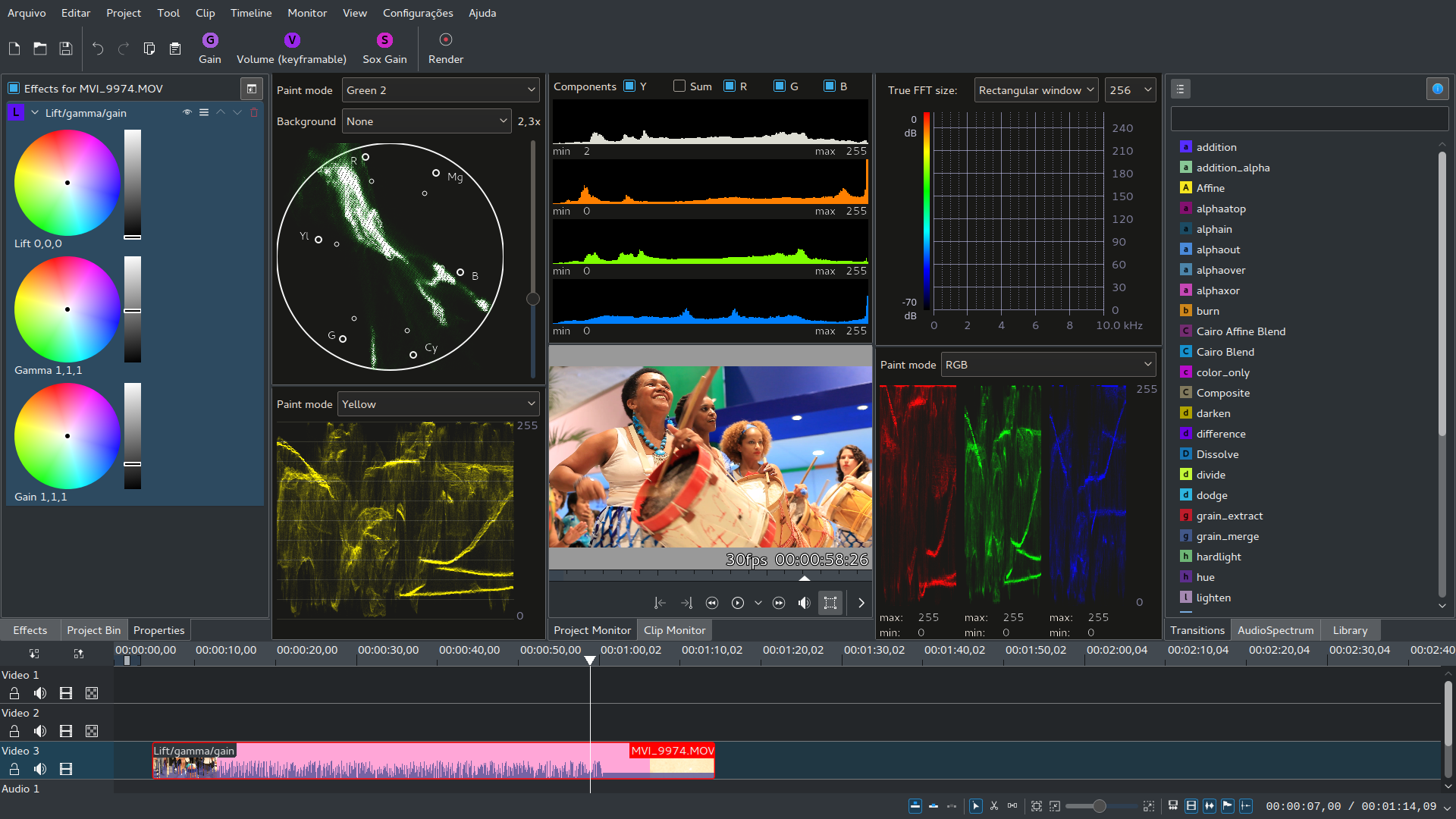
Kdenlive brings multi-track video editing and can work on almost any audio and video formats directly without the need to convert or re-encode your clips. It also brings proxy editing and auto-backup. Kdenlive supports 3-point editing and Timeline effect rendering. Users can insert or overwrite a timeline region with a clip region and delete or lift timeline regions. It pre-renders parts of the timeline so that they can be played in realtime. And you can continue working on other parts of the timeline while Kdenlive is working in the background for you.

Install Kdenlive on Ubuntu

Run the following commands in Terminal to install Kdenlive Video Editor on Ubuntu Linux Systems:

sudo apt update
sudo add-apt-repository ppa:kdenlive/kdenlive-stable
sudo apt update
sudo apt install kdenlive

Once installed, open the Kdenlive video editor from Ubuntu Dash or Terminal.

More Info:
https://kdenlive.org/
https://launchpad.net/~kdenlive/+archive/ubuntu/kdenlive-stable

Tags: Install Kdenlive Ubuntu, Install KdenLive Video Editor, Install KdenLive Video Editor Ubuntu, Install Ubuntu KdenLive, Install Ubuntu KdenLive Video Editor, Kdenlive 16 Ubuntu, Kdenlive 16.08.0, Kdenlive 16.08.0 Ubuntu, Kdenlive Ubuntu, KdenLive Ubuntu 14.04, KdenLive Ubuntu 14.10, KdenLive Ubuntu 15.04, KdenLive Ubuntu 15.10, Kdenlive Ubuntu 16.04, Kdenlive Ubuntu 16.10, KdenLive Ubuntu PPA, Kdenlive Video Editor, Kdenlive Video Editor Ubuntu, Ubuntu 14.04 KdenLive, Ubuntu 14.10 KdenLive, Ubuntu 15.04 KdenLive, Ubuntu 15.10 KdenLive, Ubuntu 16.04 Kdenlive, Ubuntu 16.10 Kdenlive, Ubuntu Kdenlive, Ubuntu Kdenlive 16.08.0, Ubuntu Kdenlive Video Editor, Ubuntu PPA KdenLive

Primary Sidebar

Latest Posts

Delete Directory And Contents Recursively Without Prompt On Linux

Check User Login History In Ubuntu Linux Command Line

Use Locate Command To Find File In Linux Terminal By Name

How To Change Terminal Color In Ubuntu Command Line

How To Run Fsck Manually In Linux To Fix Unexpected Inconsistency

How To Fix Broken Packages On Ubuntu From Terminal

Re Execute The Previous Command In Linux Ubuntu Command Line

How Much RAM Is Needed For Ubuntu PC

How To Find Large Files And Directories In Linux Command Line

How To Use Clear Command History In Linux Terminal

© 2026 Source Digit • Linux, Ubuntu Tutorials & News, Technology, Gadgets & Gizmos

  • Home
  • About
  • Privacy Policy
  • Terms & Conditions
  • Contact Us
  • Sitemap