
• Skip to primary navigation
  • Skip to main content
  • Skip to primary sidebar
Source Digit

Source Digit

Linux, Ubuntu Tutorials & News, Technology, Gadgets & Gizmos

  • Home
  • How To
  • Ubuntu
  • Instagram
  • Blogging
  • Android
  • WordPress
  • +More
    • Cloud Computing
    • Gadgets
    • Social Media
    • Technology
  • Write for Us
Home / How To / Avidemux 2.6.16 Released; Install Avidemux Ubuntu Video Editor

Avidemux 2.6.16 Released; Install Avidemux Ubuntu Video Editor

By Sourabh / February 8, 2017 Category: How To, Ubuntu

Avidemux Ubuntu video editor. Install Avidemux on Ubuntu 16.04, Ubuntu 16.10 and other Ubuntu Derivatives. Avidemux 2.6.16 released with update to ffmpeg 3.0.5, a redone UI with revamped contrast filter and an improved build scripts (euma). It also fixed a crash when encoding starts very slowly (x265).

Avidemux is a free open-source multi-purpose video editing and processing software.
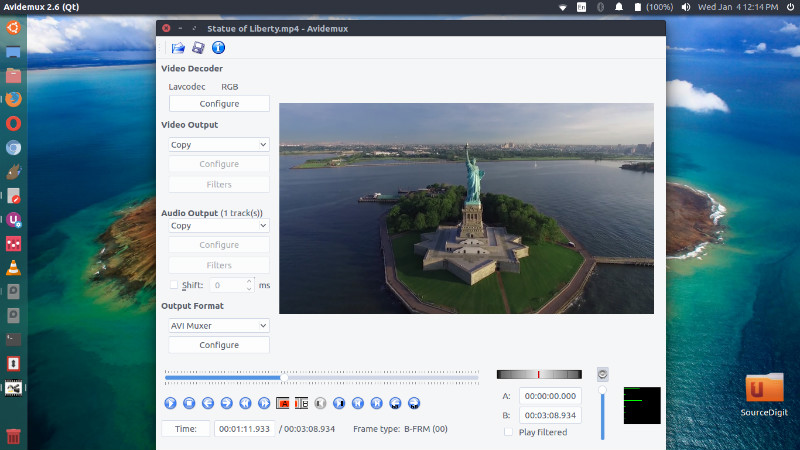
avidemux-ubuntu

Avidemux 2.6.16

Avidemux 2.6.16 brings the following changes:

  • Build : Avidemux can be built with visual c++ 2015 (losing some ASM)
  • OsX : Initialize fontconfig so that subtitling works
  • Core : Update ffmpeg to 3.0.5
  • i18n : Updated fr and ru translations (jean Elchinger/totalcaesar659)
  • Build : Improved build scripts (euma)
  • x265 : Enforce complicancy with most devices
  • vaapi : Add resizer
  • UI : Redone UI, revamped contrast filter
  • Qt : Dont use too much CPU on playback when there is no audio track
  • Qt : Reenabled nvenc + Fixed keyframe detection
  • Qt : Fixed a crash when encoding starts very slowly (x265)
  • Build : Allow use of system libass, liba52,libmad (euma)

Install Avidemux 2.6.16 on Ubuntu

Run the following commands in terminal to install Avidemux 2.6.16 on Ubuntu 16.04, Ubuntu 16.10, Ubuntu 15.04, Ubuntu 14.04 and other Ubuntu Derivatives:

sudo apt-get update
sudo sh -c 'echo "deb http://archive.getdeb.net/ubuntu xenial-getdeb apps" >> /etc/apt/sources.list.d/getdeb.list'
wget -q -O- http://archive.getdeb.net/getdeb-archive.key | sudo apt-key add -
sudo apt update
sudo apt install avidemux2.6-qt

Please note that the above command works for Ubuntu 16.10 Xenial. To install Avidemux on other Ubuntu versions, simply replace xenial in code with yakkety or whatsoever Ubuntu version you are installing on.

For more info:

http://fixounet.free.fr/avidemux/download.html

Tags: Avidemux 2.6.16, Avidemux 2.6.16 Ubuntu, Avidemux 2.6.16 Video Editor, Avidemux Deb, Avidemux Linux Mint, Avidemux Linux Mint 18, Avidemux Ubuntu, Avidemux Ubuntu 16, Avidemux Ubuntu PPA, Avidemux Video Editor 2.6.16, Download Avidemux 2.6.16, Install Avidemux 2.6.16, Install Avidemux Linux, Install Avidemux Ubuntu, Ppa:Rebuntu16/Avidemux+Unofficial, Ubuntu 14.04 Install Avidemux, Ubuntu 14.04 Video Editor, Ubuntu 14.10 Install Avidemux, Ubuntu 14.10 Video Editor, Ubuntu 15.04 Install Avidemux, Ubuntu 15.04 Video Editor, Ubuntu 15.10 Install Avidemux, Ubuntu 15.10 Video Editor, Ubuntu 16.04 Install Avidemux, Ubuntu 16.04 Video Editor, Ubuntu 16.10 Install Avidemux, Ubuntu 16.10 Video Editor, Ubuntu Avidemux, Ubuntu Avidemux 2.6.16, Ubuntu Install Avidemux, Ubuntu PPA Avidemux, Update Avidemux 2.6.16, Upgrade Avidemux 2.6.16

Primary Sidebar

Latest Posts

How To Run Fsck Manually In Linux To Fix Unexpected Inconsistency

How To Fix Broken Packages On Ubuntu From Terminal

Re Execute The Previous Command In Linux Ubuntu Command Line

How Much RAM Is Needed For Ubuntu PC

How To Find Large Files And Directories In Linux Command Line

How To Use Clear Command History In Linux Terminal

Linux Command To Check RAM Size In Ubuntu Terminal In GB

How To Install Proprietary Drivers In Linux Ubuntu Using Terminal

How To Shutdown Linux With A 15 Minute Delay And Message

Free AI Courses With Certificate For Beginners In India

© 2026 Source Digit • Linux, Ubuntu Tutorials & News, Technology, Gadgets & Gizmos

  • Home
  • About
  • Privacy Policy
  • Terms & Conditions
  • Contact Us
  • Sitemap