
• Skip to primary navigation
  • Skip to main content
  • Skip to primary sidebar
Source Digit

Source Digit

Linux, Ubuntu Tutorials & News, Technology, Gadgets & Gizmos

  • Home
  • How To
  • Ubuntu
  • Instagram
  • Blogging
  • Android
  • WordPress
  • +More
    • Cloud Computing
    • Gadgets
    • Social Media
    • Technology
  • Write for Us
Home / How To / Install Simple Weather Indicator On Ubuntu 16.10

Install Simple Weather Indicator On Ubuntu 16.10

By Sourabh / February 26, 2017 Category: How To, Ubuntu

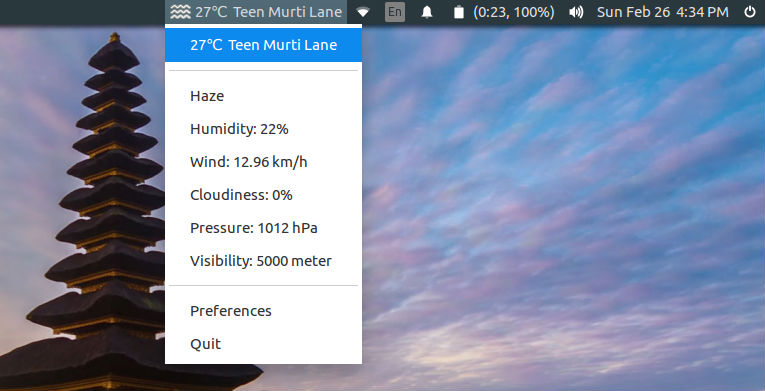
Weather Indicator for Linux Ubuntu Systems. Install Simple Weather Indicator on Ubuntu 16.10, Ubuntu 16.04 and other Ubuntu Derivatives. Simple Weather Indicator is an elegant and very simple weather indicator for Ubuntu unity and Gnome 3. It is developed with Python and uses an in-house free/open source Weather API called Eris to get the current weather condition of the user’s location.
Features

  • Simple & elegant
  • Configurable
    • Automatic/manual location detection
    • Show/hide location
    • Enable/disable indicator startup
    • Temperature scale suppert (Celsius, Fahrenheit)
    • Rounding weather temperature
  • Feature-rich
    • Overall weather condition
    • Humdity level
    • Wind speed
    • Weather cloudiness
    • Weather pressure
    • Weather visibility
  • Small footprint
  • Available through PPA
  • Free and public API (Eris Weather API)
  • GPL v3.0 licensed

Install Simple Weather Indicator

Simple Weather Indicator version 0.9 is the latest release of Simple Weather Indicator app. It is a big milestone for us and we are glad to succeed to deliver this version. The new version (0.9) comes with many new features and weather metrics. You can find the list of the new features in below:

  • Added weather condition overview
  • Added humidity level
  • Added wind speed
  • Added cloudiness level
  • Added weather pressure
  • Added weather visibility

Run the following command in Terminal to install Simple Weather Indicator on Ubuntu 16.10, Ubuntu 16.04 and other Ubuntu Derivatives:

sudo apt update
sudo add-apt-repository ppa:kasra-mp/ubuntu-indicator-weather
sudo apt update
sudo apt install indicator-weather

Once installed open the Simple Weather Indicator from Ubuntu Dash.

Tags: Download Simple Weather Indicator Ubuntu, Download Weather Indicator Ubuntu, Install Simple Weather Indicator Ubuntu, Install Weather Indicator Ubuntu, Linux Simple Weather Indicator, Linux Weather Indicator, Simple Weather Indicator Linux, Simple Weather Indicator Ubuntu, Simple Weather Indicator Ubuntu PPA, Ubuntu PPA Simple Weather Indicator, Ubuntu PPA Weather Indicator, Ubuntu Simple Weather Indicator, Ubuntu Weather Indicator, Weather Indicator Linux, Weather Indicator Ubuntu, Weather Indicator Ubuntu PPA

Primary Sidebar

Latest Posts

How To Run Fsck Manually In Linux To Fix Unexpected Inconsistency

How To Fix Broken Packages On Ubuntu From Terminal

Re Execute The Previous Command In Linux Ubuntu Command Line

How Much RAM Is Needed For Ubuntu PC

How To Find Large Files And Directories In Linux Command Line

How To Use Clear Command History In Linux Terminal

Linux Command To Check RAM Size In Ubuntu Terminal In GB

How To Install Proprietary Drivers In Linux Ubuntu Using Terminal

How To Shutdown Linux With A 15 Minute Delay And Message

Free AI Courses With Certificate For Beginners In India

© 2026 Source Digit • Linux, Ubuntu Tutorials & News, Technology, Gadgets & Gizmos

  • Home
  • About
  • Privacy Policy
  • Terms & Conditions
  • Contact Us
  • Sitemap