
• Skip to primary navigation
  • Skip to main content
  • Skip to primary sidebar
Source Digit

Source Digit

Linux, Ubuntu Tutorials & News, Technology, Gadgets & Gizmos

  • Home
  • How To
  • Ubuntu
  • Instagram
  • Blogging
  • Android
  • WordPress
  • +More
    • Cloud Computing
    • Gadgets
    • Social Media
    • Technology
  • Write for Us
Home / How To / Install Indicator Bulletin Clipboard Manager On Ubuntu

Install Indicator Bulletin Clipboard Manager On Ubuntu

By Sourabh / March 31, 2017 Category: How To, Ubuntu

Install Indicator Bulletin on Ubuntu 16.10 and Ubuntu 16.04. Indicator Bulletin is a clipboard manager for Ubuntu Linux Systems. Indicator Bulletin has an easy to use interface with ability to merge, split, and edit the contents. It can also be used to select which buffer “cut” or “copy” operations should store data in or saving copied data to long term storage. It can also index or tag clipped data or one can search within the saved data.
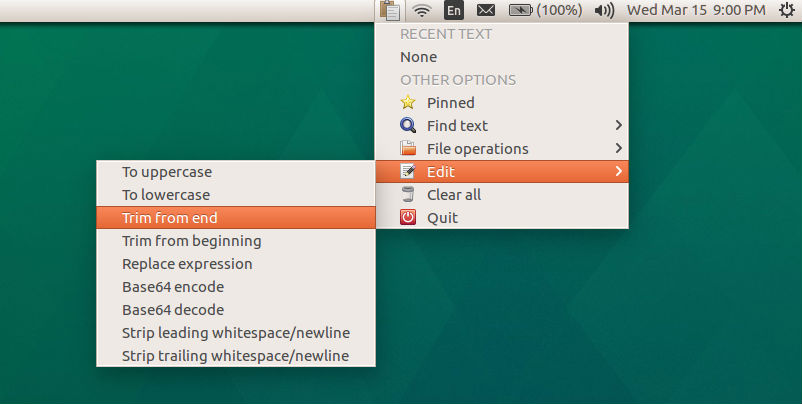
A clipboard manager is a computer program that adds functionality to an operating system’s clipboard. Many clipboards provide only one buffer for the “copy and paste” function, and it is overwritten by each new “copy” operation. The main task of a clipboard manager is to store data copied to the clipboard in a way that permits richer use of the data.

Install Indicator Bulletin on Ubuntu

Run the following commands in Terminal to install Indicator Bulletin on Ubuntu 16.10, Ubuntu 16.04 and other Ubuntu Derivatives:

sudo apt-get update
sudo add-apt-repository ppa:1047481448-2/sergkolo
sudo apt-get update
sudo apt-get install indicator-bulletin

Once installed, open the indicator-bulletin app from Ubuntu Dash.

Tags: Clipboard Manager for Ubuntu, Clipboard Manager Linux, Clipboard Manager Ubuntu, Clipboard Manager Ubuntu 15.04, Clipboard Manager Ubuntu 15.10, Clipboard Manager Ubuntu 16.04, Clipboard Manager Ubuntu 16.10, Clipboard Manager Unix, Indicator Bulletin, Install Clipboard Manager on Ubuntu, Install Indicator Bulletin on Ubuntu, Ubuntu 15.04 Clipboard Manager, Ubuntu 15.10 Clipboard Manager, Ubuntu 16.04 Clipboard Manager, Ubuntu 16.10 Clipboard Manager, Ubuntu Clipboard Manager

Primary Sidebar

Latest Posts

How To Run Fsck Manually In Linux To Fix Unexpected Inconsistency

How To Fix Broken Packages On Ubuntu From Terminal

Re Execute The Previous Command In Linux Ubuntu Command Line

How Much RAM Is Needed For Ubuntu PC

How To Find Large Files And Directories In Linux Command Line

How To Use Clear Command History In Linux Terminal

Linux Command To Check RAM Size In Ubuntu Terminal In GB

How To Install Proprietary Drivers In Linux Ubuntu Using Terminal

How To Shutdown Linux With A 15 Minute Delay And Message

Free AI Courses With Certificate For Beginners In India

© 2026 Source Digit • Linux, Ubuntu Tutorials & News, Technology, Gadgets & Gizmos

  • Home
  • About
  • Privacy Policy
  • Terms & Conditions
  • Contact Us
  • Sitemap