
Install Install Sayonara audio player for Linux Ubuntu. Sayonara is a small, clear and fast audio player for Linux Ubuntu written in C++, supported by the Qt framework. It uses Gstreamer as audio backend. Sayoanra comes with a lot of features that can easily work on even big music collections. Sayonara’s main focus during developing has been performance, low CPU usage and low memory consumption.
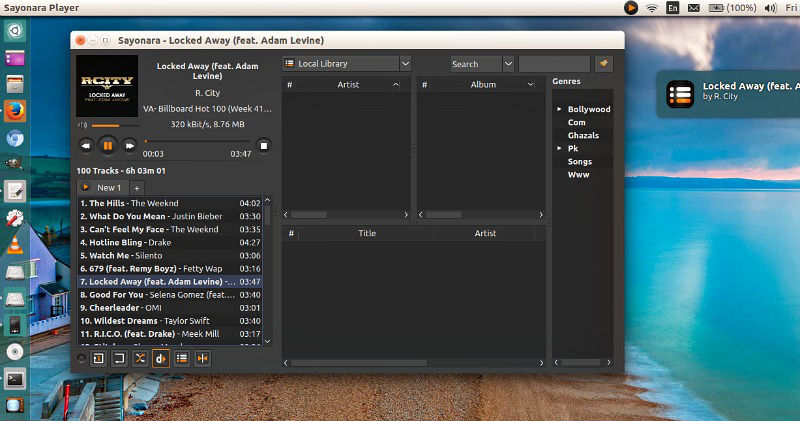
Sayonara music player is a good alternative to players like Rhythmbox, Clementine or Amarok. Those who miss Winamp for Linux should give Sayonara a try. Sayonara is only available for Linux Ubuntu.
Main features
- Many supported music and playlist formats
- Media library with search function
- Directory view
- External device support
- Genre organization
- Playlist view organized by tabs
- (Dynamic) playback
- Equalizer
- Metadata editor (including tags from path)
- Lyrics
- Shutdown function
- MP3 Converter
- Customizable spectrum analyzer and level meter
- Remote controllable
Web based features
- Last.FM scrobbling
- Soundcloud support
- Soma.fm support
- Internet streams
- Stream recorder
- Podcasts
- Radio Broadcasting
Install Sayonara on Ubuntu
Sayonara 1.0 is the latest version. It has been released with the following changes:
* Covers: Choose between Google, Discogs and Last.fm covers
* Cover view: Reload covers, zoom and sorting
* Directories: Multiple library support
* Directories: Move/Copy/Rename operations
* Directories: Show Song info
* Library: Multiple library support
* Library: Removed date filter support
* Library: “Clear selection” button
* Library: Bugfix: Search modes immediatly updated
* Look & Feel: Choose system icons
* Look & Feel: Fast preference access
* Lyrics: Lyric server updates
* MTP: Removed MTP device support
* Playback: Crossfader revisited
* Playlists: Moved load/save to playlist tabs instead of plugin
* Proxy: Added proxy support
* Stream recorder: Custom paths
* Streams/Podcast: Added preferences
Run the following commands in Terminal to install Sayonara on Ubuntu 16.04 Systems:
sudo apt-add-repository ppa:lucioc/sayonara

sudo apt-get update

sudo apt-get install sayonara
Once installed, open Sayonara music player from Ubuntu Dash.