
• Skip to primary navigation
  • Skip to main content
  • Skip to primary sidebar
Source Digit

Source Digit

Linux, Ubuntu Tutorials & News, Technology, Gadgets & Gizmos

  • Home
  • How To
  • Ubuntu
  • Instagram
  • Blogging
  • Android
  • WordPress
  • +More
    • Cloud Computing
    • Gadgets
    • Social Media
    • Technology
  • Write for Us
Home / How To / How To Enable Minimize On Click On Ubuntu 19.04

How To Enable Minimize On Click On Ubuntu 19.04

By Sourabh / April 19, 2019 Category: How To, Ubuntu

Customize Ubuntu 19.04. How to enable “minimize on click” on Ubuntu 19.04 Desktop. Enable minimise function on Unity Ubuntu 19.04, via terminal commands or Ubuntu unity tweak tool.

By default, the minimise function isn’t enabled in Ubuntu 19.04 Unity Desktop. So you cannot click on an app launcher icon to open an app and again click on it to minimise the app.

Luckily you can enable minimise on click on Ubuntu 19.04 Desktop. Here’s how to do this:

Via Tweak Tool
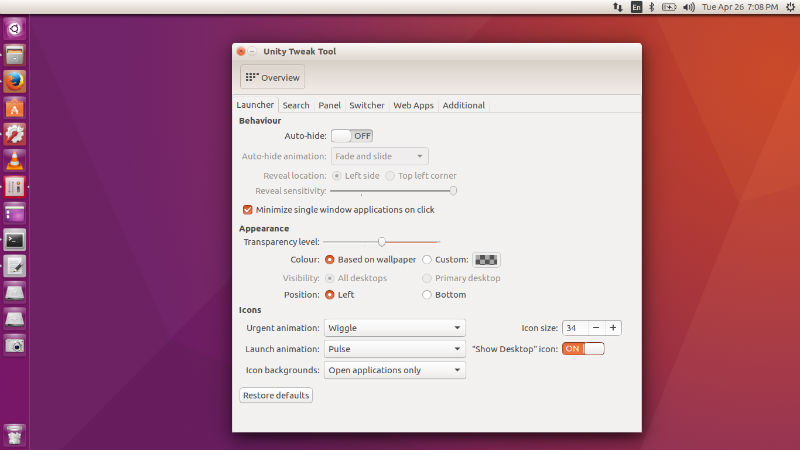
unity-ubuntu-16-04

  • Open Unity Tweak Tool.
  • Click on Launcher tab under Unity.
  • Click and enable Minimise. Select the option “Minimize single window applications on click” under Behaviour tab.

Via Terminal Commands

You can also enable minimise on click using terminal commands. Run the following commands to enable it:

gsettings set org.gnome.shell.extensions.dash-to-dock click-action 'minimize'

Or


gsettings set org.compiz.unityshell:/org/compiz/profiles/unity/plugins/unityshell/ launcher-minimize-window true

Once done, you will be able to easily minimise the app using mouse click.

Primary Sidebar

Latest Posts

Using Linux Terminal How To Get Total Disk Size In GB

Count And Find Number Of Files In A Linux Directory Using Command

Check How Many Users Are Created In Linux Ubuntu

How To Check User Permissions In Linux Using Command

Check Which Folder Is Taking More Space In Ubuntu Linux

How to Install Claude Desktop App in Ubuntu Linux

Job Scheduling Using At Command In Linux With Examples

How To Check Permissions Of A Directory In Linux Command

Delete Directory And Contents Recursively Without Prompt On Linux

Check User Login History In Ubuntu Linux Command Line

© 2026 Source Digit • Linux, Ubuntu Tutorials & News, Technology, Gadgets & Gizmos

  • Home
  • About
  • Privacy Policy
  • Terms & Conditions
  • Contact Us
  • Sitemap