
Update slack via Ubuntu terminal. Here is how to install slack in Ubuntu terminal commandline.
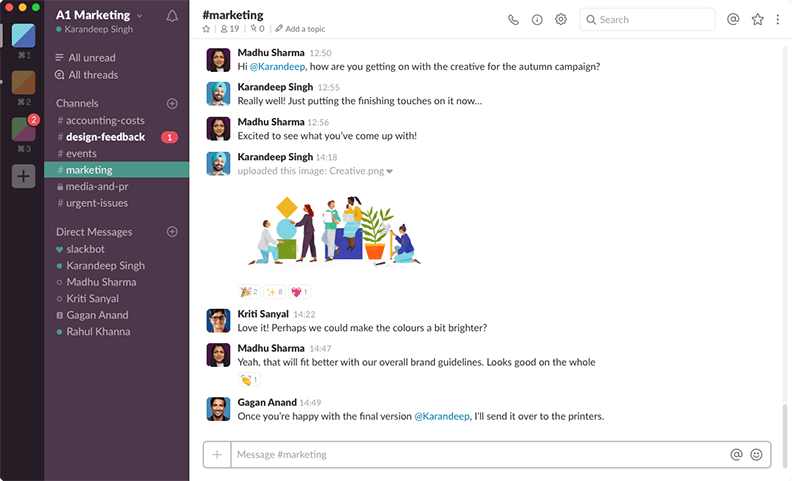
Slack messaging app for Linux Ubuntu offers IRC-like features on Linux Ubuntu Systems – messaging chat rooms (known as channels) organized by topic and support for private groups and direct messaging.
For secure messaging, besides public channels and direct messages, create private channels can also be created for subjects that are sensitive or confidential. You can also create a group message of up to eight other people if you have a couple of teammates that you collaborate with in a short-term, lightweight basis. Private channels and group messages will only be visible to those in the channel or group.
Other Features
- Collaboration beyond colleagues – Share channels with companies and businesses you regularly work with – like clients, vendors and partners – to bring all the right people into the same room.
- Face-to-face and face-to-screen – Talk in depth over voice or video calls directly from Slack. And if you need to show your work, you can also share your screen.
- Integrated file sharing – Drag and drop PDFs, images, videos and other files directly into Slack. Get feedback on your work and create an archive of your progress.
- Streamline your work with integrated tools – In Slack, tools and services work in the same place as your team. Information leaves siloed inboxes and flows into shared team channels.
- Connect your tools with Slack – The Slack App Directory has over 2,000 apps you can integrate into Slack. Spend less time juggling tabs and more time focusing on meaningful work.
Slack 4.3.2 – 30 January 2020
What’s new
- We’ve tinkered with the internal workings and polished some rough edges. The app is now better than it was.
Bug fixes
- Slack would sometimes crash when the user right-clicked to see the context menu. In context, that was unhelpful. So it no longer does that.
- When maximized, the app had developed a bit of a distracting flicker. That flicker is now part of Slack history.
- Occasionally, a restart would result in connectivity issues for Slack… now you should be back online and back to work lickety-split.
Download Slack for Linux Ubuntu
https://slack.com/intl/en-in/downloads/linux
You can also download the slack .deb package and install it manually using the “sudo apt install ./slack-desktop-*.deb” command.