
Shotcut 15.06 (Video Editor for Linux Ubuntu). Install Shotcut video editor on Ubuntu 15.04, Ubuntu 14.04 and derivatives. Shotcut is a free, open source, cross-platform video editor.
The Shotcut 15.06 video editor supports oodles of audio and video formats and codecs (thanks to FFmpeg). It also supports many image formats such as BMP, GIF, JPEG, PNG, SVG, TGA, TIFF as well as image sequences.
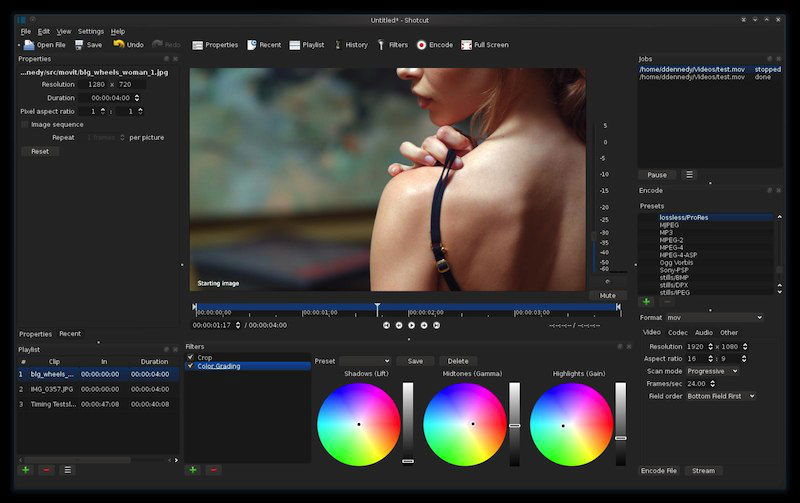
The editor comes with many exciting features:
- no import required – native editing
- frame-accurate seeking for many formats
- multi-format timeline: mix and match resolutions and frame rates within a project
- screen capture (Linux only) including background capture to capture a Shotcut session
- webcam capture (Linux and Windows only)
- audio capture (Linux and Windows only: PulseAudio, JACK, ALSA, or DirectShow)
- network stream playback (HTTP, HLS, RTMP, RTSP, MMS, UDP)
- control video zoom in the player: fit viewable area (default), 50%, original (100%), and 200%
- multitrack timeline with thumbnails and waveforms
- thumbnail and waveform caching between sessions
- audio mixing across all tracks
- video compositing across video tracks
- trimming (on timeline)
- append, insert, overwrite, lift, and delete (ripple) editing on the timeline
- 3-point editing
- external monitoring on an extra system display/monitor
- fade in and out audio and fade video from and to black with easy-to-use fader controls on timeline
- cross-fade audio and video dissolve transitions easily by overlapping shots on the same track of the timeline
Install Shotcut on 32 bit Linux Systems
Open Terminal and run the following commands to install Shotcut 15.06 Video Editor on Linux Ubuntu Systems:
$ wget https://github.com/mltframework/shotcut/releases/download/v15.06/shotcut-debian7-x86-150601.tar.bz2

$ tar -xjvf shotcut-debian7-x86-150601.tar.bz2

$ sudo rm -rf /opt/shotcut

$ sudo mv Shotcut /opt/shotcut

$ sudo ln -sf /opt/Shotcut/Shotcut.app/shotcut /usr/bin/shotcut
Install Shotcut on 64 bit Linux Systems
Open Terminal and run the following commands to install Shotcut 15.06 Video Editor on Linux Ubuntu Systems:
$ wget https://github.com/mltframework/shotcut/releases/download/v15.06/shotcut-debian7-x86_64-150601.tar.bz2

$ tar -xjvf shotcut-debian7-x86_64-150601.tar.bz2

$ sudo rm -rf /opt/shotcut

$ sudo mv Shotcut /opt/shotcut

$ sudo ln -sf /opt/Shotcut/Shotcut.app/shotcut /usr/bin/shotcut
Once installed, start Shotcut. Open Terminal, type shotcut and press enter. You can also start Shotcut via Ubuntu Dash.