
• Skip to primary navigation
  • Skip to main content
  • Skip to primary sidebar
Source Digit

Source Digit

Linux, Ubuntu Tutorials & News, Technology, Gadgets & Gizmos

  • Home
  • How To
  • Ubuntu
  • Instagram
  • Blogging
  • Android
  • WordPress
  • +More
    • Cloud Computing
    • Gadgets
    • Social Media
    • Technology
  • Write for Us
Home / Uncategorized / How To Install Kali Linux Tools On Ubuntu 15.04, Ubuntu 14.04 & Debain

How To Install Kali Linux Tools On Ubuntu 15.04, Ubuntu 14.04 & Debain

By Sourabh / September 3, 2015 Category: Uncategorized

Automatically install all Kali Linux tools on Ubuntu and Debian. Install and use “Katoolin” in Ubuntu 15.04, Ubuntu 14.04 and Debian, to install Kali Linux tools at once. Besides able to install Kali Linux tools, Katoolin tool can add Kali Linux repositories and/or remove Kali Linux repositories in an easy manner.

Katoolin is a powerful script that allows to install Kali Linux tools on Ubuntu, Debain or another Linux distributions. The only requirements to install and use Katoolin is an operating system (Ubuntu 14.04 or higher) and Python 2.7.

Installing Katoolin on Ubuntu
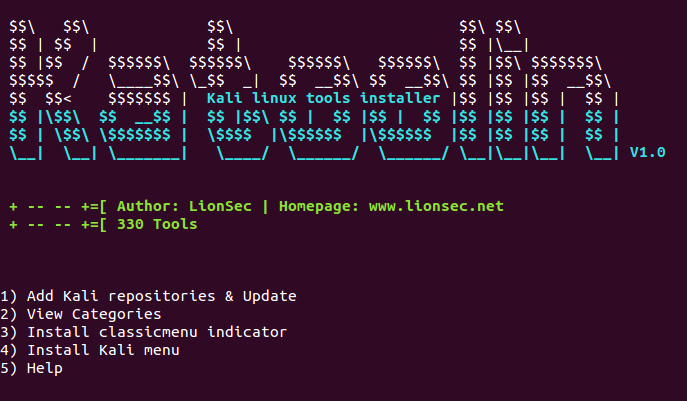
katoolin-ubuntu

To install Katoolin run the following commands.

$ apt-get install git
$ git clone https://github.com/LionSec/katoolin.git
$ cp katoolin/katoolin.py /usr/bin/katoolin
$ chmod +x /usr/bin/katoolin

Once installed, you can open and run Katoolin via “katoolin” command. Please note to run the command with quotes.

It is very easy to use:

  • Just select the number of a tool to install it
  • Press 0 to install all tools
  • back : Go back
  • gohome : Go to the main menu

The Katoolin tool gives the following usage options:

1) Add Kali repositories & Update
2) View Categories
3) Install classicmenu indicator
4) Install Kali menu
5) Help

You can make the selection from the menu.

Tags: Add Kali linux repositories, How to Install Kali Linux Tools on Debian, How to Install Kali Linux Tools on Ubuntu, Install Kali linux tools, Install Kali Linux Tools on Debian, Install Kali Linux Tools on Ubuntu, Install Kali Linux Tools Using Katoolin on Debian, Install Kali Linux Tools Using Katoolin on Ubuntu, Install Katoolin on Ubuntu, Install Katoolin on Ubuntu 14.04, Install Katoolin on Ubuntu 15.04, Installing Katoolin on Ubuntu, Katoolin - Install Kali Linux Tools, Remove kali linux repositories

Primary Sidebar

Latest Posts

Delete Directory And Contents Recursively Without Prompt On Linux

Check User Login History In Ubuntu Linux Command Line

Use Locate Command To Find File In Linux Terminal By Name

How To Change Terminal Color In Ubuntu Command Line

How To Run Fsck Manually In Linux To Fix Unexpected Inconsistency

How To Fix Broken Packages On Ubuntu From Terminal

Re Execute The Previous Command In Linux Ubuntu Command Line

How Much RAM Is Needed For Ubuntu PC

How To Find Large Files And Directories In Linux Command Line

How To Use Clear Command History In Linux Terminal

© 2026 Source Digit • Linux, Ubuntu Tutorials & News, Technology, Gadgets & Gizmos

  • Home
  • About
  • Privacy Policy
  • Terms & Conditions
  • Contact Us
  • Sitemap