
• Skip to primary navigation
  • Skip to main content
  • Skip to primary sidebar
Source Digit

Source Digit

Linux, Ubuntu Tutorials & News, Technology, Gadgets & Gizmos

  • Home
  • How To
  • Ubuntu
  • Instagram
  • Blogging
  • Android
  • WordPress
  • +More
    • Cloud Computing
    • Gadgets
    • Social Media
    • Technology
  • Write for Us
Home / Uncategorized / Install Updated & Optimized Graphics Drivers On Ubuntu 15.04 & Ubuntu 14.04

Install Updated & Optimized Graphics Drivers On Ubuntu 15.04 & Ubuntu 14.04

By Sourabh / September 8, 2015 Category: Uncategorized

Updated and optimized graphics drivers on Linux Ubuntu Systems. Install Radeon, Intel and Nvidia – graphics drivers on Ubuntu 15.04, Ubuntu 14.04. The updated and optimized graphics drivers for Linux Ubuntu Systems supports OpenGL 4.1+ support and new OpenGL extensions. The Ubuntu graphics drivers PPA provides updated X (2D) and mesa (3D) free graphics drivers for radeon, intel and nvidia hardware.

The graphics drivers updates and packages provide support for Ubuntu:

  • Ubuntu 14.04 (Trusty Tahr) Only Ubuntu 14.04 and Ubuntu 14.04.1 are supported. Ubuntu 14.04.2 and later are not supported
  • Ubuntu 15.04 (Vivid Vervet) – Recommended for this PPA

This PPA provides updated X (2D) and mesa (3D) free graphics drivers for radeon, intel and nvidia hardware. Updates packages provide:

  • OpenGL 4.1+ support and new OpenGL extensions: http://mesamatrix.net
  • Packages built against llvm-3.6
  • Gallium-nine support installed by default.
  • VDPAU, OpenMAX IL Bellagio, VAAPI and XvMC Gallium3D accelerated video drivers (see below)
  • OpenCL support (mesa-opencl-icd package), including updated libclc
  • R600 LLVM compiler, enabled with R600_DEBUG=llvm env var
  • Optional GLAMOR acceleration on radeon (>= r300), and nouveau drivers
  • i915 gallium driver replaces by default i915 classic driver
  • Experimental intel ilo gallium driver

Install Update Graphics Drivers on Ubuntu
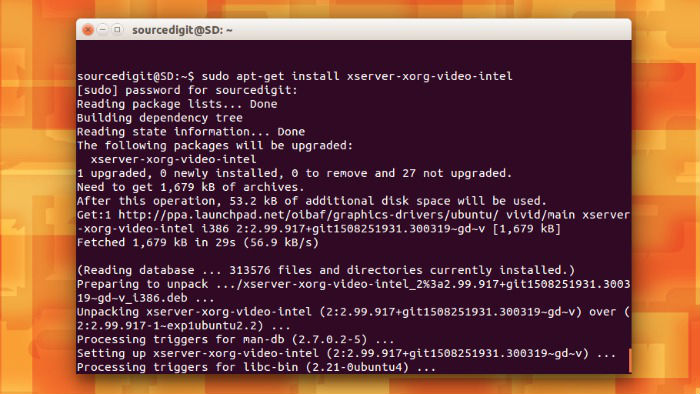
drivers-install

To install an updated and optimized graphics drivers on Linux Ubuntu Systems, run the following commands in Terminal:

$ sudo add-apt-repository ppa:oibaf/graphics-drivers
$ sudo apt-get update
$ sudo apt-get install xserver-xorg-video-intel

To run your OpenGL program (in this case glxgears -info) with non default drivers:

classic i915 driver

$ LIBGL_DRIVERS_PATH=/usr/lib/dri-alternates glxgears -info

gallium llvmpipe software render

$ LIBGL_ALWAYS_SOFTWARE=1 glxgears -info

old non-gallium software render

$ LIBGL_ALWAYS_SOFTWARE=1 LIBGL_DRIVERS_PATH=/usr/lib/dri-alternates glxgears -info

If you have some problem with the drivers try running the application from the command line and see if there are graphics related warnings. Also type dmesg to see if there are other related informations here.

If you get crashes install the relevant -dbg pacakges (libgl1-mesa-dri-dbg or libgl1-mesa-dri-experimental-dbg for 3D drivers and xserver-xorg-video-intel-dbg , xserver-xorg-video-nouveau-dbg or xserver-xorg-video-radeon-dbg for X drivers) and reproduce the crash with gdb.

To revert to standard Ubuntu drivers type the following in a prompt shell:

$ sudo apt-get install ppa-purge
$ sudo ppa-purge ppa:oibaf/graphics-drivers

Tags: Download Graphics Drivers Ubuntu 14.04, Download Graphics Drivers Ubuntu 15.04, Graphics Drivers Ubuntu 14.04, Graphics Drivers Ubuntu 15.04, Install Graphics Drivers Ubuntu 14.04, Install Graphics Drivers Ubuntu 15.04, Install Intel graphics drivers on Linux, Install Intel graphics drivers on Ubuntu, Install Intel graphics drivers on Ubuntu 14.04, Install Intel graphics drivers on Ubuntu 15.04, Install Nvidia graphics drivers on Linux, Install Nvidia graphics drivers on Ubuntu, Install Nvidia graphics drivers on Ubuntu 14.04, Install Nvidia graphics drivers on Ubuntu 15.04, Install Radeon graphics drivers on Linux, Install Radeon graphics drivers on Ubuntu, Install Radeon graphics drivers on Ubuntu 14.04, Install Radeon graphics drivers on Ubuntu 15.04, Optimized Open Graphics Drivers Ubuntu 14.04, Optimized Open Graphics Drivers Ubuntu 15.04, Remove Old Ubuntu Graphics Drivers on Ubuntu, Revert to Old Ubuntu Graphics Drivers on Ubuntu, Ubuntu 14.04 Graphics Drivers, Ubuntu 14.04 Optimized Open Graphics Drivers, Ubuntu 14.04 Updated Open Graphics Drivers, Ubuntu 15.04 Graphics Drivers, Ubuntu 15.04 Optimized Open Graphics Drivers, Ubuntu 15.04 Updated Open Graphics Drivers, Uninstall Old Ubuntu Graphics Drivers on Ubuntu, Updated Open Graphics Drivers Ubuntu 14.04, Updated Open Graphics Drivers Ubuntu 15.04

Primary Sidebar

Latest Posts

Use Locate Command To Find File In Linux Terminal By Name

How To Change Terminal Color In Ubuntu Command Line

How To Run Fsck Manually In Linux To Fix Unexpected Inconsistency

How To Fix Broken Packages On Ubuntu From Terminal

Re Execute The Previous Command In Linux Ubuntu Command Line

How Much RAM Is Needed For Ubuntu PC

How To Find Large Files And Directories In Linux Command Line

How To Use Clear Command History In Linux Terminal

Linux Command To Check RAM Size In Ubuntu Terminal In GB

How To Install Proprietary Drivers In Linux Ubuntu Using Terminal

© 2026 Source Digit • Linux, Ubuntu Tutorials & News, Technology, Gadgets & Gizmos

  • Home
  • About
  • Privacy Policy
  • Terms & Conditions
  • Contact Us
  • Sitemap