
• Skip to primary navigation
  • Skip to main content
  • Skip to primary sidebar
Source Digit

Source Digit

Linux, Ubuntu Tutorials & News, Technology, Gadgets & Gizmos

  • Home
  • How To
  • Ubuntu
  • Instagram
  • Blogging
  • Android
  • WordPress
  • +More
    • Cloud Computing
    • Gadgets
    • Social Media
    • Technology
  • Write for Us
Home / How To / Move Unity Launcher To The Bottom Of The Desktop Ubuntu 16.04

Move Unity Launcher To The Bottom Of The Desktop Ubuntu 16.04

By Sourabh / June 18, 2016 Category: How To, Ubuntu

Change the position of Unity Launcher in Ubuntu. How to move Unity launcher to the bottom of the desktop Ubuntu 16.04, Ubuntu 14.04, Ubuntu 15.04, Ubuntu 15.10 and Ubuntu 14.10 Systems. Ubuntu 16.04 lets move Unity launcher to the bottom or any other position on the Desktop.

There are two ways to move the Unity launcher – Terminal commands and Dconf Editor.

UserPromptView: don’t hide local scale property (LP: #1551820) – set the gettext domain directly in CMakeLists rather than using refering to the project name, the translation template is updated during the build by dh_translations which is not clever enough to understand the variable

Dash: move it down when the launcher is positioned at the bottom.
Launcher: add Bottom mode, so that the launcher can be positioned horisontally

https://plus.google.com/u/0/+MarcoTrevisan/posts/X46usgf7gSk
https://launchpad.net/ubuntu/+source/unity/7.4.0+16.04.20160318-0ubuntu1

Using Command Line
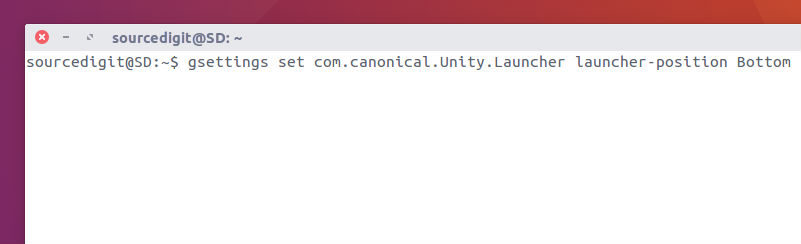
cli-unity-move

Open Terminal (Ctrl+Alt+T) and run the following commands:

To move the Unity Launcher to bottom

gsettings set com.canonical.Unity.Launcher launcher-position Bottom

To move the Unity Launcher to left

gsettings set com.canonical.Unity.Launcher launcher-position Left

Using Dconf Editor
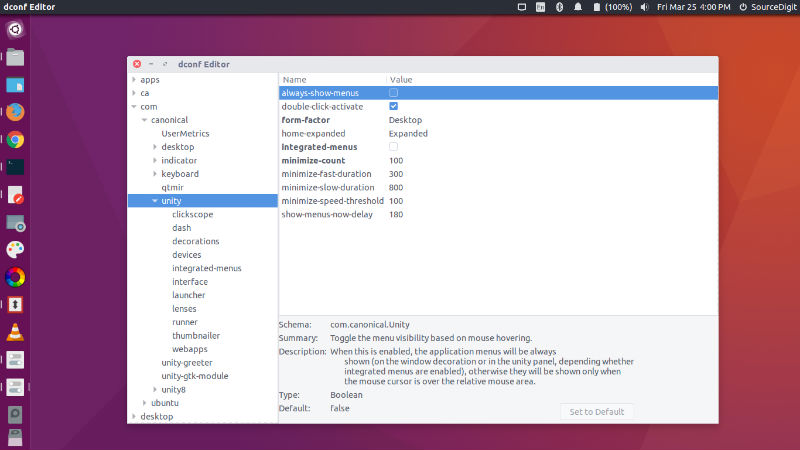
dconf-unity-01

Install dconf Editor – run the command:

sudo apt-get install dconf-editor

  • Once installed, open for dconf Editor from Ubuntu Dash.
  • Navigate to com > canonical > unity > launcher (see left hand side options)
  • In the right side option pane, click on launcher-position and change its value between ‘left’ and ‘bottom’.
  • Exit the dconf editor.

Please note that the changes are reflected immediately. You don’t need system restart.

Tags: Change Unity Launcher position in Ubuntu 16.04, Create Unity Launcher, How To Move Unity Launcher To The Bottom Of The Screen, Move the Unity Launcher to bottom, Move the Unity Launcher to bottom Ubuntu 16.04, Move the Unity Launcher to left, Move the Unity Launcher to left Ubuntu 16.04, Move Unity Launcher To Bottom, Move Unity Launcher To Bottom 14.04, Move Unity Launcher To Bottom 14.10, Move Unity Launcher To Bottom 15.04, Move Unity Launcher To Bottom 15.10, Move Unity Launcher To Bottom 16.04, Move Unity Launcher To Bottom in Ubuntu, Move Unity Launcher To Bottom of the Desktop Ubuntu, Move Unity Launcher To Bottom of the Ubuntu Desktop, Move Unity Launcher To Bottom Ubuntu 14.04, Move Unity Launcher To Bottom Ubuntu 14.10, Move Unity Launcher To Bottom Ubuntu 15.04, Move Unity Launcher To Bottom Ubuntu 15.10, Move Unity Launcher To Bottom Ubuntu 16.04, Move Unity Launcher To The Bottom, Move Unity Launcher To The Bottom Of The Desktop, Move Unity Launcher To The Bottom Of The Desktop Ubuntu 14.04, Move Unity Launcher To The End, Ubuntu 14.04 Move Unity Launcher To Bottom, Ubuntu 14.10 Move Unity Launcher To Bottom, Ubuntu 15.04 Move Unity Launcher To Bottom, Ubuntu 15.10 Move Unity Launcher To Bottom, Ubuntu 16.04 Move the Unity Launcher to bottom, Ubuntu 16.04 Move the Unity Launcher to left, Ubuntu 16.04 Move Unity Launcher To Bottom, Ubuntu Cairo Dock, Ubuntu Hide Launcher, Unity Launcher 3.01 Apk, Unity Launcher Bottom, Unity Launcher Download, Unity Launcher Folder, Unity Launcher Pro Apk

Primary Sidebar

Latest Posts

Delete Directory And Contents Recursively Without Prompt On Linux

Check User Login History In Ubuntu Linux Command Line

Use Locate Command To Find File In Linux Terminal By Name

How To Change Terminal Color In Ubuntu Command Line

How To Run Fsck Manually In Linux To Fix Unexpected Inconsistency

How To Fix Broken Packages On Ubuntu From Terminal

Re Execute The Previous Command In Linux Ubuntu Command Line

How Much RAM Is Needed For Ubuntu PC

How To Find Large Files And Directories In Linux Command Line

How To Use Clear Command History In Linux Terminal

© 2026 Source Digit • Linux, Ubuntu Tutorials & News, Technology, Gadgets & Gizmos

  • Home
  • About
  • Privacy Policy
  • Terms & Conditions
  • Contact Us
  • Sitemap