
• Skip to primary navigation
  • Skip to main content
  • Skip to primary sidebar
Source Digit

Source Digit

Linux, Ubuntu Tutorials & News, Technology, Gadgets & Gizmos

  • Home
  • How To
  • Ubuntu
  • Instagram
  • Blogging
  • Android
  • WordPress
  • +More
    • Cloud Computing
    • Gadgets
    • Social Media
    • Technology
  • Write for Us
Home / How To / Install Kylin Icon Theme On Ubuntu 16.04

Install Kylin Icon Theme On Ubuntu 16.04

By Sourabh / October 5, 2016 Category: How To, Ubuntu

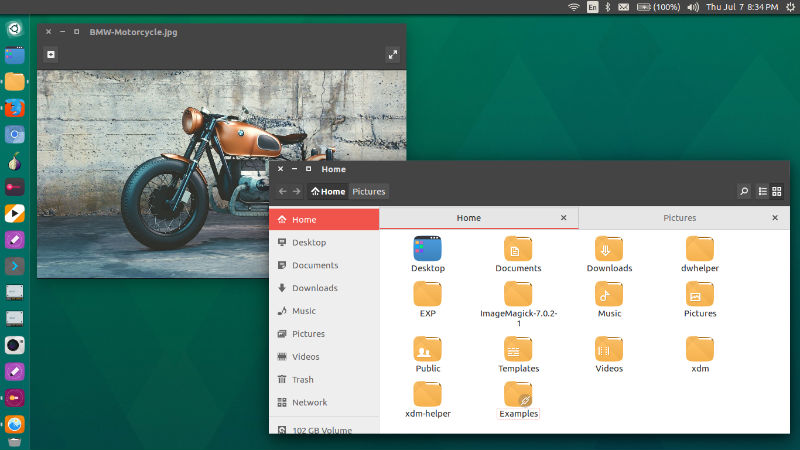
Install Kylin Icon Theme on Ubuntu 16.04. Kylin Icon Theme, inspired by the suru icon theme is a fabulous theme for Ubuntu 16.04 Systems. The Kylin theme is available to download and install on Ubuntu 16.04. (download link below).

Click to Install the Kylin Icon Theme on Ubuntu

NOTE: Installing Kylin icon theme also installs other Kylin-themed system UI tweaks such as Plymouth boot screen and GTK theme.
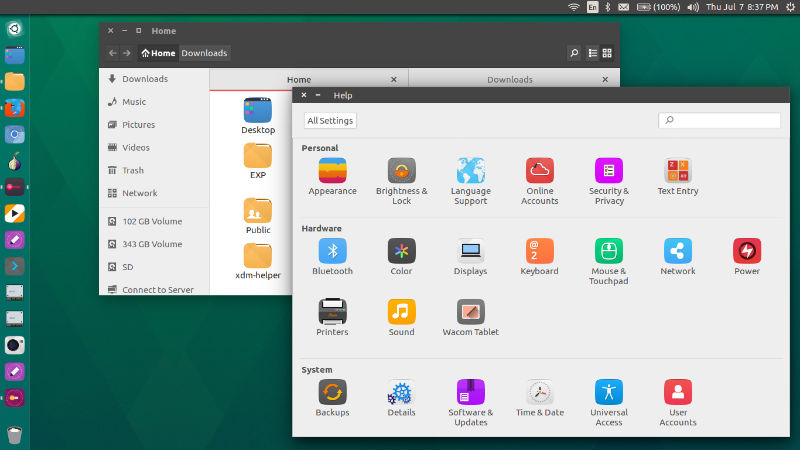
ubuntu-kylin-03

If you don’t want to install all these additional UI parts, install the Kylin icon theme manually. Download the icons, extract it, and place the ‘ubuntukylin-icon-theme’ folder in to ‘~/.icons’ folder in the home directory. Please note that /.icons folder is hidden. Press Ctrl+h to see all the hidden directories and files.
Download Ubuntu Kylin Theme

ubuntu-kylin-02

There are two ways to download and install themes in Ubuntu:

  1. Install Themes via PPA – Run terminal commands to install themes via PPA using Terminal commands
  2. Install Themes Manually – Download the custom theme file and install them manually

To use the downloaded Ubuntu theme:

  1. Extract or move the theme to usr/share//themes directory. For security reasons, Themes folder is restricted to use. Luckily, you can also create a folder in your Home directory (name it .theme) and extract the zip archive (downloaded theme) there.
  2. Use the theme via Ubuntu Tweak Tool. Open Ubuntu Tweak Tool and go to the Tweaks tab, and select the Theme option. Choose the theme you wish to use from the list.

Tags: Install Kylin Icon Theme in Ubuntu 16.04, Kylin Icon Theme Ubuntu 16.04, Kylin Icon Ubuntu 16.04, Kylin Theme Ubuntu 16.04, Ubuntu 16.04 Kylin Icon, Ubuntu 16.04 kylin Icon Theme, Ubuntu 16.04 kylin Icons, Ubuntu 16.04 Kylin Theme, Ubuntu 16.04 kylin Themes, Ubuntu Kylin 16.04 – ubuntu kylin icon theme

Primary Sidebar

Latest Posts

Delete Directory And Contents Recursively Without Prompt On Linux

Check User Login History In Ubuntu Linux Command Line

Use Locate Command To Find File In Linux Terminal By Name

How To Change Terminal Color In Ubuntu Command Line

How To Run Fsck Manually In Linux To Fix Unexpected Inconsistency

How To Fix Broken Packages On Ubuntu From Terminal

Re Execute The Previous Command In Linux Ubuntu Command Line

How Much RAM Is Needed For Ubuntu PC

How To Find Large Files And Directories In Linux Command Line

How To Use Clear Command History In Linux Terminal

© 2026 Source Digit • Linux, Ubuntu Tutorials & News, Technology, Gadgets & Gizmos

  • Home
  • About
  • Privacy Policy
  • Terms & Conditions
  • Contact Us
  • Sitemap