
• Skip to primary navigation
  • Skip to main content
  • Skip to primary sidebar
Source Digit

Source Digit

Linux, Ubuntu Tutorials & News, Technology, Gadgets & Gizmos

  • Home
  • How To
  • Ubuntu
  • Instagram
  • Blogging
  • Android
  • WordPress
  • +More
    • Cloud Computing
    • Gadgets
    • Social Media
    • Technology
  • Write for Us
Home / How To / How To Install & Use VLC Skins On Linux Ubuntu

How To Install & Use VLC Skins On Linux Ubuntu

By Sourabh / October 8, 2016 Category: How To, Ubuntu

Best VLC Skins for Ubuntu Linux. How to install VLC skins and learn how to change VLC skins on Linux Ubuntu Systems. Below are some of the best VLC skins that make VLC Media Player look totally amazing:

Download VLC Skins on Linux Ubuntu
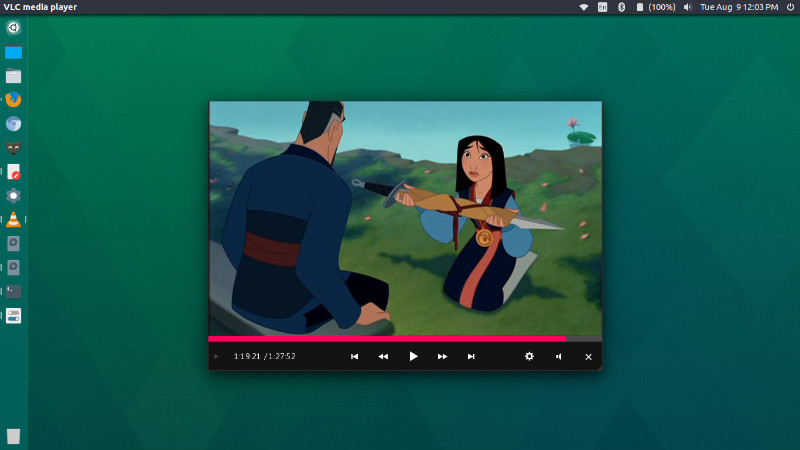
vlc-skin-ubuntu

VLC Skins are .VLT files that are used to customise the look and feel of VLC media player. There are various websites and resources where one can download VLC skins. Deviantart is one such website where one can easily download various VLC Skins.

One such beautiful theme is Arc Dark VLC Theme. The theme looks very good on Arc Theme on Linux Ubuntu Systems. Download the Arc Dark VLC Theme from the link given below:

Click Here To Download Arc Dark VLC Theme

Similarly there are various other VLC themes that can be downloaded and installed on Linux Ubuntu Systems.

  • eDark VLC Skin
    http://aaron-a-arts.deviantart.com/art/eDark-VLC-Upgraded-190063256?q=gallery%3AAaron-A-Arts&qo=20
  • MinimalX
    http://www.deviantart.com/art/VLC-MinimalX-385698882
  • Skyfire
    http://rasvob.deviantart.com/art/Skyfire-VLC-Skin-457179002
  • VLC 2
    http://mathieuodin.deviantart.com/art/VLC-2-0-4-skin-289054926
  • Slim Beam Black
    http://kryptonsyt.deviantart.com/art/VLC-Slim-Beam-Black-Skin-437200484
  • Other VLC Skins
    http://maverick07x.deviantart.com/gallery/

How To Use VLC Skins on Linux Ubuntu
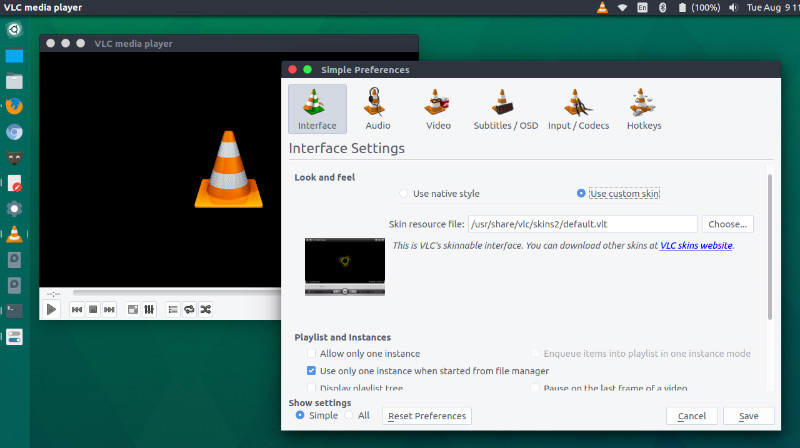
use-skins-vlc

To use VLC Skins on Linux Ubuntu Systems, first download the VLC theme you want to use and unpack or extract it. Now move the .vlt theme to ~/.local/share/VLC/skins2 folder.

Once VLC theme is placed in the skins2 folder, open VLC settings, go to preferences/settings and go to .Tools > Preferences > Use Custom Skin. From here you can easily switch VLC themes by right-clicking on the skin and going to .Interface > Choose Skin.

Once VLC theme is selected restart VLC player to use the new theme. Without restarting the VLC music player the new theme won’t be used.

Tags: How To Change VLC Skins, How To Install VLC Skins, How To Install VLC Skins on Linux, How To Install VLC Skins on Linux Ubuntu, How To Install VLC Skins on Ubuntu, How To Use VLC Skins on Linux, How To Use VLC Skins on Linux Ubuntu, How To Use VLC Skins on Ubuntu, Install VLC Skins on Linux, Install VLC Skins on Ubuntu, Linux VLC Skins, Ubuntu Install VLC Skins, Ubuntu Use VLC Skins, Ubuntu VLC Skins, Use VLC Skins on Linux, Use VLC Skins on Ubuntu, VLC Skins 2012, VLC Skins 2012 Free Download, VLC Skins 2014, VLC Skins Deviantart, VLC Skins Download, VLC Skins Linux, VLC Skins Mac, VLC Skins Ubuntu

Primary Sidebar

Latest Posts

Delete Directory And Contents Recursively Without Prompt On Linux

Check User Login History In Ubuntu Linux Command Line

Use Locate Command To Find File In Linux Terminal By Name

How To Change Terminal Color In Ubuntu Command Line

How To Run Fsck Manually In Linux To Fix Unexpected Inconsistency

How To Fix Broken Packages On Ubuntu From Terminal

Re Execute The Previous Command In Linux Ubuntu Command Line

How Much RAM Is Needed For Ubuntu PC

How To Find Large Files And Directories In Linux Command Line

How To Use Clear Command History In Linux Terminal

© 2026 Source Digit • Linux, Ubuntu Tutorials & News, Technology, Gadgets & Gizmos

  • Home
  • About
  • Privacy Policy
  • Terms & Conditions
  • Contact Us
  • Sitemap