
• Skip to primary navigation
  • Skip to main content
  • Skip to primary sidebar
Source Digit

Source Digit

Linux, Ubuntu Tutorials & News, Technology, Gadgets & Gizmos

  • Home
  • How To
  • Ubuntu
  • Instagram
  • Blogging
  • Android
  • WordPress
  • +More
    • Cloud Computing
    • Gadgets
    • Social Media
    • Technology
  • Write for Us
Home / Uncategorized / Install Classifier File Organizer – An Advanced File Manager For Ubuntu

Install Classifier File Organizer – An Advanced File Manager For Ubuntu

By Sourabh / March 21, 2017 Category: Uncategorized

Install Classifier file organizer on Ubuntu Linux. It is an advanced file manager for Linux Ubuntu that organize files in your directory instantly, by classifying them into different folders.

Install Classifier File Organizer
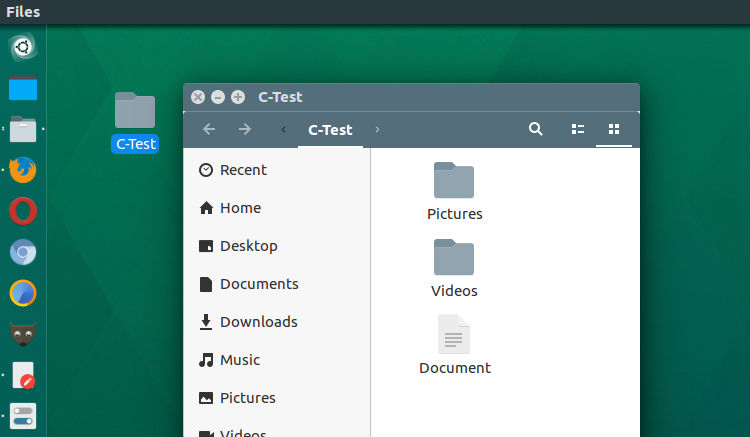
The Classifier file organizer can easily be installed and used on Ubuntu Linux Systems. Run the following commands to install the Classifier file organizer on Ubuntu 16.10, Ubuntu 16.04 and other Ubuntu Derivatives:

sudo apt-get update
sudo apt-get install python-pip
sudo pip install classifier

Use Classifier File Organizer
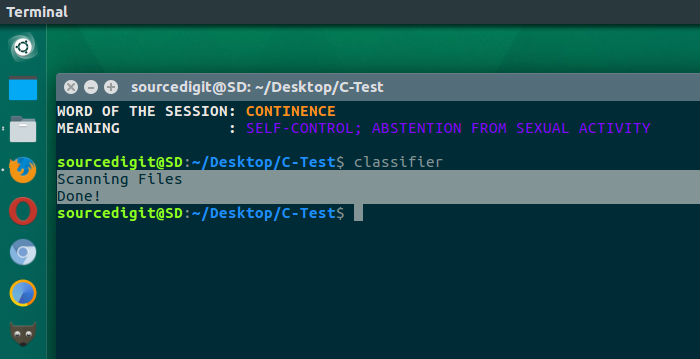
Once installed, using Classifier file organizer is very easy. Simply go to your directory, where you want to classify your files and run the following command in your terminal.

classifier

The command will get executed and you will see output message “Scanning Files. Done!”. This OK message shows that the files have been organized in separate folders.

Command Line Arguments

Since the Classifier file organizer is a command line tool, it supports many parameters to be used with the command. Below are the command parameters that can be used:

##Options classifier [-dt] [-st SPECIFIC_TYPES [SPECIFIC_TYPES …]] [-sf SPECIFIC_FOLDER] [-o OUTPUT]

-h –help show help message and exit
-dt –date Classify the files by their Creation Date
-st –specific-types Move the specific file extensions into the Specific Folder
-sf –specific-folder Folder to move files with Specific Type
-d –directory The directory whose files you want to classify
-o –output Main directory to put organized folders

If you wish to learn more about the Classifier file organizer, visit https://github.com/bhrigu123/classifier

Tags: Advance File Manager Linux, Advance File Manager Ubuntu, Best Ubuntu File Manager, Classifier File Manager, Classifier File Organizer, Classifier File Organizer Ubuntu, Classifier Ubuntu, Classifier Ubuntu Install, Dolphin File Manager, File Organizer Ubuntu, Install Classifier Ubuntu, Install Ubuntu Classifier, Konqueror File Manager, Krusader File Manager, Linux Advance File Manager, Linux File Browser, Nemo File Manager, Pcman File Manager, Spacefm File Manager, Ubuntu Advance File Manager, Ubuntu Classifier, Ubuntu Classifier File Organizer, Ubuntu Classifier Install, Ubuntu File Organizer

Primary Sidebar

Latest Posts

How To Fix Broken Packages On Ubuntu From Terminal

Re Execute The Previous Command In Linux Ubuntu Command Line

How Much RAM Is Needed For Ubuntu PC

How To Find Large Files And Directories In Linux Command Line

How To Use Clear Command History In Linux Terminal

Linux Command To Check RAM Size In Ubuntu Terminal In GB

How To Install Proprietary Drivers In Linux Ubuntu Using Terminal

How To Shutdown Linux With A 15 Minute Delay And Message

Free AI Courses With Certificate For Beginners In India

Best AI Plugins For WordPress To Use In 2026

© 2026 Source Digit • Linux, Ubuntu Tutorials & News, Technology, Gadgets & Gizmos

  • Home
  • About
  • Privacy Policy
  • Terms & Conditions
  • Contact Us
  • Sitemap