• Skip to primary navigation
  • Skip to main content
  • Skip to primary sidebar
Source Digit

Source Digit

Linux, Ubuntu Tutorials & News, Technology, Gadgets & Gizmos

  • Home
  • How To
  • Ubuntu
  • Instagram
  • Blogging
  • Android
  • WordPress
  • +More
    • Cloud Computing
    • Gadgets
    • Social Media
    • Technology
  • Write for Us
Home / How To / Ubuntu 17.04 – Move Unity Launcher To Bottom Of The Screen

Ubuntu 17.04 – Move Unity Launcher To Bottom Of The Screen

By Sourabh / April 14, 2017 Category: How To, Ubuntu

Ubuntu 17.04 – How to move Unity launcher to bottom of the screen. Learn to change the position of Unity Launcher in Ubuntu. Ubuntu 17.04 lets move Unity launcher to the bottom or any other position on the Desktop. There are three ways to move the Unity launcher to bottom of the screen – Unity Tweak Tool, Terminal commands and Dconf Editor.

Move The Unity Launcher

By default, the Unity is placed on the left-hand side of the Desktop. But users can easily move it to the bottom of the screen. There are two ways to move the Unity launcher to the bottom of the screen – using Unity Tweak Tool and using Terminal command. Here’s how to do it:

Using Unity Tweak Tool
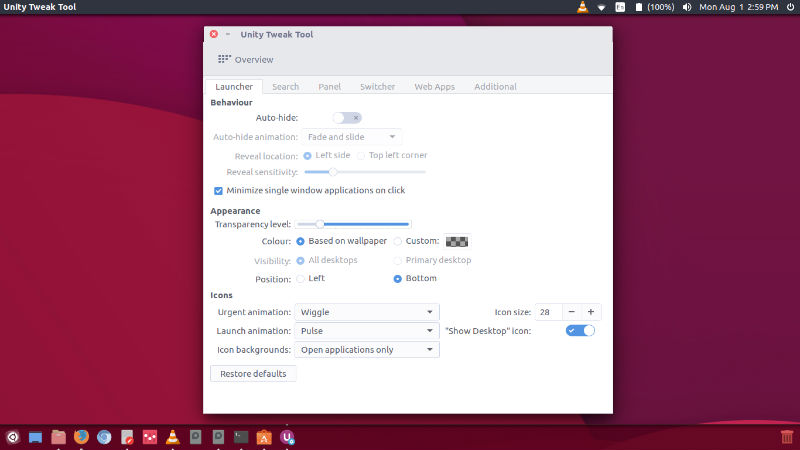
ubuntu-move-unity

I assume you have installed Unity Tweak Tool on your system. Once installed:

  • Open it from Ubuntu Dash.
  • Go to Unity tab > Launcher > Position.
  • Select the Bottom position.
  • Exit.

Using Command Line

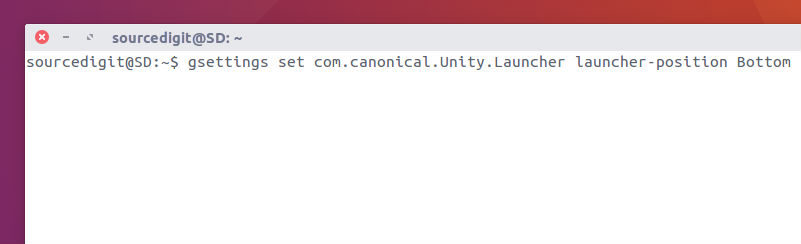
cli-unity-move

Open Terminal (Ctrl+Alt+T) and run the following commands:

To move the Unity Launcher to bottom

gsettings set com.canonical.Unity.Launcher launcher-position Bottom

To move the Unity Launcher to left

gsettings set com.canonical.Unity.Launcher launcher-position Left

Using Dconf Editor
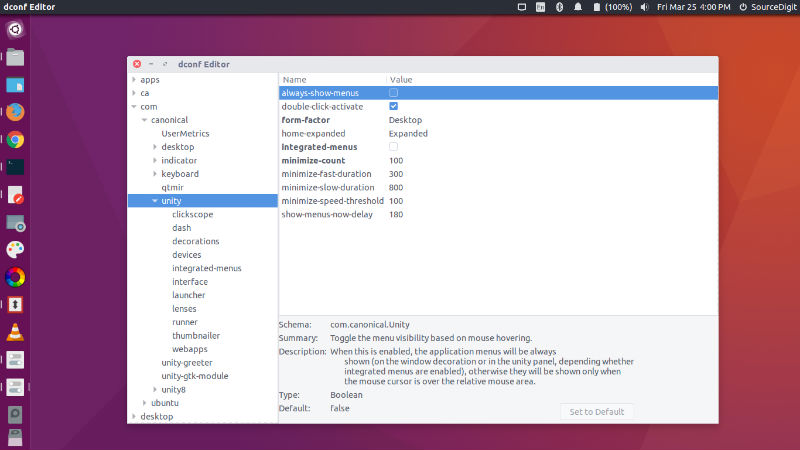
dconf-unity-01

Install dconf Editor – run the command:

sudo apt-get install dconf-editor

  • Once installed, open for dconf Editor from Ubuntu Dash.
  • Navigate to com > canonical > unity > launcher (see left hand side options)
  • In the right side option pane, click on launcher-position and change its value between ‘left’ and ‘bottom’.
  • Exit the dconf editor.

Please note that the changes are reflected immediately. You don’t need system restart.

Tags: Change Unity Launcher position in Ubuntu 16.04, Create Unity Launcher, How To Move Unity Launcher To The Bottom Of The Screen, Move the Unity Launcher to bottom, Move the Unity Launcher to bottom Ubuntu 16.04, Move the Unity Launcher to left, Move the Unity Launcher to left Ubuntu 16.04, Move Unity Launcher To Bottom, Move Unity Launcher To Bottom 14.10, Move Unity Launcher To Bottom 15.04, Move Unity Launcher To Bottom 16.04, Move Unity Launcher To Bottom 17.04, Move Unity Launcher To Bottom in Ubuntu, Move Unity Launcher To Bottom of the Desktop Ubuntu, Move Unity Launcher To Bottom of the Ubuntu Desktop, Move Unity Launcher To Bottom Ubuntu 14.10, Move Unity Launcher To Bottom Ubuntu 15.04, Move Unity Launcher To Bottom Ubuntu 16.04, Move Unity Launcher To Bottom Ubuntu 17.04, Move Unity Launcher To The Bottom, Move Unity Launcher To The Bottom Of The Desktop, Move Unity Launcher To The Bottom Of The Desktop Ubuntu 17.04, Move Unity Launcher To The End, Ubuntu 14.10 Move Unity Launcher To Bottom, Ubuntu 15.04 Move Unity Launcher To Bottom, Ubuntu 16.04 Move the Unity Launcher to bottom, Ubuntu 16.04 Move the Unity Launcher to left, Ubuntu 16.04 Move Unity Launcher To Bottom, Ubuntu 17.04 Move Unity Launcher To Bottom, Ubuntu Cairo Dock, Ubuntu Hide Launcher, Unity Launcher 3.01 Apk, Unity Launcher Bottom, Unity Launcher Download, Unity Launcher Folder, Unity Launcher Pro Apk

Primary Sidebar

Latest Posts

Delete Directory And Contents Recursively Without Prompt On Linux

Check User Login History In Ubuntu Linux Command Line

Use Locate Command To Find File In Linux Terminal By Name

How To Change Terminal Color In Ubuntu Command Line

How To Run Fsck Manually In Linux To Fix Unexpected Inconsistency

How To Fix Broken Packages On Ubuntu From Terminal

Re Execute The Previous Command In Linux Ubuntu Command Line

How Much RAM Is Needed For Ubuntu PC

How To Find Large Files And Directories In Linux Command Line

How To Use Clear Command History In Linux Terminal

© 2026 Source Digit • Linux, Ubuntu Tutorials & News, Technology, Gadgets & Gizmos

  • Home
  • About
  • Privacy Policy
  • Terms & Conditions
  • Contact Us
  • Sitemap