
• Skip to primary navigation
  • Skip to main content
  • Skip to primary sidebar
Source Digit

Source Digit

Linux, Ubuntu Tutorials & News, Technology, Gadgets & Gizmos

  • Home
  • How To
  • Ubuntu
  • Instagram
  • Blogging
  • Android
  • WordPress
  • +More
    • Cloud Computing
    • Gadgets
    • Social Media
    • Technology
  • Write for Us
Home / Ubuntu / Install Yunit Unity 8 Fork on Ubuntu

Install Yunit Unity 8 Fork on Ubuntu

By Sourabh / July 21, 2017 Category: How To, Ubuntu

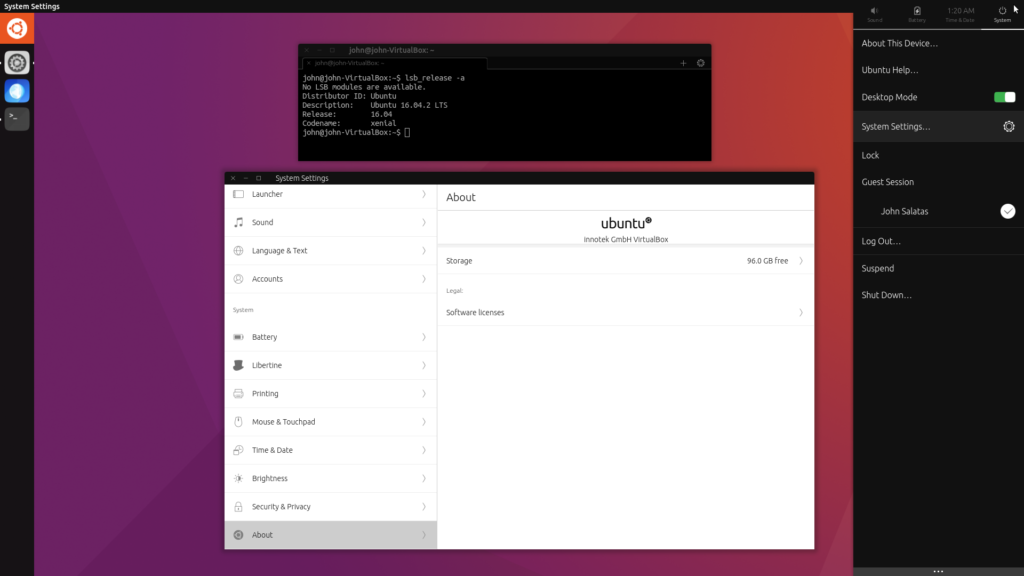
How to install Yunit on Ubuntu 16.04 LTS. Yunit is a user interface shell based on the Unity 8 shell originally developed for the Unity convergent personal computing environment developed by Canonical Ltd.

Yunit’s about page says, following up with Mark Shuttleworth’s announcement to abandon Unity 8 development, we have forked it and are planning to continue working with the project.
Install Yunit

Yunit is now available as an overlay repository for Ubuntu 16.04 LTS xenial (64bit). Open a terminal and execute the following commands. If asked, choose lightdm as display manager:

wget -qO - https://archive.yunit.io/yunit.gpg.key | sudo apt-key add
echo 'deb [arch=amd64] http://archive.yunit.io/ubuntu/ xenial main' | sudo tee /etc/apt/sources.list.d/yunit.list
echo 'deb-src http://archive.yunit.io/ubuntu/ xenial main' | sudo tee --append /etc/apt/sources.list.d/yunit.list
sudo apt update
sudo apt upgrade
sudo apt install yunit-desktop

The following have been tested and should work with an existing ubuntu 16.04, ubuntu gnome 16.04, lubuntu 16.04 and xubuntu 16.04 installation.

Tags: Install Yunit Unity 8 Fork on Ubuntu, Linux Yunit, Ubuntu Yunit, Unity 8 Fork Yunit, Yunit, Yunit Linux, Yunit Ubuntu, Yunit Unity 8 Fork

Primary Sidebar

Latest Posts

Use Locate Command To Find File In Linux Terminal By Name

How To Change Terminal Color In Ubuntu Command Line

How To Run Fsck Manually In Linux To Fix Unexpected Inconsistency

How To Fix Broken Packages On Ubuntu From Terminal

Re Execute The Previous Command In Linux Ubuntu Command Line

How Much RAM Is Needed For Ubuntu PC

How To Find Large Files And Directories In Linux Command Line

How To Use Clear Command History In Linux Terminal

Linux Command To Check RAM Size In Ubuntu Terminal In GB

How To Install Proprietary Drivers In Linux Ubuntu Using Terminal

© 2026 Source Digit • Linux, Ubuntu Tutorials & News, Technology, Gadgets & Gizmos

  • Home
  • About
  • Privacy Policy
  • Terms & Conditions
  • Contact Us
  • Sitemap