
How to change terminal color in Ubuntu command line? Know what are the 8 terminal colors (Ubuntu terminal color code)?
On Linux Terminal you’ve got 8 different terminal colors, which are – black , red , green , yellow , blue , magenta , cyan , and white.
Here is a pro tip on how to change terminal color in Ubuntu command line and change terminal text color in Linux Ubuntu command line. You can customize your terminal colors by going to Edit > Profile Preferences > Colors . Here, you can choose the text and background colors.
- Open the terminal window – Open the terminal window from application manager or use the shortcut “Ctrl + Alt + T”.
- Right click on the terminal – Right click on the terminal window. From the menu that pops up, go to profile -> profile preferences. Once you click on profile preferences, you will see a menu that looks like (see the screenshot) :
- Change the Ubuntu terminal colors – Simply edit the color section of the profile using the colors tab. You can also change the text colour from here. You can also select some built in color schemes that you wish to use. Click on the ‘Built-in schemes‘ menu.
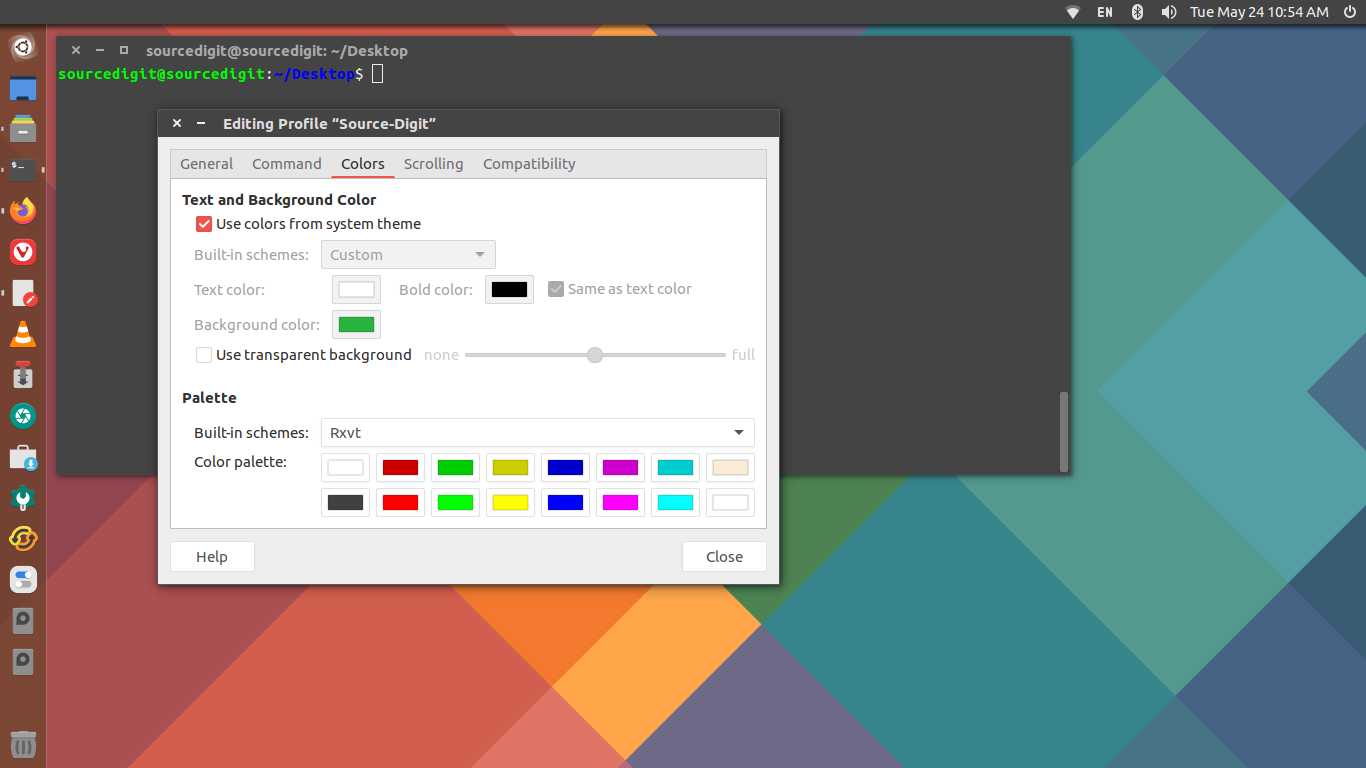
Note: Uncheck the option ‘Use colors from system theme‘. You can also make your own combination of text color and background color for the terminal. Select built-in scheme option to “Custom” and select the colors for Text color, Bold color and Background color.