
• Skip to primary navigation
  • Skip to main content
  • Skip to primary sidebar
Source Digit

Source Digit

Linux, Ubuntu Tutorials & News, Technology, Gadgets & Gizmos

  • Home
  • How To
  • Ubuntu
  • Instagram
  • Blogging
  • Android
  • WordPress
  • +More
    • Cloud Computing
    • Gadgets
    • Social Media
    • Technology
  • Write for Us
Home / How To / Corebird 1.7 Is Out – How to Install Corebird Twitter Client on Ubuntu 17.10

Corebird 1.7 Is Out – How to Install Corebird Twitter Client on Ubuntu 17.10

By Sourabh / November 13, 2017 Category: How To, Ubuntu

Corebird 1.7 is out – How to install Corebird Twitter Client on Ubuntu 17.10 and Derivatives. Corebird is a Twitter Client for Ubuntu Linux Systems. Using Corebird users can manage their Twitter account from Ubuntu Desktop.
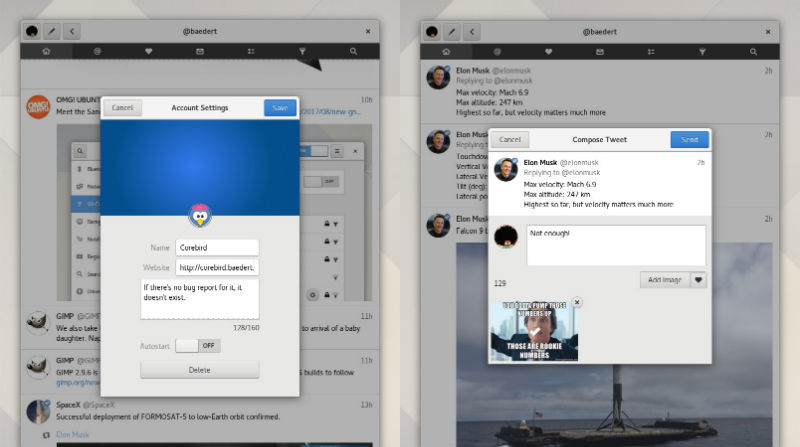
 

Corebird 1.7 Changelog:

  • Hashtags and Mentions in profile desriptions are now clickable
  • The mention-completion when composing a new tweet now fetches unknown users from the twitter server
  • Videos larger than the screen size are now getting scaled down while playing
  • Profiles now indicate when an account is suspended
  • Profiles handle protected accounts better when trying to access followers/following users, etc.
  • The compose window now allows tweets with just media attached but not text
  • Improve the hashtag/mention/link detection when composing a new tweet
  • The compose dialog now shows an emoji chooser. This is only available starting GTK+ 3.22.19 and the emojis will only be rendered with color if you have the needed cairo version installed, as well as an emoji font.
  • Fixed a bug that led to wrong Direct Message info being inserted into the database
  • Fixed a bug that resulted in broken files when downloading instagram images

Install Corebird 1.7 on Ubuntu

Run the following commands in terminal to install Corebird 1.7 on Ubuntu 17.10, Ubuntu 17.04, Ubuntu 16.10, Ubuntu 16.04 and other Ubuntu Derivatives:

sudo add-apt-repository ppa:ubuntuhandbook1/corebird
sudo apt update
sudo apt install corebird

Once installed, open Corebird from Ubuntu Dash and authorize it for using it on Ubuntu Desktop.

https://github.com/baedert/corebird

Tags: Corebird 1.7, Corebird Debian, Corebird Github, Corebird Pin, Corebird Shortcuts, Corebird Twitter App on Ubuntu, Corebird Twitter App Ubuntu 17.10, Corebird Twitter Client, Corebird Ubuntu 17.10, Corebird Update, Corebird Windows, Gtk+ Twitter App Corebird, Install Corebird GTK+ Twitter App For Ubuntu, Install Corebird on Ubuntu, Install Corebird Twitter App on Ubuntu, Install Corebird Twitter App Ubuntu 17.10, Install Corebird Twitter Client Ubuntu 17.10, Install Corebird Ubuntu 17.10, Install Twitter App Ubuntu 17.10, Twitter App Ubuntu 17.10, Twitter Client Ubuntu, Ubuntu 17.10 Corebird, Ubuntu 17.10 Corebird Twitter App, Ubuntu 17.10 Twitter App

Primary Sidebar

Latest Posts

Delete Directory And Contents Recursively Without Prompt On Linux

Check User Login History In Ubuntu Linux Command Line

Use Locate Command To Find File In Linux Terminal By Name

How To Change Terminal Color In Ubuntu Command Line

How To Run Fsck Manually In Linux To Fix Unexpected Inconsistency

How To Fix Broken Packages On Ubuntu From Terminal

Re Execute The Previous Command In Linux Ubuntu Command Line

How Much RAM Is Needed For Ubuntu PC

How To Find Large Files And Directories In Linux Command Line

How To Use Clear Command History In Linux Terminal

© 2026 Source Digit • Linux, Ubuntu Tutorials & News, Technology, Gadgets & Gizmos

  • Home
  • About
  • Privacy Policy
  • Terms & Conditions
  • Contact Us
  • Sitemap