
Install Fresh Player Plugin on Ubuntu via PPA (Pepper Flash Wrapper for Firefox). The latest Fresh Player Plugin 0.2.4 is released with accelerated rendering and high DPI support. The latest Adobe Flash Player versions are only available on Linux Systems via/through Google Chrome browser. Other browsers are still using the older version of Adobe Flash […]
How To Install Themes In Ubuntu 15.04, Ubuntu 14.04 and Ubuntu 14.10
How to install Themes in Ubuntu 15.04, Ubuntu 14.04 and Ubuntu 14.10. Change Unity Desktop themes on Ubuntu with Ubuntu/Gnome Tweak Tool or via Terminal Commands. You can download and install custom themes in Ubuntu 15.04/14.10/14.04. There are two ways to install and use themes in Ubuntu: Install Themes via PPA – Run terminal commands […]
How To Install & Run Microsoft Windows Games & Apps on Linux Ubuntu
Install PlayonLinux 4.2.7 in Ubuntu and Linux Mint Systems. PlayOnLinux software allows to install and use Microsoft Windows games and apps on Linux Ubuntu Systems. PlayOnLinux is a free software which uses Bash and Python. PlayOnLinux is based on Wine HQ, and you don’t have to own a Windows license to use PlayOnLinux. PlayOnLinux’s features […]
Install MS Paint Like Bitmap Image Drawing/Editing Software on Ubuntu 14.10/14.04
Install Pinta 1.6, a drawing and image editing software in Ubuntu 15.04/14.04/14.10 or Linux Mint Systems. Here’s how to install Pinta, MS Paint like Software for Linux Ubuntu Systems. The latest version, Pinta 1.6 brings a completely redesigned UI, image dialog box and editing tools. It also resolves over 50 bug fixes and other improvements. […]
How to Reset Lost Root Password in Ubuntu 14.04 & Other Linux Ubuntu Derivatives
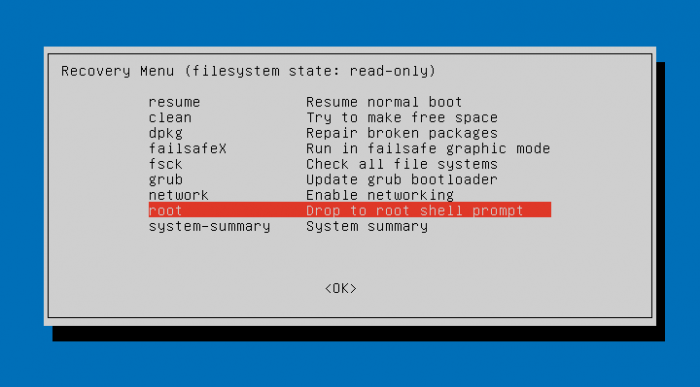
How to reset lost Ubuntu password using Terminal commands. Reset lost Root password in Linux Ubuntu 14.04 and other Ubuntu Derivatives. Recover and change forgotten password in Ubuntu 14.04 system. Follow the steps given below to reset Root password: 1. Boot your Ubuntu PC and enter into Boot Option. Press ESC key when you see […]
How To Mount Partitions Automatically in Ubuntu 15.04/14.10/14.04
Mount Partition automatically on start up in Ubuntu 15.04/14.10/14.04 Systems. Automatically mount partitions – How to mount Ubuntu partitions automatically on start up. Mounting partitions automatically can be initiated via per-user mounting (usually under /media) or systemwide mounting (anywhere, often under /mnt). Let us learn how to mount Ubuntu partitions automatically: Open Dash and search […]