
• Skip to primary navigation
  • Skip to main content
  • Skip to primary sidebar
Source Digit

Source Digit

Linux, Ubuntu Tutorials & News, Technology, Gadgets & Gizmos

  • Home
  • How To
  • Ubuntu
  • Instagram
  • Blogging
  • Android
  • WordPress
  • +More
    • Cloud Computing
    • Gadgets
    • Social Media
    • Technology
  • Write for Us
Home / How To / Apt-Get Command To Install ImageMagick 7 On Ubuntu 16.04

Apt-Get Command To Install ImageMagick 7 On Ubuntu 16.04

By Sourabh / June 29, 2016 Category: How To, Ubuntu

Download and install ImageMagick 7.0.2-1 on Ubuntu 16.04 Systems. Apt-Get command to install Imagemagick on Ubuntu. ImageMagick is a software suite to create, edit, compose, or convert bitmap images. It can read and write images in a variety of formats (over 200)  including PNG, JPEG, JPEG-2000, GIF, TIFF, DPX, EXR, WebP, Postscript, PDF, and SVG. Use ImageMagick to resize, flip, mirror, rotate, distort, shear and transform images, adjust image colors, apply various special effects, or draw text, lines, polygons, ellipses and Bézier curves.
imagemagick-ubuntu-16-04

ImageMagick 7.0.x-x changelog

  • Added support for GROUP4 compression to the FAX coder
  • Distort no longer converts grayscale image to sRGB
  • Don’t return a zero bounding box for QueryMultilineFontMetrics()
  • Backoff finite precision epsilon
  • Fix drawing glitch for stroke widths greater than 2
  • Deny indirect reads by policy, remove policy to permit, e.g., convert caption:@mytext.txt …
  • RLE check for pixel offset less than 0
  • Properly initialze PES blocks
  • Fix small memory leak
  • Coder path traversal is not authorized
  • Turn off alpha channel for the compare difference image
  • Support configure script –enable-pipes option to enable pipes (|) in filenames.
  • Support configure script –enable-indirect-reads option to enable indirect reads (@) in filenames

Install ImageMagick 7.0.2-1 on Ubuntu

Run the following commands in Terminal to install ImageMagick 7.0.2-1 on Ubuntu 16.04, Ubuntu 15.01, Ubuntu 15.04, Ubuntu 14.04 and other Ubuntu Derivatives:

wget http://www.imagemagick.org/download/ImageMagick.tar.gz
tar -xvf ImageMagick.tar.gz
cd ImageMagick-7.*
./configure
make
sudo make install
sudo ldconfig /usr/local/lib

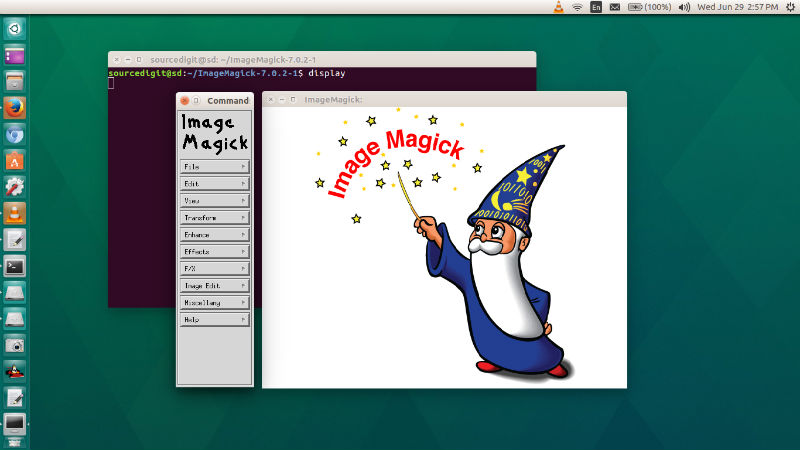
Once installed, start ImageMagick by running “display” (without quotes) in Terminal

Tags: Apt-Get Command To Install ImageMagick 7 On Ubuntu 16.04, Apt-Get Install Imagemagick Ubuntu, How To Start Imagemagick From Command Line, Http Www Imagemagick Org Script Command Line Options, ImageMagick 7, ImageMagick 7 Install, ImageMagick 7 Ubuntu, ImageMagick 7 Ubuntu Install, ImageMagick 7.0.2-1, Imagemagick Command Line Crop Example, Imagemagick Command Line Examples, Imagemagick Command Line Options, Imagemagick Command Line Resize, Imagemagick Command Line Ubuntu, Imagemagick Command Line Windows, Imagemagick I386, Imagemagick Package, Imagemagick Quantal, Imagemagick Ubuntu Download, Imagemagick Ubuntu Install, Install ImageMagick 7, Install ImageMagick 7 Ubuntu, Install ImageMagick 7.0.2-1 on Ubuntu, Install Ubuntu ImageMagick 7, Magemagick Amd64, Ubuntu ImageMagick 7, Ubuntu ImageMagick 7 Install, Ubuntu Upgrade Imagemagick

Primary Sidebar

Latest Posts

How To Run Fsck Manually In Linux To Fix Unexpected Inconsistency

How To Fix Broken Packages On Ubuntu From Terminal

Re Execute The Previous Command In Linux Ubuntu Command Line

How Much RAM Is Needed For Ubuntu PC

How To Find Large Files And Directories In Linux Command Line

How To Use Clear Command History In Linux Terminal

Linux Command To Check RAM Size In Ubuntu Terminal In GB

How To Install Proprietary Drivers In Linux Ubuntu Using Terminal

How To Shutdown Linux With A 15 Minute Delay And Message

Free AI Courses With Certificate For Beginners In India

© 2026 Source Digit • Linux, Ubuntu Tutorials & News, Technology, Gadgets & Gizmos

  • Home
  • About
  • Privacy Policy
  • Terms & Conditions
  • Contact Us
  • Sitemap