
• Skip to primary navigation
  • Skip to main content
  • Skip to primary sidebar
Source Digit

Source Digit

Linux, Ubuntu Tutorials & News, Technology, Gadgets & Gizmos

  • Home
  • How To
  • Ubuntu
  • Instagram
  • Blogging
  • Android
  • WordPress
  • +More
    • Cloud Computing
    • Gadgets
    • Social Media
    • Technology
  • Write for Us
Home / How To / How to Create Desktop Shortcut Icons in Ubuntu 14.04/14.10

How to Create Desktop Shortcut Icons in Ubuntu 14.04/14.10

By Sourabh / March 4, 2015 Category: How To, Ubuntu

How to create desktop shortcut icons in Ubuntu 14.04/14.10. Create applications shortcut icons on Ubuntu Unity Desktop.

By default, you cannot drag and drop application shortcuts from the Unity Dash on to the Desktop. If you do so, you will get an error message. Luckily, you can easily create desktop icons or shortcuts in Ubuntu 14.10 Unity desktop.

Create Desktop Shortcut Icons in Ubuntu

The most easiest way to create desktop shortcuts icons is to directly copy and paste the application shortcuts. You will have to copy and paste the shortcuts from /usr/share/applications directory on to your Ubuntu desktop.
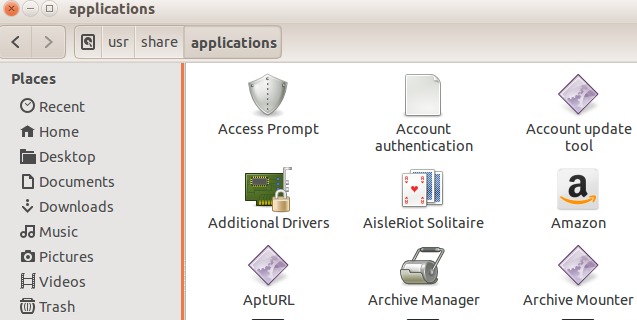
Creat Ubuntu Desktop Shortcuts

  • Open “Files” from the left Launcher and navigate to Computer/usr/share/applications.
  • Under /applications folder you can see all the applications’ icons and shortcuts.
  • Select one or more shortcuts or icons and press Ctrl+C to copy them.
  • Go to your desktop, click on blank area of your desktop and paste the icons. Press Ctrl+V to paste the icons.
  • Please note that you cannot drag and drop the shortcuts and icons, it won’t work.
  • That’s it, you have successfully created desktop shortcuts icons on Ubuntu desktop.

You can also place Home, Network, Trash, and Devices icons (shortcuts) on Ubuntu desktop. To do so, open Ubuntu Unity Tweak Tool (you can install it from Ubuntu Software Center) from the Unity Dash and enable the shortcuts from Desktop Icons option tab.

Tags: Creat Ubuntu Desktop Shortcuts, Create Desktop Icons in Ubuntu, Create Desktop Shortcut Icons in Linux, Create Desktop Shortcut Icons in Ubuntu 14.10, Create Desktop Shortcut in Ubuntu, Create Ubuntu Unity Desktop Iocns, Desktop Shortcut Icons in Ubuntu, How to Create Desktop Icons in Ubuntu, How to Create Desktop Shortcut in Ubuntu, Linux Ubuntu, Ubuntu 14.04, Ubuntu 14.04 Trusty Tahr, Ubuntu 14.10, Ubuntu 14.10 Create Desktop Shortcut Icons, Ubuntu 14.10 Utopic Unicorn, Ubuntu Create Desktop Shortcuts Icons, Ubuntu Desktop Icons, Ubuntu Desktop Shortcuts, Unity Desktop Applications Shortcut, Unity Desktop Icons, Unity Desktop Shortcuts

Primary Sidebar

Latest Posts

How To Run Fsck Manually In Linux To Fix Unexpected Inconsistency

How To Fix Broken Packages On Ubuntu From Terminal

Re Execute The Previous Command In Linux Ubuntu Command Line

How Much RAM Is Needed For Ubuntu PC

How To Find Large Files And Directories In Linux Command Line

How To Use Clear Command History In Linux Terminal

Linux Command To Check RAM Size In Ubuntu Terminal In GB

How To Install Proprietary Drivers In Linux Ubuntu Using Terminal

How To Shutdown Linux With A 15 Minute Delay And Message

Free AI Courses With Certificate For Beginners In India

© 2026 Source Digit • Linux, Ubuntu Tutorials & News, Technology, Gadgets & Gizmos

  • Home
  • About
  • Privacy Policy
  • Terms & Conditions
  • Contact Us
  • Sitemap