
• Skip to primary navigation
  • Skip to main content
  • Skip to primary sidebar
Source Digit

Source Digit

Linux, Ubuntu Tutorials & News, Technology, Gadgets & Gizmos

  • Home
  • How To
  • Ubuntu
  • Instagram
  • Blogging
  • Android
  • WordPress
  • +More
    • Cloud Computing
    • Gadgets
    • Social Media
    • Technology
  • Write for Us
Home / How To / How to List Ubuntu Network Adapters – Top 5 Commands to Display Ethernet Adapters

How to List Ubuntu Network Adapters – Top 5 Commands to Display Ethernet Adapters

By Sourabh / March 2, 2019 Category: How To, Ubuntu

Find all the Network Adapters in Linux Ubuntu. Display a list of all installed Ethernet adapters on Ubuntu system. Find out which network adapters you are using in Ubuntu or other Linux systems. Easily find out the manufacturer of the network adapters on your Ubuntu/Linux systems.

You can use the following commands to list Ethernet adapters on a Ubuntu Linux system. These command gives you information about both wired and wireless network adapters.

lshw

The lshw command is used to list hardwares. lshw command extract detailed information on the hardware configuration of the system. It can report exact memory configuration, firmware version, mainboard configuration, CPU version and speed, cache configuration, bus speed, etc.

Open the Terminal and run the following command:

sudo lshw -C network
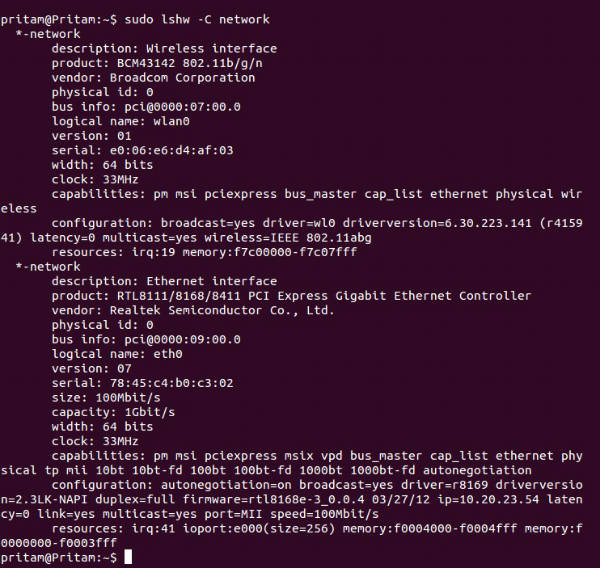
lshw-command-ubuntu

lspci command

List all PCI device including Ethernet cards (NICs).


lspci
lspci | less
lspci | grep -i eth
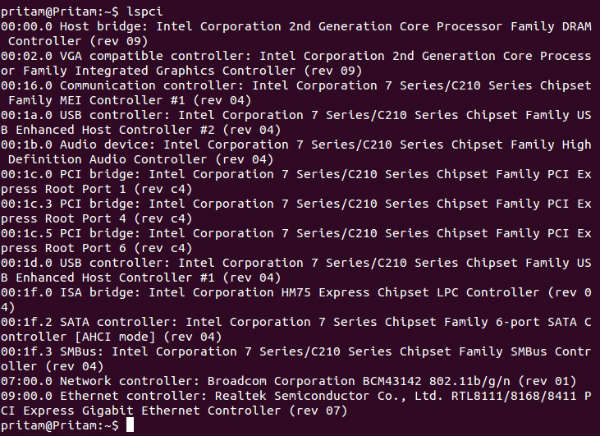
lspci-ubuntu-command

ip command

Display or manipulate routing, devices, policy routing and tunnels on Linux operating systems. You can use ip command to list all NICs:


ip link

 

ip-link-command-ubuntu

ifconfig command

Display or configure a network interface on Linux or Unix like operating systems.


ifconfig
ifconfig eth0

or


/sbin/ifconfig
/sbin/ifconfig eth0
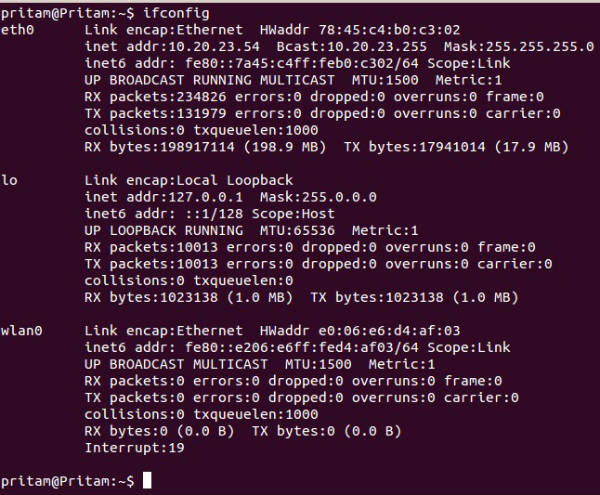
 

ifconfig-ubuntu-command

Tags: Display list installed Ethernet adapters on Ubuntu system, Find all the Network Adapters in Linux Ubuntu, Find which network adapters using in Ubuntu, How To Fix No Wireless Network In Ubuntu, How to fix wireless problems in Ubuntu 14.04, How to List Ubuntu Network Adapters, How to List Ubuntu Network Adapters - Top 5 Commands to Display Ethernet Adapters, HowTo: Linux Show List Of Network Cards, ifconfig command Linux Ubuntu, ip command Linux Ubuntu, List of network adapters in Ubuntu/Linux systems, List of Network Cards in Ubuntu., lshw command Ubuntu Linux, lspci command Linux Ubuntu, Network Adapters in Linux Ubuntu, No Wireless Network In Ubuntu 14.04, No Wireless Network In Ubuntu 14.10, Terminal Commands to List Ubuntu Network Adapters, Top 5 Commands to Display Ethernet Adapters, Troubleshoot Wireless Network Connection in Ubuntu, Ubuntu 14.04, Ubuntu 14.10, Ubuntu List Network Interfaces

Primary Sidebar

Latest Posts

Delete Directory And Contents Recursively Without Prompt On Linux

Check User Login History In Ubuntu Linux Command Line

Use Locate Command To Find File In Linux Terminal By Name

How To Change Terminal Color In Ubuntu Command Line

How To Run Fsck Manually In Linux To Fix Unexpected Inconsistency

How To Fix Broken Packages On Ubuntu From Terminal

Re Execute The Previous Command In Linux Ubuntu Command Line

How Much RAM Is Needed For Ubuntu PC

How To Find Large Files And Directories In Linux Command Line

How To Use Clear Command History In Linux Terminal

© 2026 Source Digit • Linux, Ubuntu Tutorials & News, Technology, Gadgets & Gizmos

  • Home
  • About
  • Privacy Policy
  • Terms & Conditions
  • Contact Us
  • Sitemap