
• Skip to primary navigation
  • Skip to main content
  • Skip to primary sidebar
Source Digit

Source Digit

Linux, Ubuntu Tutorials & News, Technology, Gadgets & Gizmos

  • Home
  • How To
  • Ubuntu
  • Instagram
  • Blogging
  • Android
  • WordPress
  • +More
    • Cloud Computing
    • Gadgets
    • Social Media
    • Technology
  • Write for Us
Home / How To / How to Find and Remove Duplicate Files on Linux Ubuntu 14.04/14.10

How to Find and Remove Duplicate Files on Linux Ubuntu 14.04/14.10

By Sourabh / March 17, 2015 Category: How To, Ubuntu

How to find duplicate files on Linux Ubuntu. Search and remove duplicate files on a Linux Ubuntu systems. FSlint can be used to find duplicate files on a Linux filesystem.

To install FSlint on Ubuntu, Debain and Ubuntu Derivatives, follow the installation commands given below:

Ubuntu

To install FSlint on Ubuntu, run the following command:

sudo apt-get install fslint
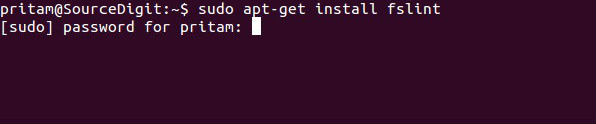
fslint-01

Debian

svn checkout http://fslint.googlecode.com/svn/trunk/ fslint-2.45
cd fslint-2.45
dpkg-buildpackage -I.svn -rfakeroot -tc
sudo dpkg -i ../fslint_2.45-1_all.deb

Fedora

sudo yum install fslint

For Other Distros

Find the installation code and instructions over here – http://www.pixelbeat.org/fslint/.

Find and Remove Duplicate Files on Linux

Once FSlint is installed, you can open it in GUI or Terminal mode. To open and run FSlint in GUI mode, run “fslint-gui” command (without quotes) in Ubuntu terminal or search and open it via Dash.
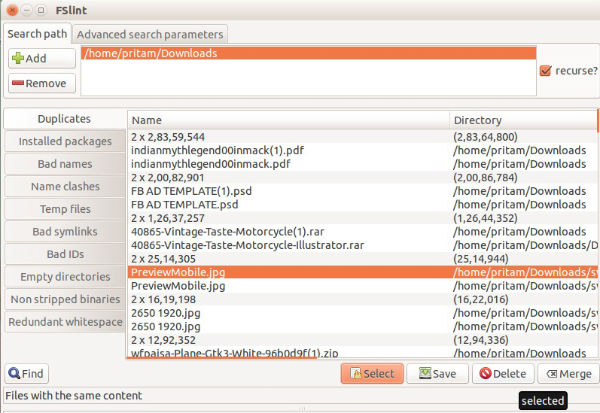
fslint-01f

By default, FSlint opens with the home directory selected in the Duplicates pane window. The home directory is always the default search path. You can also add another path and click the Find button to give you the list of duplicate files in directories.

Once the list is shown up, delete any files you want to remove or double-click to preview them.

Tags: Find and Remove Duplicate Files on Linux, Find and Remove Duplicate Files on Linux Ubuntu 14.04/14.10, FSlint Application Ubuntu 14.04/14.10, How to Find Duplicate Files on Ubuntu 14.04, How to Find Duplicate Files on Ubuntu 14.10, How to Remove Duplicate Files on Ubuntu 14.04, How to Remove Duplicate Files on Ubuntu 14.10, Install FSlint on Debain, Install FSlint on Linux Ubuntu, Install FSlint on Ubuntu 14.04, Install FSlint on Ubuntu 14.10, Linux Ubuntu Find and Remove Duplicate Files on Linux, Linux Ubuntu Find Duplicate Files on Linux, Linux Ubuntu Remove Duplicate Files on Linux, Ubuntu 14.04, Ubuntu 14.10, Ubuntu Find and Remove Duplicate Files on Linux

Primary Sidebar

Latest Posts

Delete Directory And Contents Recursively Without Prompt On Linux

Check User Login History In Ubuntu Linux Command Line

Use Locate Command To Find File In Linux Terminal By Name

How To Change Terminal Color In Ubuntu Command Line

How To Run Fsck Manually In Linux To Fix Unexpected Inconsistency

How To Fix Broken Packages On Ubuntu From Terminal

Re Execute The Previous Command In Linux Ubuntu Command Line

How Much RAM Is Needed For Ubuntu PC

How To Find Large Files And Directories In Linux Command Line

How To Use Clear Command History In Linux Terminal

© 2026 Source Digit • Linux, Ubuntu Tutorials & News, Technology, Gadgets & Gizmos

  • Home
  • About
  • Privacy Policy
  • Terms & Conditions
  • Contact Us
  • Sitemap