
• Skip to primary navigation
  • Skip to main content
  • Skip to primary sidebar
Source Digit

Source Digit

Linux, Ubuntu Tutorials & News, Technology, Gadgets & Gizmos

  • Home
  • How To
  • Ubuntu
  • Instagram
  • Blogging
  • Android
  • WordPress
  • +More
    • Cloud Computing
    • Gadgets
    • Social Media
    • Technology
  • Write for Us
Home / How To / Install App Grid 0.215 Software Center Alternative on Ubuntu Systems

Install App Grid 0.215 Software Center Alternative on Ubuntu Systems

By Sourabh / March 11, 2015 Category: How To, Ubuntu

How to install App Grid 0.215 on Ubuntu Systems. App Grid is an alternative of Ubuntu Software Center. App Grid is a great way to discover and install apps for Ubuntu Systems. Here’s how to install App Grid on Ubuntu.

App Grid delivers stunning startup speed. It has a clean and simple design which makes App Grid a joy to use. It comes with an intuitive graphical user interface which offers a grid view of the applications, including screenshots, ratings and reviews.
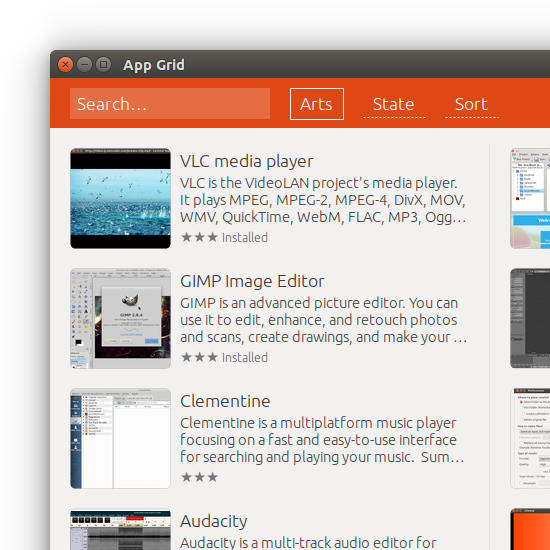
appgrid

Here is how to install App Grid 0.215 on Ubuntu Systems:

sudo add-apt-repository ppa:appgrid/stable
sudo apt-get update
sudo apt-get install appgrid

You can also click on the link given below to download and install App Grid (.deb):

Download App Grid for Ubuntu 14.04/14.10/15.04

Run the following command to uninstall and remove App Grid:

sudo apt-get remove appgrid

Tags: Alternative Ubuntu Software Center, AppGrid 0.215 Software Center, AppGrid Software Center Linux Ubuntu, Download App Grid for Linxu Ubuntu, Download App Grid for Ubuntu 14.04, Download App Grid for Ubuntu 14.10, Install AppGrid 0.215, Install AppGrid 0.215 on Ubuntu 14.04, Install AppGrid 0.215 on Ubuntu 14.10, Linux Ubuntu Install AppGrid 0.215, Linxu Ubuntu Download App Grid, Ubuntu 14.04, Ubuntu 14.10, Ubuntu AppGrid Software Center, Ubuntu Software Center Alternative

Primary Sidebar

Latest Posts

Job Scheduling Using At Command In Linux With Examples

How To Check Permissions Of A Directory In Linux Command

Delete Directory And Contents Recursively Without Prompt On Linux

Check User Login History In Ubuntu Linux Command Line

Use Locate Command To Find File In Linux Terminal By Name

How To Change Terminal Color In Ubuntu Command Line

How To Run Fsck Manually In Linux To Fix Unexpected Inconsistency

How To Fix Broken Packages On Ubuntu From Terminal

Re Execute The Previous Command In Linux Ubuntu Command Line

How Much RAM Is Needed For Ubuntu PC

© 2026 Source Digit • Linux, Ubuntu Tutorials & News, Technology, Gadgets & Gizmos

  • Home
  • About
  • Privacy Policy
  • Terms & Conditions
  • Contact Us
  • Sitemap